> For the complete documentation index, see [llms.txt](https://docs.bindplane.com/llms.txt). Markdown versions of documentation pages are available by appending `.md` to page URLs; this page is available as [Markdown](https://docs.bindplane.com/integrations/sources/udp.md).
# UDP
Receives logs over UDP on a listen address and port, and parses them into structured log records. UDP is a generic, fire-and-forget listener suited to network devices and applications that emit logs over UDP. It supports optional JSON or regex parsing, timestamp and severity extraction, and multiline log handling.
### Supported Telemetry Types
| Platform | Metrics | Logs | Traces |
| ------------------ | ------- | ---- | ------ |
| Linux | | ✓ | |
| Windows | | ✓ | |
| macOS | | ✓ | |
| Kubernetes Gateway | | ✓ | |
| OpenShift Gateway | | ✓ | |
### Prerequisites
This source opens a UDP listener on the collector. The sending device or application is responsible for delivering its logs to that listener.
* The sending device or application must be configured to send logs to the collector's IP address and the configured **Listen Port** over UDP.
* The listen port must be open to the senders in any host, cloud, or Kubernetes network firewalls.
* Binding to a port below 1024 (for example, the well-known syslog port 514) requires the collector to run with root (Linux/macOS) or Administrator (Windows) privileges. Use a port above 1024 to avoid elevated privileges.
* On Kubernetes or OpenShift, you must create a custom Service resource to route external traffic to the collector. See the Kubernetes [Service](/deployment/kubernetes/collector/custom-service.md) documentation.
### Configuration
**Logs**
| Parameter | Type | Required | Default | Description |
| ----------------------- | ------------------------------------------------ | -------- | ------------------------ | -------------------------------------------------------------------------------------------------------------------------------------------------------------------------------------------------------------------------------------------------------------------------------------------------------------------------------------- |
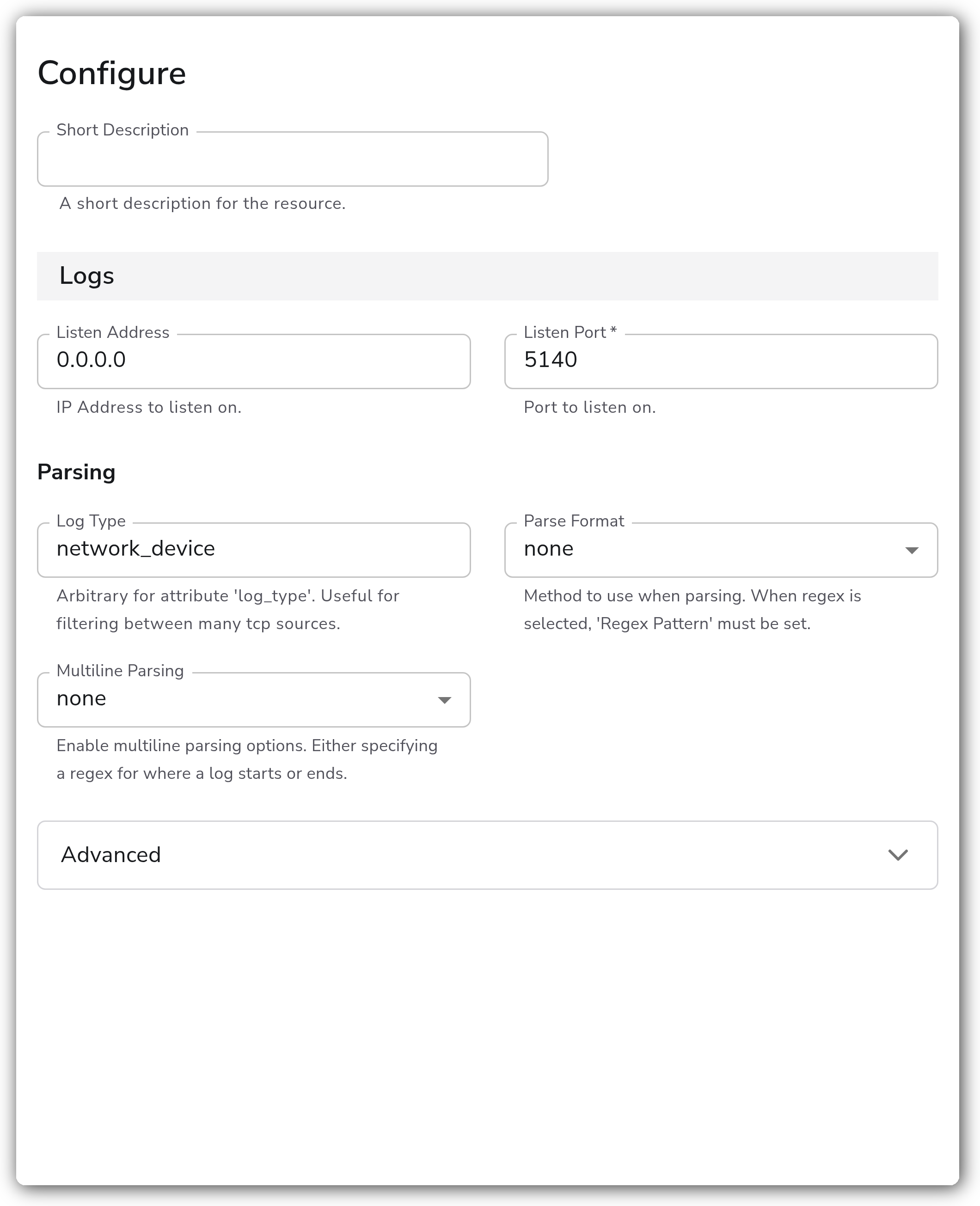
| Listen Address | String | No | `0.0.0.0` | IP Address to listen on. |
| Listen Port | Integer | Yes | *(empty)* | Port to listen on. |
| Log Type | String | No | `udp` | Arbitrary value for the `log_type` attribute. Useful for filtering between many UDP sources. |
| Parse Format | Enum: none, json, regex | No | `none` | Method to use when parsing. When `regex` is selected, Regex Pattern must be set. |
| Regex Pattern | String | Yes | *(empty)* | The regex pattern used when parsing log entries. Relevant when Parse Format is `regex`. |
| Parse Timestamp | Boolean | No | `false` | Whether to parse the timestamp from the log entry. Relevant when Parse Format is not `none`. |
| Timestamp Field | String | Yes | `timestamp` | The field containing the timestamp in the log entry. Relevant when Parse Timestamp is enabled and Parse Format is not `none`. |
| Timestamp Format | Enum: RFC3339, ISO8601, Epoch, Manual | No | `RFC3339` | The format of the timestamp in the log entry. Relevant when Parse Timestamp is enabled and Parse Format is not `none`. |
| Epoch Layout | Enum: s, ms, us, ns, s.ms, s.us, s.ns | Yes | `s` | The layout of the epoch-based timestamp. Relevant when Parse Timestamp is enabled, Timestamp Format is `Epoch`, and Parse Format is not `none`. See [Supported Epoch Layouts](https://github.com/open-telemetry/opentelemetry-collector-contrib/blob/main/pkg/stanza/docs/types/timestamp.md#parse-a-timestamp-using-an-epoch-layout). |
| Timestamp Layout | String | Yes | `%Y-%m-%dT%H:%M:%S.%f%z` | The strptime layout of the timestamp. Relevant when Parse Timestamp is enabled, Timestamp Format is `Manual`, and Parse Format is not `none`. See [Supported Layout Directives](https://docs.bindplane.com/how-to-guides/ctime-formatting). |
| Timezone | Timezone | No | `UTC` | The timezone to use if Timestamp Format doesn't include a timezone. Otherwise the timezone in Timestamp Format is respected. Relevant when Parse Timestamp is enabled, Parse Format is not `none`, and Timestamp Format is neither `RFC3339` nor `Epoch`. |
| Parse Severity | Boolean | No | `false` | Whether to parse severity from the log entry. Relevant when Parse Format is not `none`. |
| Severity Field | String | Yes | `severity` | The field containing the severity in the log entry. Relevant when Parse Severity is enabled and Parse Format is not `none`. |
| Parse To | Enum: body, attributes | No | `body` | The field to which the log will be parsed. Relevant when Parse Format is not `none`. |
| Multiline Parsing | Enum: none, specify line start, specify line end | No | `none` | Enable multiline parsing by specifying a regex for where a log starts or ends. |
| Multiline Start Pattern | String | Yes | *(empty)* | Regex pattern that matches the beginning of a log entry, for handling multiline logs. Relevant when Multiline Parsing is `specify line start`. |
| Multiline End Pattern | String | Yes | *(empty)* | Regex pattern that matches the end of a log entry, useful for terminating parsing of multiline logs. Relevant when Multiline Parsing is `specify line end`. |
**Advanced**
| Parameter | Type | Required | Default | Description |
| ---------------------- | ------- | -------- | ------- | ---------------------------------------------------------------------------------------------------------------------------------------------------------------------------------------------------------------------------------------------------------------------------- |
| Add Attributes | Boolean | No | `true` | Adds `net.*` attributes according to semantic convention. |
| Async Readers | Integer | No | `1` | Determines how many workers read from the UDP port and push to the buffer. Generally this value should remain at `1` unless otherwise directed by Bindplane support. |
| Async Processors | Integer | No | `3` | Determines how many workers read from the buffer (pushed by readers) and process logs before sending downstream. Increasing this can help when the collector is under significant load. |
| Async Max Queue Length | Integer | No | `100` | Length of the buffer used by async reader workers. When the buffer reaches the max, reader workers block until the buffer has room. Increasing this can help during short bursts of increased log volume. Generally, increase Async Processors before increasing this value. |
### Examples
#### Listen for plain UDP logs on a non-privileged port
Listen on all interfaces on port 5140 and tag the logs with a custom `log_type`. No parsing is applied, so each datagram is stored as the log body.
```yaml
- name: udp
type: udp
parameters:
- name: listen_ip
value: 0.0.0.0
- name: listen_port
value: 5140
- name: log_type
value: network_device
```
#### Parse JSON logs and extract the timestamp
Listen on port 5140, parse each datagram as JSON into attributes, and extract an ISO8601 timestamp from the `time` field.
```yaml
- name: udp
type: udp
parameters:
- name: listen_port
value: 5140
- name: parse_format
value: json
- name: parse_to
value: attributes
- name: parse_timestamp
value: true
- name: timestamp_field
value: time
- name: parse_timestamp_format
value: ISO8601
```
### Configuration Tips
* UDP is connectionless and fire-and-forget. Unlike TCP, it provides no delivery guarantee, ordering, or acknowledgement, so datagrams can be lost under load or network congestion with no retransmission. Use the [TCP](/integrations/sources/tcp.md) source when delivery reliability matters.
* To receive on the standard syslog port 514, the collector must run with root or Administrator privileges. Prefer a port above 1024 to avoid elevated privileges, or use the dedicated [Syslog](/integrations/sources/syslog.md) source for syslog-formatted traffic.
* Tune the async workers under sustained load: increase **Async Processors** first, and only raise **Async Max Queue Length** if you anticipate short bursts of increased volume. Leave **Async Readers** at `1` unless directed otherwise by Bindplane support.
### Troubleshooting
#### No logs arriving
Symptoms: the source is deployed but no logs appear downstream.
Solutions:
1. Confirm the sending device or application is configured to send to the collector's IP address and the configured Listen Port over UDP.
2. Verify the listen port is open in any host, cloud, or Kubernetes network firewalls between the sender and the collector.
3. On Kubernetes or OpenShift, confirm a custom Service is routing external UDP traffic to the collector.
#### Permission denied binding the port
Symptoms: the collector fails to start or the source reports it cannot bind the listen port.
Solutions:
1. Binding to a port below 1024 requires root (Linux/macOS) or Administrator (Windows). Run the collector with the required privileges, or use a port above 1024.
#### Logs arrive but are not parsed
Symptoms: log records appear but the body is unparsed or timestamps and severity are missing.
Solutions:
1. Set **Parse Format** to `json` or `regex`. When using `regex`, set a valid **Regex Pattern**.
2. To extract a timestamp, enable **Parse Timestamp** and confirm **Timestamp Field** and **Timestamp Format** match the incoming data.
### Standalone Source
```yaml
apiVersion: bindplane.observiq.com/v1
kind: Source
metadata:
name: udp
spec:
type: udp
parameters:
- name: listen_ip
value: 0.0.0.0
- name: listen_port
value: 5140
- name: log_type
value: network_device
- name: parse_format
value: none
- name: add_attributes
value: true
```
### Related Resources
* [UDP Log Receiver — OpenTelemetry Collector Contrib](https://github.com/open-telemetry/opentelemetry-collector-contrib/tree/main/receiver/udplogreceiver)
* [Kubernetes custom Service](/deployment/kubernetes/collector/custom-service.md)
---
# Agent Instructions
This documentation is published with GitBook. GitBook is the documentation platform designed so that both humans and AI agents can read, navigate, and reason over technical content effectively. Learn more at gitbook.com.
## Querying This Documentation
If you need additional information that is not directly available in this page, you can query the documentation by asking a question.
Perform an HTTP GET request on the following URL with the `ask` and `goal` query parameters:
```
GET https://docs.bindplane.com/integrations/sources/udp.md?ask=&goal=
```
`ask` is the immediate question: it should be specific, self-contained, and written in natural language.
`goal` is what the user is ultimately trying to achieve, the reason they need the answer. Sharing it helps GitBook give you a better, more relevant answer. A goal is most helpful when it describes the outcome the user wants rather than restating the question. For example, with `ask=how do I create an API token`, a goal like `automate deployments from our CI pipeline` lets GitBook tailor the answer to that use case.
The response will contain a direct answer to the question and relevant excerpts and sources from the documentation.
Use this mechanism when the answer is not explicitly present in the current page, you need clarification or additional context, or you want to retrieve related documentation sections.