> For the complete documentation index, see [llms.txt](https://docs.bindplane.com/llms.txt). Markdown versions of documentation pages are available by appending `.md` to page URLs; this page is available as [Markdown](https://docs.bindplane.com/integrations/sources/couchbase.md).
# Couchbase
The Couchbase source collects metrics and logs from [Couchbase Server](https://www.couchbase.com/). Metrics are scraped from the Couchbase REST/metrics endpoint (default port `8091`) using basic authentication, then renamed and shaped into the `couchbase.bucket.*` metric set. Logs are tailed directly from the Couchbase log files on the collector host (error, info, debug, HTTP access, internal access, baby sitter, and XDCR logs). Pick either or both signals with the telemetry type selector.
### Supported Telemetry Types
| Platform | Metrics | Logs | Traces |
| -------- | ------- | ---- | ------ |
| Linux | ✓ | ✓ | |
| Windows | ✓ | ✓ | |
| macOS | ✓ | ✓ | |
### Prerequisites
**For metrics:**
* A reachable Couchbase Server endpoint. The collector must be able to reach the host on the metrics port (default `8091`).
* A monitoring user with least privilege. Create a dedicated Couchbase user and assign it the **External Stats Reader** role, which grants the ability to read Couchbase Server's metrics. See [Configure Prometheus to Collect Couchbase Metrics](https://docs.couchbase.com/server/current/manage/monitor/set-up-prometheus-for-monitoring.html).
**For logs:**
* The collector must run on the Couchbase Server host and have read access to the log files under `/opt/couchbase/var/lib/couchbase/logs/` (or your configured log directory).
* The Couchbase node must be writing the log types you enable. Each log type is read from its own path.
### Configuration
**Telemetry Type**
| Parameter | Type | Required | Default | Description |
| --------------------- | ------------------ | -------- | --------------------- | ------------------------------------------------------ |
| Choose Telemetry Type | Telemetry Selector | No | `["Logs", "Metrics"]` | Which signals to collect. Valid values: Logs, Metrics. |
**Logs**
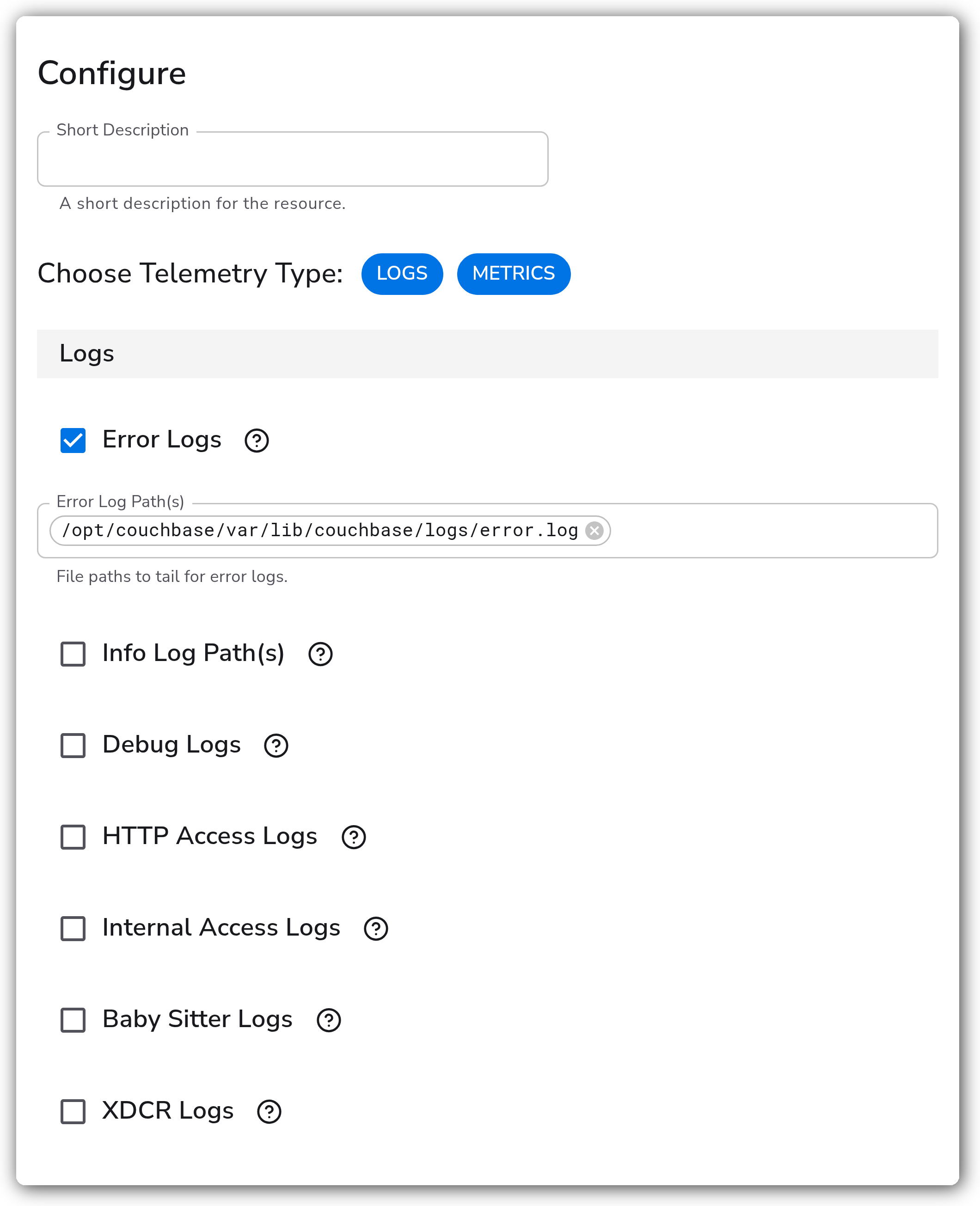
These parameters apply when **Metrics** includes Logs. Each log type has an enable toggle and one or more file paths. Path parameters are only relevant when their enable toggle is `true`.
| Parameter | Type | Required | Default | Description |
| --------------------------- | ------- | -------- | ---------------------------------------------------------------- | ------------------------------------------------------------------------------------------- |
| Error Logs | Boolean | No | `true` | Enable to read error logs. |
| Error Log Path(s) | Strings | No | `/opt/couchbase/var/lib/couchbase/logs/error.log` | File paths to tail for error logs. Relevant when Error Logs is enabled. |
| Info Log Path(s) (enable) | Boolean | No | `false` | Enable to read info logs. |
| Info Log Path(s) | Strings | No | `/opt/couchbase/var/lib/couchbase/logs/info.log` | File paths to tail for info logs. Relevant when info logs are enabled. |
| Debug Logs | Boolean | No | `false` | Enable to read debug logs. |
| Debug Log Path(s) | Strings | No | `/opt/couchbase/var/lib/couchbase/logs/debug.log` | File paths to tail for debug logs. Relevant when Debug Logs is enabled. |
| HTTP Access Logs | Boolean | No | `false` | Enable to read http access logs. |
| HTTP Access Log Path(s) | Strings | No | `/opt/couchbase/var/lib/couchbase/logs/http_access.log` | File paths to tail for http access logs. Relevant when HTTP Access Logs is enabled. |
| Internal Access Logs | Boolean | No | `false` | Enable to read internal access logs. |
| Internal Access Log Path(s) | Strings | No | `/opt/couchbase/var/lib/couchbase/logs/http_access_internal.log` | File paths to tail for internal access logs. Relevant when Internal Access Logs is enabled. |
| Baby Sitter Logs | Boolean | No | `false` | Enable to read baby sitter logs. |
| Baby Sitter Log Path(s) | Strings | No | `/opt/couchbase/var/lib/couchbase/logs/babysitter.log` | File paths to tail for baby sitter logs. Relevant when Baby Sitter Logs is enabled. |
| XDCR Logs | Boolean | No | `false` | Enable to read xdcr logs. |
| XDCR Log Path(s) | Strings | No | `/opt/couchbase/var/lib/couchbase/logs/goxdcr.log` | File paths to tail for xdcr logs. Relevant when XDCR Logs is enabled. |
**Metrics**
These parameters apply when **Metrics** includes Metrics.
| Parameter | Type | Required | Default | Description |
| --------- | ------- | -------- | ----------- | ------------------------------------------------ |
| Hostname | String | Yes | `localhost` | The hostname or IP address of the Couchbase API. |
| Port | Integer | No | `8091` | The TCP port of the Couchbase API. |
| Username | String | Yes | *(empty)* | Username used to authenticate. |
| Password | String | Yes | *(empty)* | Password used to authenticate. |
**Advanced**
| Parameter | Type | Required | Default | Description |
| ------------------- | -------------------- | -------- | ------- | ---------------------------------------------------------------- |
| Start At | Enum: beginning, end | No | `end` | Start reading logs from `beginning` or `end`. Relevant for Logs. |
| Parse | Boolean | No | `true` | Parses the log fields into structured data. Relevant for Logs. |
| Collection Interval | Integer | No | `60` | How often (seconds) to scrape for metrics. Relevant for Metrics. |
### Examples
#### Collect metrics from a single Couchbase node
Scrape the Couchbase metrics endpoint on `couchbase-1` using a dedicated monitoring user, every 30 seconds.
```yaml
apiVersion: bindplane.observiq.com/v1
kind: Source
metadata:
name: couchbase-metrics
spec:
type: couchbase
parameters:
- name: telemetry_types
value:
- Metrics
- name: hostname
value: couchbase-1.internal
- name: port
value: 8091
- name: username
value: bindplane-monitor
- name: password
value: "{{ password }}"
- name: collection_interval
value: 30
```
#### Collect error and XDCR logs
Tail the error and XDCR logs from a Couchbase node, reading only new lines.
```yaml
apiVersion: bindplane.observiq.com/v1
kind: Source
metadata:
name: couchbase-logs
spec:
type: couchbase
parameters:
- name: telemetry_types
value:
- Logs
- name: enable_error_log
value: true
- name: enable_xdcr_log
value: true
- name: start_at
value: end
```
### Configuration Tips
* The metrics path scrapes the Couchbase endpoint over the network, so it can run on any collector with reachability to the host. The logs path tails files on disk, so it must run on the Couchbase node itself.
* Error logs are enabled by default. All other log types are off by default. Enable only the log types you need to avoid collecting noise.
* Use a dedicated monitoring user with the External Stats Reader role rather than an administrative account.
### Troubleshooting
#### Metrics: connection refused
Symptoms: no metrics arrive and the collector logs show connection refused or timeout to the Couchbase host.
Solutions:
1. Confirm Couchbase is reachable from the collector on the configured Hostname and Port (default `8091`).
2. Verify no firewall or security group blocks the metrics port between the collector and the Couchbase node.
#### Metrics: authentication failed
Symptoms: scrape requests return 401/403 and no metrics are stored.
Solutions:
1. Confirm the Username and Password are correct.
2. Confirm the monitoring user has the **External Stats Reader** role, which is required to read Couchbase metrics.
#### Logs: no log records
Symptoms: the log types are enabled but no records arrive.
Solutions:
1. Confirm the configured log paths exist and match where this Couchbase node writes its logs.
2. Confirm the collector user has read permission on the log files, and that the collector runs on the Couchbase host.
### Standalone Source
```yaml
apiVersion: bindplane.observiq.com/v1
kind: Source
metadata:
name: couchbase
spec:
type: couchbase
parameters:
- name: telemetry_types
value:
- Logs
- Metrics
- name: hostname
value: localhost
- name: port
value: 8091
- name: username
value: bindplane-monitor
- name: password
value: "{{ password }}"
- name: collection_interval
value: 60
- name: enable_error_log
value: true
- name: error_log_path
value:
- /opt/couchbase/var/lib/couchbase/logs/error.log
- name: start_at
value: end
- name: parse
value: true
```
### Related Resources
* [Configure Prometheus to Collect Couchbase Metrics — Couchbase Docs](https://docs.couchbase.com/server/current/manage/monitor/set-up-prometheus-for-monitoring.html)
* [prometheusreceiver — OpenTelemetry Collector Contrib](https://github.com/open-telemetry/opentelemetry-collector-contrib/tree/main/receiver/prometheusreceiver)
---
# Agent Instructions
This documentation is published with GitBook. GitBook is the documentation platform designed so that both humans and AI agents can read, navigate, and reason over technical content effectively. Learn more at gitbook.com.
## Querying This Documentation
If you need additional information that is not directly available in this page, you can query the documentation by asking a question.
Perform an HTTP GET request on the following URL with the `ask` and `goal` query parameters:
```
GET https://docs.bindplane.com/integrations/sources/couchbase.md?ask=&goal=
```
`ask` is the immediate question: it should be specific, self-contained, and written in natural language.
`goal` is what the user is ultimately trying to achieve, the reason they need the answer. Sharing it helps GitBook give you a better, more relevant answer. A goal is most helpful when it describes the outcome the user wants rather than restating the question. For example, with `ask=how do I create an API token`, a goal like `automate deployments from our CI pipeline` lets GitBook tailor the answer to that use case.
The response will contain a direct answer to the question and relevant excerpts and sources from the documentation.
Use this mechanism when the answer is not explicitly present in the current page, you need clarification or additional context, or you want to retrieve related documentation sections.