> For the complete documentation index, see [llms.txt](https://docs.bindplane.com/llms.txt). Markdown versions of documentation pages are available by appending `.md` to page URLs; this page is available as [Markdown](https://docs.bindplane.com/integrations/sources/google-cloud-pubsub.md).
# Google Cloud Pub/Sub (Pull)
The Google Cloud Pub/Sub source pulls messages from an existing [Pub/Sub subscription](https://cloud.google.com/pubsub/docs/subscriber) and generates logs, metrics, or traces from them. The collector reads messages using the subscription's `Pull` delivery and uses the message payload encoding to determine the telemetry type.
> **Note:** The OpenTelemetry receiver this source uses is in beta and is subject to change.
### Supported Telemetry Types
| Platform | Metrics | Logs | Traces |
| ------------------ | ------- | ---- | ------ |
| Linux | ✓ | ✓ | ✓ |
| Windows | ✓ | ✓ | ✓ |
| macOS | ✓ | ✓ | ✓ |
| Kubernetes Gateway | ✓ | ✓ | ✓ |
| OpenShift Gateway | ✓ | ✓ | ✓ |
### Prerequisites
* A Google Cloud project with the [Pub/Sub API](https://cloud.google.com/pubsub/docs) enabled.
* An existing Pub/Sub [subscription](https://cloud.google.com/pubsub/docs/create-subscription) configured with `Pull` delivery. The source does not create the subscription.
* A service account with the **Pub/Sub Subscriber** role on the subscription.
* Application Default Credentials available to the collector, typically by pointing `GOOGLE_APPLICATION_CREDENTIALS` at the service account key file (see [Authentication](#authentication)).
### Configuration
#### General
| Parameter | Type | Default | Description |
| --------------------- | ------------------ | ----------------------------- | ---------------------------------------------------------------------------------------- |
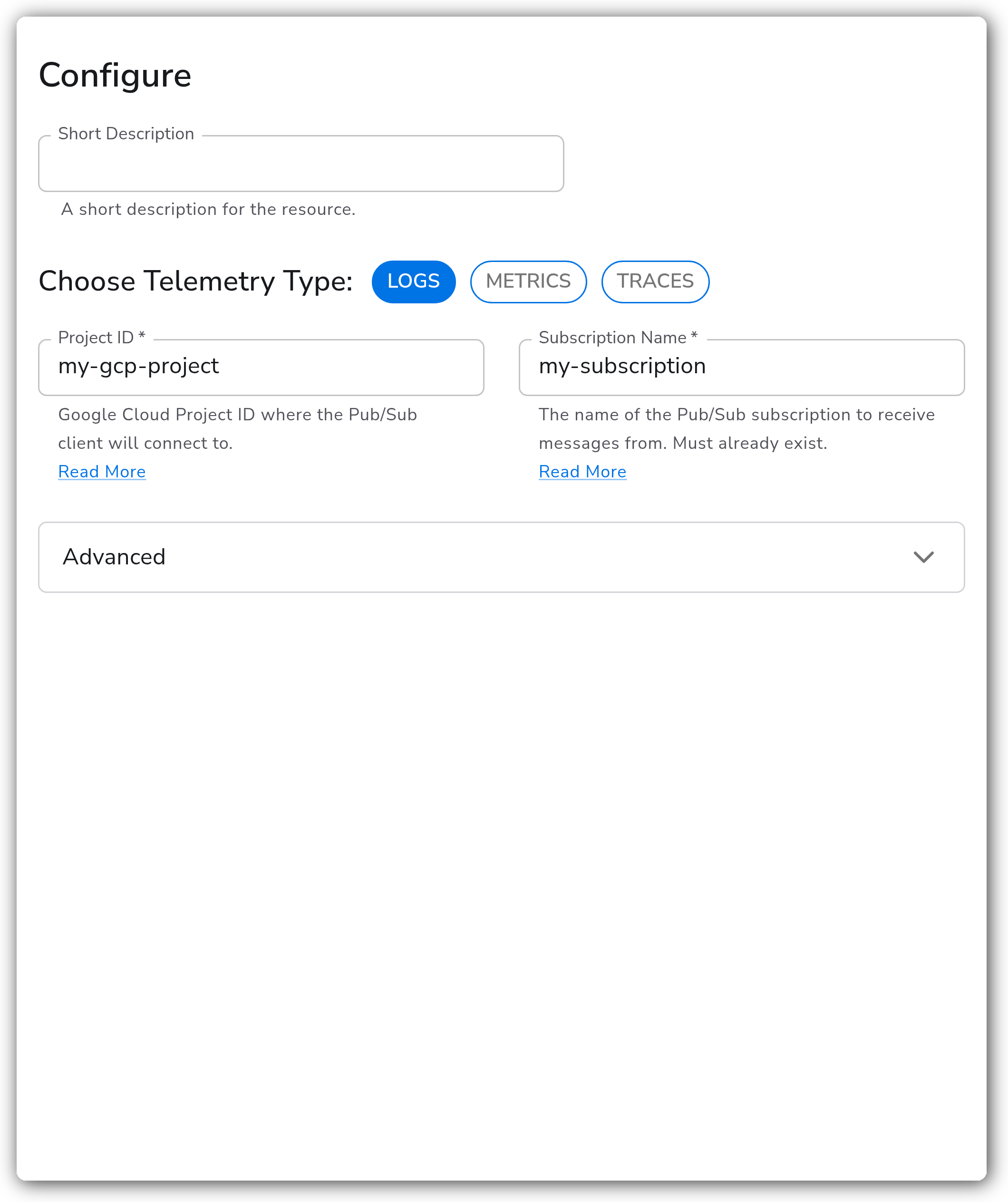
| Choose Telemetry Type | Telemetry Selector | `["Logs","Metrics","Traces"]` | Which types of telemetry to receive from the subscription. Required. |
| Project ID | String | | Google Cloud Project ID the Pub/Sub client connects to. Required. |
| Subscription Name | String | | Name of the Pub/Sub subscription to receive messages from. Must already exist. Required. |
#### Advanced
| Parameter | Type | Default | Description |
| ------------------- | --------- | ------- | ------------------------------------------------------------------------------------------------------------------------------------------------------------------------------------------ |
| Payload Encoding | Extension | `none` | Payload encoding used as a fallback when the message `content-type` attribute is not set.1 Required. See [Payload encoding and compression](#payload-encoding-and-compression). |
| Payload Compression | Enum | `none` | Payload compression. Use `none` for attribute-based detection. Valid values: `none`, `gzip`. |
| Client ID | String | `""` | Client ID used by Pub/Sub to make load balancing decisions. |
| User Agent | String | `""` | User agent used by the Pub/Sub client to connect to the service. |
| Timeout | Duration | `12s` | Timeout for all API calls. |
| Endpoint | String | `""` | Override of the Pub/Sub endpoint. Leave empty for the default endpoint. |
| Insecure | Boolean | `false` | Whether the connection should be insecure. Only takes effect when `endpoint` is set. |
1. *Use `None` for attribute-based detection. Metrics and traces support OTLP Protobuf only. Options other than `None` and `OTLP Protobuf` require receiver v0.132.0+.*
#### Flow Control
Flow control parameters require the `googlecloudpubsub` receiver v0.150.0+. They control how aggressively the server delivers unacknowledged messages.
| Parameter | Type | Default | Description |
| -------------------------- | -------- | ------- | -------------------------------------------------------------------------------------------------------- |
| Trigger Ack Batch Duration | Duration | `10s` | Time between each message acknowledge batch. |
| Stream Ack Deadline | Duration | `60s` | Ack deadline used for the stream. Minimum 10 seconds, maximum 600 seconds. |
| Max Outstanding Messages | Integer | `0` | Threshold of unacked messages at which the server stops sending more messages. Specify `0` for no limit. |
| Max Outstanding Bytes | Integer | `0` | Threshold of unacked bytes at which the server stops sending more messages. Specify `0` for no limit. |
### Authentication
The collector authenticates to Pub/Sub using Application Default Credentials. The service account must have the **Pub/Sub Subscriber** role on the target subscription, and the subscription must use `Pull` delivery.
Point the `GOOGLE_APPLICATION_CREDENTIALS` environment variable at the service account key file for the collector process. How you set the variable depends on the collector's platform.
**Linux**
Use a Systemd override:
```bash
sudo systemctl edit observiq-otel-collector
```
Add the environment variable, then reload and restart:
```bash
sudo systemctl daemon-reload
sudo systemctl restart observiq-otel-collector
```
**Windows**
Start PowerShell as administrator and set the variable on the service:
```powershell
reg add "HKEY_LOCAL_MACHINE\SYSTEM\CurrentControlSet\Services\observiq-otel-collector" /v Environment /t REG_MULTI_SZ /d "GOOGLE_APPLICATION_CREDENTIALS=" /f
```
Then restart the service:
```powershell
Restart-Service observiq-otel-collector
```
**macOS**
Add `GOOGLE_APPLICATION_CREDENTIALS` to the `EnvironmentVariables` dict in `/Library/LaunchDaemons/com.observiq.collector.plist` (other values shown for context):
```xml
EnvironmentVariablesGOOGLE_APPLICATION_CREDENTIALSOIQ_OTEL_COLLECTOR_HOME/opt/observiq-otel-collector/OIQ_OTEL_COLLECTOR_STORAGE/opt/observiq-otel-collector/storage
```
Then reload the collector:
```bash
sudo launchctl unload /Library/LaunchDaemons/com.observiq.collector.plist
sudo launchctl load /Library/LaunchDaemons/com.observiq.collector.plist
```
### Payload encoding and compression
The receiver inspects message attributes to decide how to interpret each Pub/Sub message:
* `content-type` controls how the message content is interpreted. If it is set to `application/protobuf`, a `ce-type` attribute is expected to identify the telemetry type, one of `org.opentelemetry.otlp.traces.v1`, `org.opentelemetry.otlp.metrics.v1`, or `org.opentelemetry.otlp.logs.v1`.
* `content-encoding` controls the message compression.
When these attributes are present, attribute-based detection applies and the `encoding_extension` and `compression` parameters are ignored, so set both to `none` / `None`. When the attributes are absent, the receiver falls back to the `encoding_extension` and `compression` parameters.
Metrics and traces support OTLP Protobuf only. Logs can be OTLP JSON, OTLP Protobuf, or raw text. Encoding options other than `None` and `OTLP Protobuf` require receiver v0.132.0+.
#### Example message attributes
A publisher sending OTLP Protobuf logs with gzip compression would set:
```
content-type: application/protobuf
ce-type: org.opentelemetry.otlp.logs.v1
content-encoding: gzip
```
With these attributes set, configure the source with `encoding_extension` = `None` and `compression` = `none`.
### Example Configuration
#### Standalone Source
This example pulls logs from a subscription. The encoding attributes are not present on the message data, so a text encoding extension is used to decode the payload and `compression` determines compression.
```yaml
apiVersion: bindplane.observiq.com/v1
kind: Source
metadata:
id: googlecloudpubsub
name: googlecloudpubsub
spec:
type: googlecloudpubsub_v2
parameters:
- name: telemetry_types
value:
- Logs
- name: project
value: 'my-gcp-project'
- name: subscription
value: 'my-subscription'
- name: compression
value: 'none'
- name: encoding_extension
value:
disabled: false
type: text_encoding_unmarshaling
parameters:
- name: text_encoding
value: utf8
- name: text_unmarshaling_separator
value: \n?\r
```
### Configuration Tips
#### Encoding and compression
* Prefer attribute-based detection: set `content-type` and `content-encoding` on the publisher and leave `encoding_extension` and `compression` set to `None` / `none`.
* If your publisher cannot set attributes, set `encoding_extension` and `compression` to match the actual payload format. Remember that metrics and traces must be OTLP Protobuf.
#### Flow control
* Use `max_outstanding_messages` and `max_outstanding_bytes` to cap how much unacknowledged data the collector buffers, which helps control memory on a busy subscription. `0` means no limit.
* Flow control parameters only take effect with `googlecloudpubsub` receiver v0.150.0+. On older collectors they are ignored.
### Troubleshooting
**Symptom:** No messages are received from the subscription. **Solution:** Confirm the subscription exists, uses `Pull` delivery, and that the service account has the **Pub/Sub Subscriber** role. Verify `GOOGLE_APPLICATION_CREDENTIALS` points to a valid key file readable by the collector process and that the collector was restarted after the variable was set.
**Symptom:** Messages arrive but fail to parse, or telemetry of the wrong type is produced. **Solution:** Check the message encoding. If the publisher sets `content-type` / `ce-type`, set `encoding_extension` to `None` and `compression` to `none` so attribute-based detection is used. If those attributes are absent, set `encoding_extension` and `compression` to match the payload. Metrics and traces must be OTLP Protobuf.
**Symptom:** The collector consumes excessive memory under high message volume. **Solution:** On a collector running receiver v0.150.0+, set `max_outstanding_messages` and/or `max_outstanding_bytes` to bound the unacknowledged backlog the server delivers.
### Related Resources
* [Google Cloud Pub/Sub documentation](https://cloud.google.com/pubsub/docs)
* [Create a Pub/Sub subscription](https://cloud.google.com/pubsub/docs/create-subscription)
* [Pub/Sub flow control](https://cloud.google.com/pubsub/docs/flow-control)
* [Pub/Sub access control roles](https://cloud.google.com/pubsub/docs/access-control)
---
# Agent Instructions
This documentation is published with GitBook. GitBook is the documentation platform designed so that both humans and AI agents can read, navigate, and reason over technical content effectively. Learn more at gitbook.com.
## Querying This Documentation
If you need additional information that is not directly available in this page, you can query the documentation by asking a question.
Perform an HTTP GET request on the following URL with the `ask` and `goal` query parameters:
```
GET https://docs.bindplane.com/integrations/sources/google-cloud-pubsub.md?ask=&goal=
```
`ask` is the immediate question: it should be specific, self-contained, and written in natural language.
`goal` is what the user is ultimately trying to achieve, the reason they need the answer. Sharing it helps GitBook give you a better, more relevant answer. A goal is most helpful when it describes the outcome the user wants rather than restating the question. For example, with `ask=how do I create an API token`, a goal like `automate deployments from our CI pipeline` lets GitBook tailor the answer to that use case.
The response will contain a direct answer to the question and relevant excerpts and sources from the documentation.
Use this mechanism when the answer is not explicitly present in the current page, you need clarification or additional context, or you want to retrieve related documentation sections.