> For the complete documentation index, see [llms.txt](https://docs.bindplane.com/llms.txt). Markdown versions of documentation pages are available by appending `.md` to page URLs; this page is available as [Markdown](https://docs.bindplane.com/integrations/connectors/span-metrics.md).
# Span Metrics
The Span Metrics connector consumes spans from a traces pipeline and generates Request, Error, and Duration (R.E.D) metrics from them, feeding the resulting metrics into a metrics pipeline. It is built on the OpenTelemetry `spanmetricsconnector` and lets you derive request rate, error rate, and latency metrics from existing trace data without instrumenting code for metrics separately.
### Supported Telemetry Types
| Platform | Metrics | Logs | Traces |
| ------------------ | ------- | ---- | ------ |
| Linux | | | ✓ |
| Windows | | | ✓ |
| macOS | | | ✓ |
| AIX | | | ✓ |
| Kubernetes Node | | | ✓ |
| Kubernetes Cluster | | | ✓ |
| Kubernetes Gateway | | | ✓ |
| OpenShift Node | | | ✓ |
| OpenShift Cluster | | | ✓ |
| OpenShift Gateway | | | ✓ |
The connector receives trace spans from one pipeline, converts them into call-count and duration metrics, and emits those metrics into a metrics pipeline.
### Generated Metrics
The connector produces the following metrics (prefixed by the namespace, default `traces.span.metrics`):
| Metric | Type | Description |
| ---------- | --------- | ------------------------------------------------------------------------- |
| `calls` | Sum | Count of spans. Error counts are derived via the `status.code` attribute. |
| `duration` | Histogram | Distribution of span durations. |
| `events` | Sum | Count of span events (optional, disabled by default). |
Every metric includes these default attributes, unless removed with Exclude Default Attributes:
| Attribute | Description |
| -------------- | ------------------------------------------------------------- |
| `service.name` | The service that produced the span. |
| `span.name` | The operation name. |
| `span.kind` | The span kind (client, server, internal, producer, consumer). |
| `status.code` | The span status code (Ok, Error, Unset). |
### Configuration
#### Basic Configuration
**General Settings**
| Parameter | Type | Required | Default | Description |
| ----------------------- | --------------------------------------------------------------------------- | -------- | ---------- | ----------------------------------------------------------------------------------- |
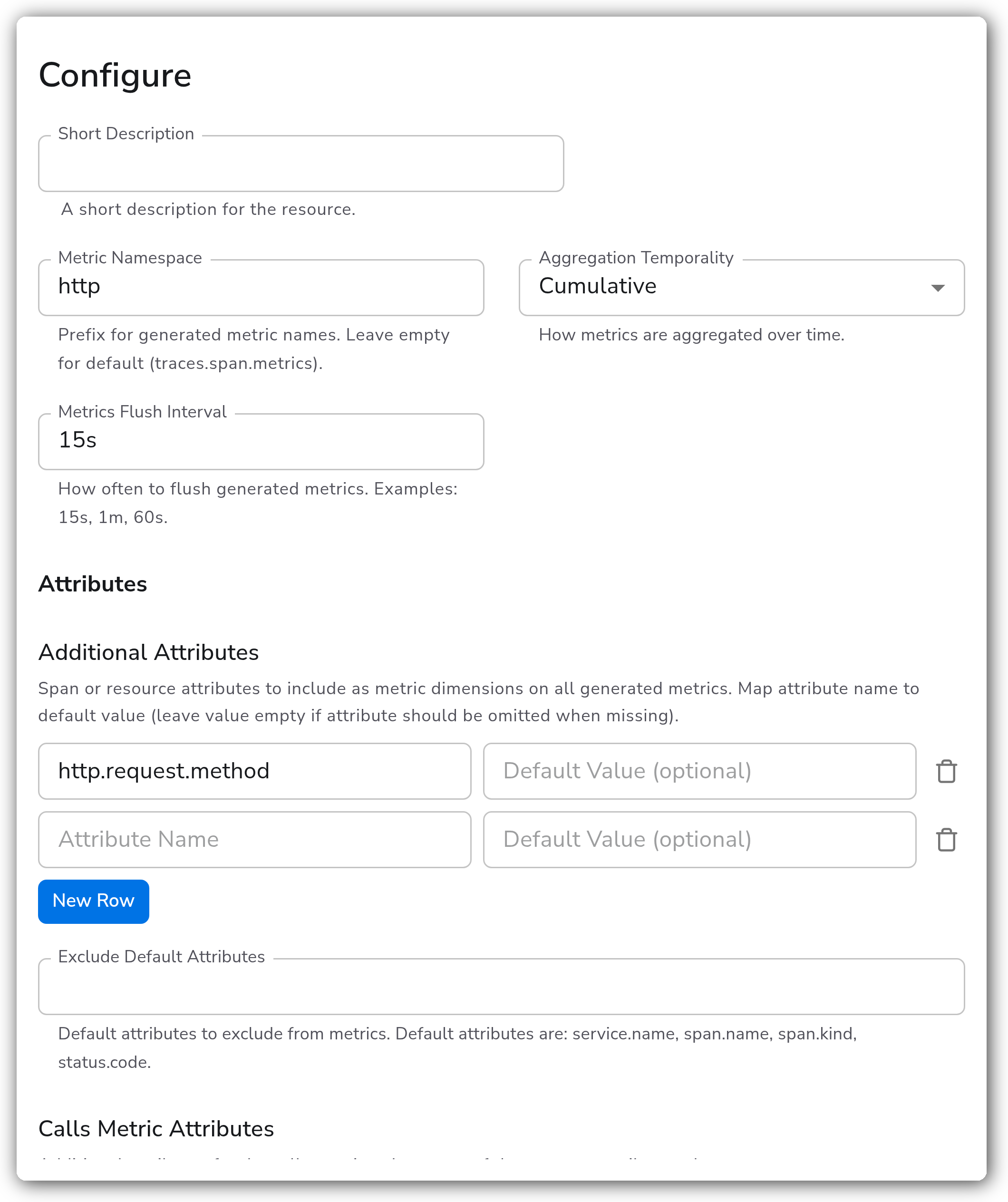
| Metric Namespace | String | No | *(empty)* | Prefix for generated metric names. Leave empty for default (`traces.span.metrics`). |
| Aggregation Temporality | Enum: AGGREGATION\_TEMPORALITY\_CUMULATIVE, AGGREGATION\_TEMPORALITY\_DELTA | No | Cumulative | How metrics are aggregated over time. |
| Metrics Flush Interval | Duration | No | `5s` | How often to flush generated metrics. Examples: `15s`, `1m`, `60s`. |
**Attributes**
| Parameter | Type | Required | Default | Description |
| -------------------------- | ------- | -------- | --------- | ------------------------------------------------------------------------------------------------------------------------------------------------------------------------------------------------ |
| Additional Attributes | Map | No | *(empty)* | Span or resource attributes to include as metric dimensions on all generated metrics. Map attribute name to a default value (leave value empty if the attribute should be omitted when missing). |
| Exclude Default Attributes | Strings | No | *(empty)* | Default attributes to exclude from metrics. Default attributes are `service.name`, `span.name`, `span.kind`, `status.code`. |
| Calls Metric Attributes | Map | No | *(empty)* | Additional attributes for the `calls` metric only, on top of the common attributes above. |
**Duration Histogram**
| Parameter | Type | Required | Default | Description |
| ----------------------------- | --------------------------- | -------- | ---------- | ------------------------------------------------------------------------------------------------------------------------------------------------------------------- |
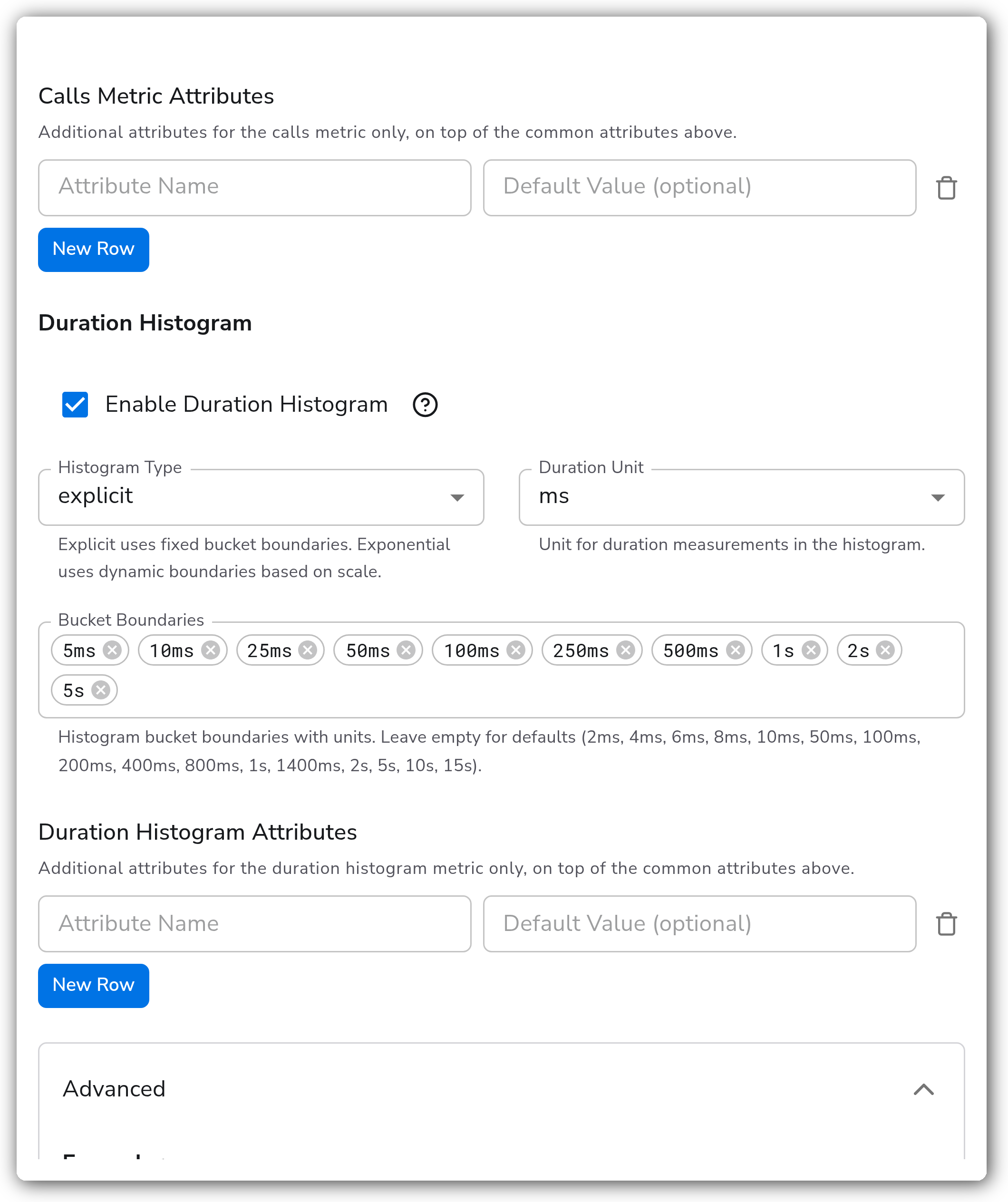
| Enable Duration Histogram | Boolean | No | `true` | Generate a duration histogram metric. When disabled, only call count metrics are produced. |
| Histogram Type | Enum: explicit, exponential | No | `explicit` | Explicit uses fixed bucket boundaries. Exponential uses dynamic boundaries based on scale. Shown when Enable Duration Histogram is true. |
| Duration Unit | Enum: ms, s | No | `ms` | Unit for duration measurements in the histogram. Shown when Enable Duration Histogram is true. |
| Bucket Boundaries | Strings | No | *(empty)* | Histogram bucket boundaries with units. Leave empty for defaults.1 Shown when Enable Duration Histogram is true and Histogram Type is explicit. |
| Exponential Max Size | Integer | No | `160` | Maximum number of buckets per positive or negative range for exponential histogram. Shown when Enable Duration Histogram is true and Histogram Type is exponential. |
| Duration Histogram Attributes | Map | No | *(empty)* | Additional attributes for the duration histogram metric only, on top of the common attributes above. Shown when Enable Duration Histogram is true. |
1. *Defaults: `2ms, 4ms, 6ms, 8ms, 10ms, 50ms, 100ms, 200ms, 400ms, 800ms, 1s, 1400ms, 2s, 5s, 10s, 15s`.*
**Advanced**
These parameters are available under the advanced configuration toggle.
| Parameter | Type | Required | Default | Description |
| ------------------------------- | -------- | -------- | --------- | -------------------------------------------------------------------------------------------------------------------------------------------------------------------------------------------------------------------------------------------------- |
| Enable Exemplars | Boolean | No | `false` | Attach trace exemplars to histogram metrics, allowing correlation from metrics back to traces. |
| Max Exemplars Per Data Point | Integer | No | `5` | Maximum number of exemplars to attach per histogram data point. Shown when Enable Exemplars is true. |
| Enable Events Metric | Boolean | No | `false` | Generate a metric counting span events. |
| Event Attributes | Map | Yes | *(empty)* | Span event attributes to include as dimensions on the events metric. At least one is required. Map attribute name to a default value (leave value empty if the attribute should be omitted when missing). Shown when Enable Events Metric is true. |
| Metrics Expiration | Duration | No | `0` | Time after which metrics stop being exported if no new spans arrive. `0` means never expire. |
| Resource Metrics Cache Size | Integer | No | `1000` | Size of the cache holding metrics for a service. |
| Metric Timestamp Cache Size | Integer | No | `1000` | Cache size for tracking metric timestamps (used with delta temporality). |
| Aggregation Cardinality Limit | Integer | No | `0` | Maximum unique dimension combinations. `0` means unlimited. |
| Include Instrumentation Scope | Strings | No | *(empty)* | Only process spans from these instrumentation scope names. If empty, all scopes are included. |
| Resource Metrics Key Attributes | Strings | No | *(empty)* | Resource attributes used to build the resource metrics map key. If empty, all resource attributes are used. |
| Add Resource Attributes | Boolean | No | `true` | Include resource attributes on generated metrics. Has no effect unless the upstream feature gate `connector.spanmetrics.excludeResourceMetrics` is enabled. |
### Examples
#### HTTP latency with custom buckets and exemplars
This example generates R.E.D metrics under a custom namespace, adds the HTTP request method as a dimension, sets explicit histogram buckets tuned for HTTP latency, and enables exemplars so metric data points link back to the originating traces.
* Metric Namespace: `http`
* Metrics Flush Interval: `15s`
* Additional Attributes: `http.request.method` (no default value)
* Enable Duration Histogram: `true`
* Histogram Type: `explicit`
* Bucket Boundaries: `5ms`, `10ms`, `25ms`, `50ms`, `100ms`, `250ms`, `500ms`, `1s`, `2s`, `5s`
* Enable Exemplars: `true` *(advanced)*
* Max Exemplars Per Data Point: `5` *(advanced)*
With exemplars enabled, clicking a metric data point in a compatible backend (for example Grafana with Tempo) links directly to a trace that produced it.
### Configuration Tips
* Metrics are emitted on a timer. After adding the connector, wait at least one Metrics Flush Interval before expecting metrics to appear.
* The `span.name` attribute is included by default. Non-normalized span names (such as `GET /user/12345` instead of `GET /user/{id}`) can explode metric cardinality. Normalize span names with a Transform processor upstream, or set an Aggregation Cardinality Limit as a safety net.
* When events are enabled, Event Attributes is required and must contain at least one attribute, otherwise the configuration is invalid.
### Troubleshooting
#### No metrics are produced
Symptoms: a metrics destination downstream of the connector receives nothing.
Solutions:
1. Confirm the connector sits between a Traces source pipeline and a Metrics destination pipeline, and that spans are actually flowing in.
2. Wait at least one Metrics Flush Interval (default `5s`) before expecting the first metrics.
#### Metric cardinality is too high
Symptoms: backend storage or query cost spikes after enabling the connector.
Solutions:
1. Normalize span names upstream and drop high-cardinality Additional Attributes.
2. Set an Aggregation Cardinality Limit to cap the number of unique dimension combinations.
### Standalone Connector
```yaml
apiVersion: bindplane.observiq.com/v1
kind: Connector
metadata:
name: span-metrics
spec:
type: spanmetrics
parameters:
- name: namespace
value: http
- name: aggregation_temporality
value: AGGREGATION_TEMPORALITY_CUMULATIVE
- name: metrics_flush_interval
value: 15s
- name: dimensions
value:
http.request.method: ""
- name: histogram_enable
value: true
- name: histogram_type
value: explicit
- name: histogram_unit
value: ms
- name: explicit_buckets
value:
- 5ms
- 10ms
- 25ms
- 50ms
- 100ms
- 250ms
- 500ms
- 1s
- 2s
- 5s
- name: exemplars_enabled
value: true
- name: exemplars_max_per_datapoint
value: 5
```
### Related Resources
* [OpenTelemetry spanmetrics connector reference](https://github.com/open-telemetry/opentelemetry-collector-contrib/blob/main/connector/spanmetricsconnector/README.md)
### Bindplane Resources
* [Count](/integrations/connectors/count.md)
* [Signal to Metrics](/integrations/connectors/signal-to-metrics.md)
* [Routing](/integrations/connectors/routing.md)
---
# Agent Instructions
This documentation is published with GitBook. GitBook is the documentation platform designed so that both humans and AI agents can read, navigate, and reason over technical content effectively. Learn more at gitbook.com.
## Querying This Documentation
If you need additional information that is not directly available in this page, you can query the documentation by asking a question.
Perform an HTTP GET request on the following URL with the `ask` and `goal` query parameters:
```
GET https://docs.bindplane.com/integrations/connectors/span-metrics.md?ask=&goal=
```
`ask` is the immediate question: it should be specific, self-contained, and written in natural language.
`goal` is what the user is ultimately trying to achieve, the reason they need the answer. Sharing it helps GitBook give you a better, more relevant answer. A goal is most helpful when it describes the outcome the user wants rather than restating the question. For example, with `ask=how do I create an API token`, a goal like `automate deployments from our CI pipeline` lets GitBook tailor the answer to that use case.
The response will contain a direct answer to the question and relevant excerpts and sources from the documentation.
Use this mechanism when the answer is not explicitly present in the current page, you need clarification or additional context, or you want to retrieve related documentation sections.