> For the complete documentation index, see [llms.txt](https://docs.bindplane.com/llms.txt). Markdown versions of documentation pages are available by appending `.md` to page URLs; this page is available as [Markdown](https://docs.bindplane.com/integrations/connectors/signal-to-metrics.md).
# Signal to Metrics
Signal to Metrics produces new metrics from incoming logs, metric datapoints, or trace spans. Each metric is defined with an OTTL value expression, an optional filter condition, and a set of attributes to carry through. It bridges pipelines by consuming one or more signal types from a source pipeline and emitting the generated metrics into a metrics pipeline.
### Supported Telemetry Types
| Platform | Metrics | Logs | Traces |
| ------------------ | ------- | ---- | ------ |
| Linux | ✓ | ✓ | ✓ |
| Windows | ✓ | ✓ | ✓ |
| macOS | ✓ | ✓ | ✓ |
| Kubernetes Node | ✓ | ✓ | ✓ |
| Kubernetes Cluster | ✓ | ✓ | ✓ |
| Kubernetes Gateway | ✓ | ✓ | ✓ |
| OpenShift Node | ✓ | ✓ | ✓ |
| OpenShift Cluster | ✓ | ✓ | ✓ |
| OpenShift Gateway | ✓ | ✓ | ✓ |
The connector reads the input signal types you enable and converts matching records into metric datapoints. Whatever the input signal, the output is always Metrics.
### Configuration
#### Basic Configuration
| Parameter | Type | Required | Default | Description |
| ------------------ | ------------------ | -------- | --------------------- | ------------------------------------------------------------------------------------------- |
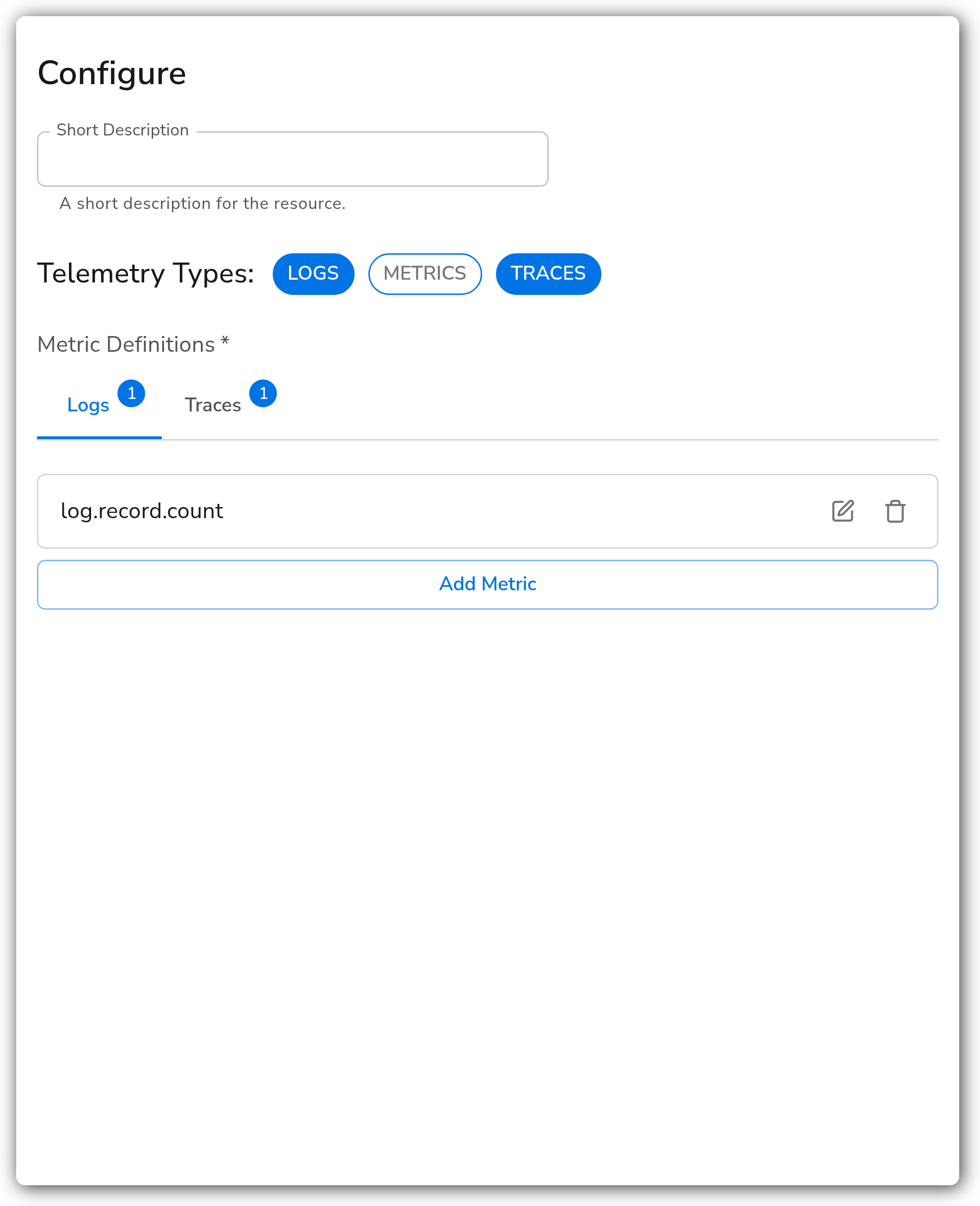
| Telemetry Types | Telemetry Selector | Yes | Logs, Metrics, Traces | Which input signal types to generate metrics from. At least one must be selected. |
| Metric Definitions | Signal to Metrics | Yes | *(empty)* | One or more metrics to generate. At least one metric must be defined. See the fields below. |
**Metric Definition fields**
Each entry under Metric Definitions describes one output metric.
| Field | Description |
| ------------------- | ----------------------------------------------------------------------------------------------------------------------------------------- |
| Signal Type | The input signal this metric reads from: `logs`, `datapoints` (metrics), or `spans` (traces). Must be one of the enabled Telemetry Types. |
| Name | The output metric name, for example `http.request.count`. |
| Description | Optional description of the metric. |
| Unit | Optional unit, for example `ms`, `By`, or `1`. |
| Type | `Sum`, `Gauge`, `Histogram`, or `Exponential Histogram`. |
| Value | OTTL expression returning the metric value, for example `1` to count, or `Double(attributes["duration_ms"])`. |
| Condition | Optional OTTL condition; only matching records generate this metric. |
| Buckets | Explicit bucket boundaries. Histogram type only. |
| Max Size | Maximum bucket count. Exponential Histogram type only. |
| Count | Optional OTTL expression for the datapoint count. Histogram and Exponential Histogram types only. |
| Attributes | Signal attributes to include on the output metric. See below. |
| Resource Attributes | Resource attributes to include on the output metric. See below. |
**Metric types**
| Type | Behavior |
| --------------------- | --------------------------------------------------------------------------- |
| Sum | Aggregates numeric values. Use for counters and cumulative totals. |
| Gauge | Records the last observed value. Use for current-state measurements. |
| Histogram | Distributes values across explicit `Buckets`. |
| Exponential Histogram | Distributes values across dynamically sized buckets, bounded by `Max Size`. |
**Attributes**
Choose which attributes from the source signal to copy onto the output metric. If no attributes are defined, the output metric carries no attributes.
| Field | Description |
| ------------- | ----------------------------------------------------------------------------------------------------------------------------------------------------------------------------------------------- |
| Key | The attribute key to include. |
| Behavior | `Required` (default): records missing this attribute are skipped. `Optional`: included when present, omitted when absent. `Has Default`: a default value is used when the attribute is missing. |
| Default Value | The value to substitute when the attribute is missing. Only with `Has Default`. |
**Resource Attributes**
Choose which resource attributes to copy onto the output metric. If no resource attributes are defined, all incoming resource attributes are included.
| Field | Description |
| ------------- | ---------------------------------------------------------------------------------------------------------------- |
| Key | The resource attribute key to include. |
| Behavior | `Has Default` substitutes the default value when missing. (`Required` is not available for resource attributes.) |
| Default Value | The value to substitute when the resource attribute is missing. Only with `Has Default`. |
### Examples
#### Latency histogram from HTTP server spans
This metric definition reads trace spans and emits a millisecond-bucketed latency histogram, keeping only server spans and grouping by route and method.
* Signal Type: `spans`
* Name: `http.server.duration`
* Unit: `ms`
* Type: `Histogram`
* Value: `Double(attributes["http.server.request.duration"])`
* Condition: `kind == SPAN_KIND_SERVER`
* Buckets: `[5, 10, 25, 50, 100, 250, 500, 1000, 2500, 5000, 10000]`
* Attributes: `http.route` (Optional), `http.request.method` (Required)
#### Count log records by severity
A simpler logs-based definition counts every log record and groups by severity.
* Signal Type: `logs`
* Name: `log.record.count`
* Type: `Sum`
* Value: `1`
* Attributes: `severity` (Optional)
#### Count spans accurately under sampling
For sampled traces, `AdjustedCount()` scales each span back up to its pre-sampling weight so counts stay accurate.
* Signal Type: `spans`
* Name: `span.count`
* Type: `Sum`
* Value: `Int(AdjustedCount())`
### Configuration Tips
* Each metric definition's Signal Type must be one of the enabled Telemetry Types, otherwise that definition produces nothing.
* Use `Value: 1` with a `Sum` type to turn any matching record into a counter; use a numeric OTTL expression for measured values.
* Leaving Resource Attributes empty passes through every incoming resource attribute, which can produce high-cardinality metrics. List only the keys you need.
### Troubleshooting
#### No metrics are produced
Symptoms: the connector runs but emits nothing into the metrics pipeline.
Solutions:
1. Confirm the metric definition's Signal Type matches an enabled Telemetry Type and that the source pipeline is actually carrying that signal.
2. Check the Condition: if it never evaluates true for incoming records, no metric is generated. Temporarily remove it to confirm.
#### Output metric is missing expected attributes
Symptoms: datapoints appear but lack attributes you configured.
Solutions:
1. A `Required` attribute that is absent on an incoming record causes that whole record to be skipped. Switch to `Optional` or `Has Default` if the attribute is not always present.
2. Verify the attribute Key matches the source field exactly, including case.
### Standalone Connector
```yaml
apiVersion: bindplane.observiq.com/v1
kind: Connector
metadata:
name: signal-to-metrics
spec:
type: signaltometrics
parameters:
- name: telemetry_types
value:
- Logs
- Traces
- name: metrics
value:
- signalType: logs
name: log.record.count
type: sum
value: "1"
attributes:
- key: severity
behavior: optional
- signalType: spans
name: http.server.duration
unit: ms
type: histogram
value: Double(attributes["http.server.request.duration"])
condition: kind == SPAN_KIND_SERVER
buckets:
- 5
- 10
- 25
- 50
- 100
- 250
- 500
- 1000
- 2500
- 5000
- 10000
attributes:
- key: http.route
behavior: optional
- key: http.request.method
behavior: required
```
### Related Resources
* [Signal to Metrics connector reference](https://github.com/open-telemetry/opentelemetry-collector-contrib/blob/main/connector/signaltometricsconnector/README.md)
* [OTTL functions reference](https://github.com/open-telemetry/opentelemetry-collector-contrib/blob/main/pkg/ottl/ottlfuncs/README.md)
### Bindplane Resources
* [Count](/integrations/connectors/count.md)
* [Span Metrics](/integrations/connectors/span-metrics.md)
---
# Agent Instructions
This documentation is published with GitBook. GitBook is the documentation platform designed so that both humans and AI agents can read, navigate, and reason over technical content effectively. Learn more at gitbook.com.
## Querying This Documentation
If you need additional information that is not directly available in this page, you can query the documentation by asking a question.
Perform an HTTP GET request on the following URL with the `ask` and `goal` query parameters:
```
GET https://docs.bindplane.com/integrations/connectors/signal-to-metrics.md?ask=&goal=
```
`ask` is the immediate question: it should be specific, self-contained, and written in natural language.
`goal` is what the user is ultimately trying to achieve, the reason they need the answer. Sharing it helps GitBook give you a better, more relevant answer. A goal is most helpful when it describes the outcome the user wants rather than restating the question. For example, with `ask=how do I create an API token`, a goal like `automate deployments from our CI pipeline` lets GitBook tailor the answer to that use case.
The response will contain a direct answer to the question and relevant excerpts and sources from the documentation.
Use this mechanism when the answer is not explicitly present in the current page, you need clarification or additional context, or you want to retrieve related documentation sections.