> For the complete documentation index, see [llms.txt](https://docs.bindplane.com/llms.txt). Markdown versions of documentation pages are available by appending `.md` to page URLs; this page is available as [Markdown](https://docs.bindplane.com/production-checklist/bindplane/secrets-management/using-environment-variables.md).
# Using Environment Variables
Using Environment Variables in Bindplane
Environment variables enable secure credential management in Bindplane by leveraging the OpenTelemetry Collector's environment variable substitution capabilities. This approach ensures sensitive values remain outside of the platform's storage.
### Overview
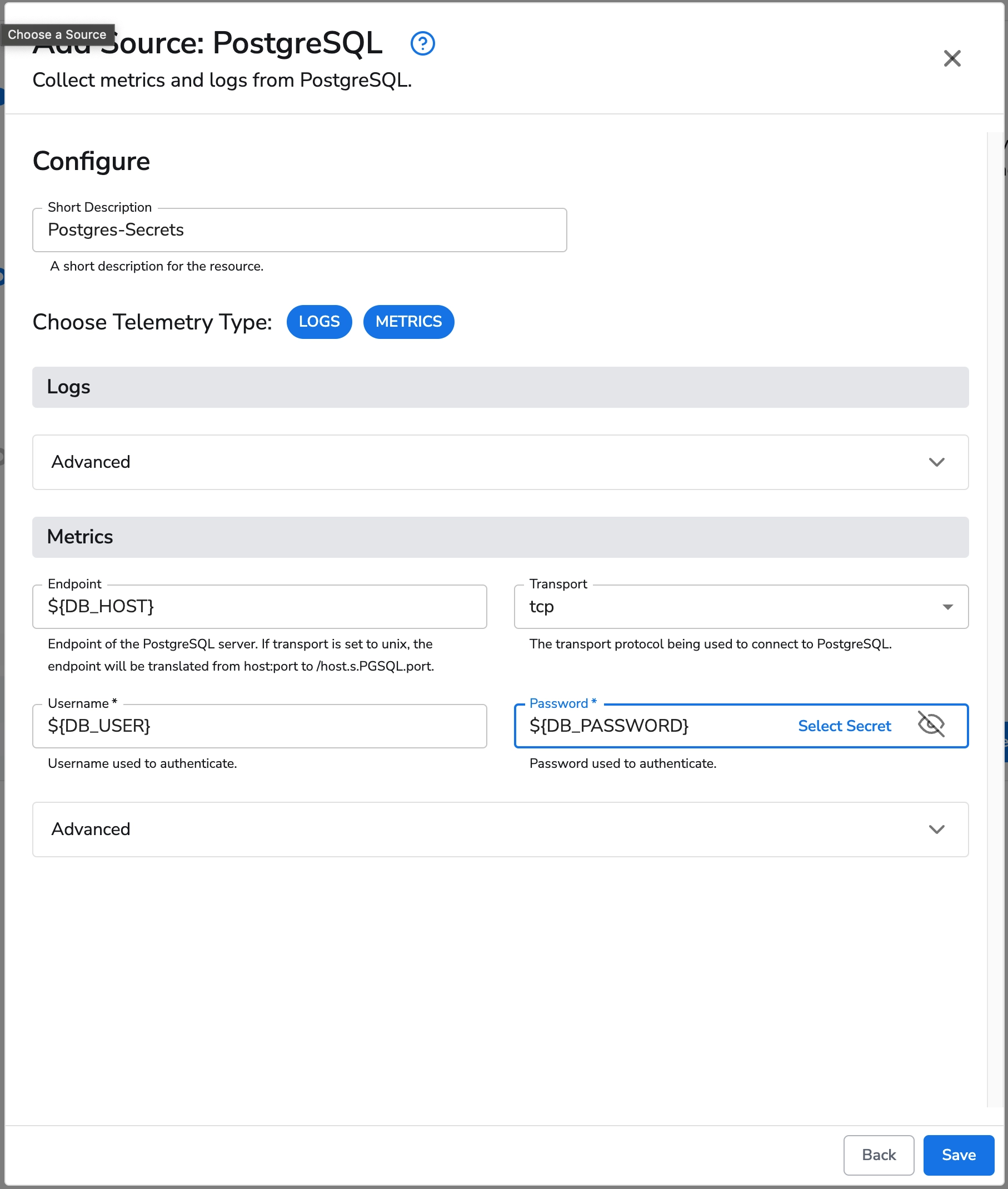
Bindplane supports environment variable references in collector configurations through the standard `${ENV_VAR}` syntax. During deployment, these references are automatically resolved to their corresponding values in the collector's runtime environment.
{% hint style="info" %}
**NOTE**
Environment variable values remain exclusively within your deployment environment and are not persisted in Bindplane's database.
{% endhint %}
{% hint style="info" %}
**NOTE**
Proper configuration of environment variables on collector hosts is essential. Misconfigured variable names or values may lead to deployment failures or pipeline execution errors.
{% endhint %}
### Implementation Guide
#### Step 1: Configuration Setup
Create or modify collector configurations in the Bindplane UI by incorporating environment variable references for sensitive values.
#### Step 2: Environment Configuration
Configure the required environment variables on all systems hosting OpenTelemetry collectors.
For Linux systems:
```bash
# This will set the Environment Variables for the scope of your shell session.
# To persist them, you will need to add them to your .bashrc or .zshrc files.
export DB_HOST=db.example.com
export DB_USER=collector_user
export DB_PASSWORD=your-secure-password
export DB_NAME=metrics_db
```
For Windows systems:
```powershell
# To set scoped environment variables to the powershell session
$env:DB_HOST="db.example.com"
$env:DB_USER="collector_user"
$env:DB_PASSWORD="your-secure-password"
$env:DB_NAME="metrics_db"
# To set machine scoped environment variables permanently
[Environment]::SetEnvironmentVariable('DB_HOST', 'db.example.com', 'Machine')
[Environment]::SetEnvironmentVariable('DB_USER', 'collector_user', 'Machine')
[Environment]::SetEnvironmentVariable('DB_PASSWORD', 'your-secure-password', 'Machine')
[Environment]::SetEnvironmentVariable('DB_NAME', 'metrics_db', 'Machine')
# To set the Environment Variable via the Registry, you can use the following:
reg add "HKEY_LOCAL_MACHINE\SYSTEM\CurrentControlSet\Services\observiq-otel-collector" /v Environment /t REG_MULTI_SZ /d "DB_HOST="db.example.com" /f
```
For additional information about Windows Environment Variables in PowerShell, consult the [Microsoft PowerShell documentation](https://learn.microsoft.com/en-us/powershell/module/microsoft.powershell.core/about/about_environment_variables?view=powershell-7.5).
#### Step 3: Deployment and Validation
Deploy the configuration through Bindplane and validate collector functionality with the configured environment variables.
### Implementation Best Practices
1. **Naming Conventions**: Implement clear, descriptive environment variable names (e.g., `DB_MYSQL_PASSWORD` rather than `PASSWORD`)
2. **Documentation**: Maintain comprehensive documentation of required environment variables for each collector configuration
3. **Access Control**: Implement appropriate permissions to restrict environment variable access to authorized collector service accounts
4. **Deployment Automation**: Incorporate environment variable configuration into deployment automation or service definitions
5. **Security Integration**: Consider integrating with enterprise secrets management solutions for automated environment variable population
---
# Agent Instructions
This documentation is published with GitBook. GitBook is the documentation platform designed so that both humans and AI agents can read, navigate, and reason over technical content effectively. Learn more at gitbook.com.
## Querying This Documentation
If you need additional information that is not directly available in this page, you can query the documentation dynamically by asking a question.
Perform an HTTP GET request on the current page URL with the `ask` query parameter, and the optional `goal` query parameter:
```
GET https://docs.bindplane.com/production-checklist/bindplane/secrets-management/using-environment-variables.md?ask=&goal=
```
`ask` is the immediate question: it should be specific, self-contained, and written in natural language.
`goal` is optional and describes the broader end goal you are ultimately trying to accomplish on behalf of the user. GitBook uses it to tailor the answer towards what is most useful for that goal.
The response will contain a direct answer to the question and relevant excerpts and sources from the documentation.
Use this mechanism when the answer is not explicitly present in the current page, you need clarification or additional context, or you want to retrieve related documentation sections.