> For the complete documentation index, see [llms.txt](https://docs.bindplane.com/llms.txt). Markdown versions of documentation pages are available by appending `.md` to page URLs; this page is available as [Markdown](https://docs.bindplane.com/integrations/sources/windows-remote-collection.md).
# Windows Remote Collection
The Windows Remote Collection source reads Windows Event Log channels from a remote Windows host over RPC. The collector runs on one Windows machine and connects to the target server using a username, password, and (optionally) domain, so no collector needs to be installed on the host being monitored. Select common channels such as System, Application, and Security, add custom channels, or supply a raw XML QueryList for advanced filtering.
This source maintains parity with the Windows Events source, with the addition of the remote connection settings.
### Supported Telemetry Types
| Platform | Metrics | Logs | Traces |
| -------- | ------- | ---- | ------ |
| Windows | | ✓ | |
### Prerequisites
The collector must run on a Windows host. Remote collection connects to the target server over RPC, so the following must be in place on each remote host:
* **Windows Remote Management (WinRM) / Remote Event Log access enabled on the target.** Run `winrm quickconfig` on the remote host to start the WinRM service and create the default listener. See [Installation and configuration for Windows Remote Management](https://learn.microsoft.com/en-us/windows/win32/winrm/installation-and-configuration-for-windows-remote-management).
* **Firewall rules permitting the connection.** The "Remote Event Log Management" firewall rule group must be enabled on the target, and `winrm quickconfig` opens the WinRM HTTP/HTTPS ports. Inbound RPC traffic from the collector host must be allowed.
* **An account with permission to read the event log channels.** The credentials supplied to the source must be able to read each channel being collected (for example, membership in the **Event Log Readers** group, or Administrator for the Security channel). For a domain account, set the Domain parameter to the Active Directory domain (e.g. `CORP`). For a local account on the remote host, set the Domain parameter to the remote host's computer name, not its IP address.
SID resolution requires the collector itself to run on Windows. Resolved values come from the Windows LSA API, which contacts the domain controller for domain-joined machines.
### Configuration
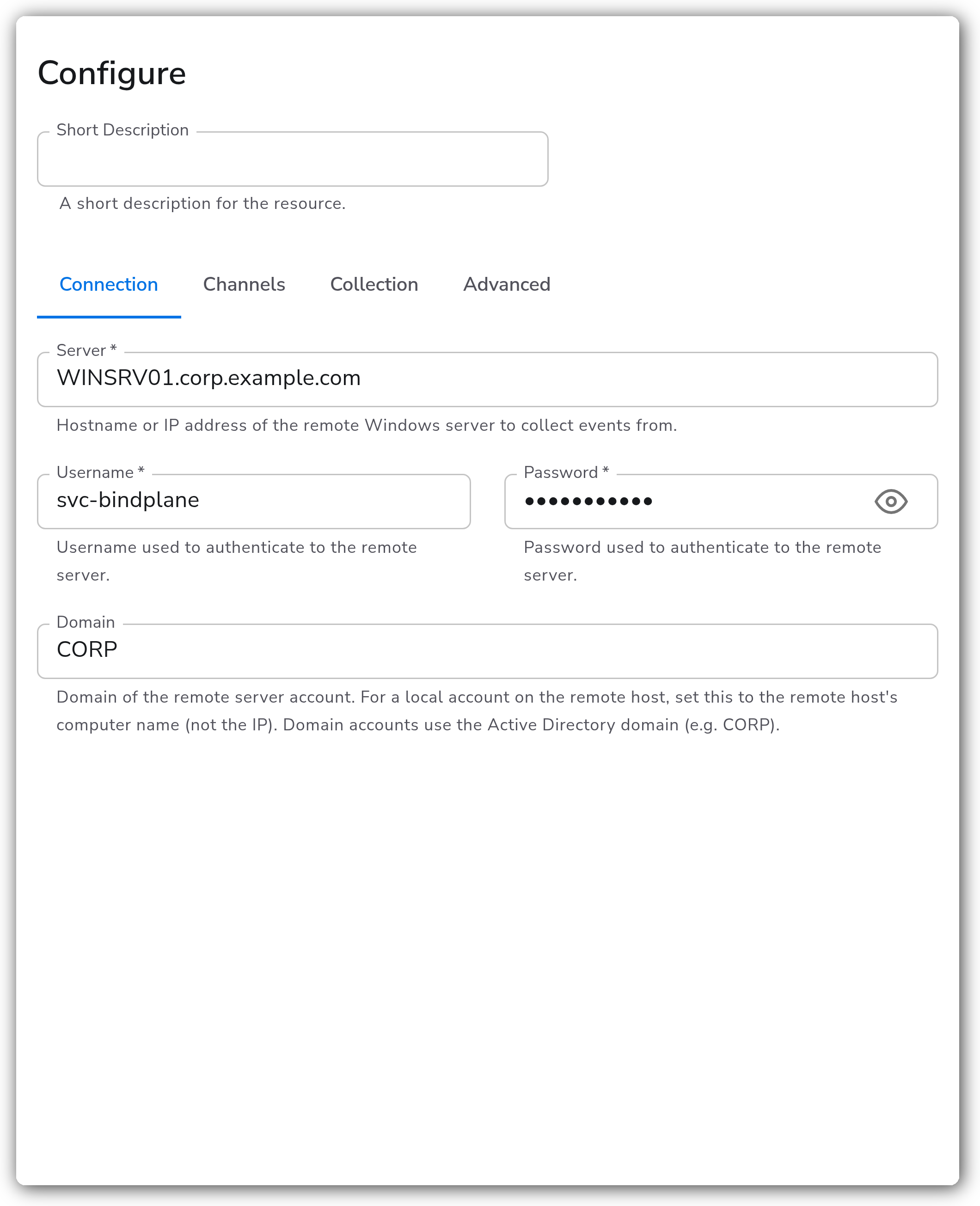
**Connection**
| Parameter | Type | Required | Default | Description |
| --------- | ------------------ | -------- | --------- | ----------------------------------------------------------------------------------------------------------------------------------------------------------------------------------------------------- |
| Server | string | Yes | — | Hostname or IP address of the remote Windows server to collect events from. |
| Username | string | Yes | — | Username used to authenticate to the remote server. |
| Password | string (sensitive) | Yes | — | Password used to authenticate to the remote server. |
| Domain | string | No | *(empty)* | Domain of the remote server account. For a local account on the remote host, set this to the remote host's computer name (not the IP). Domain accounts use the Active Directory domain (e.g. `CORP`). |
**Channels**
| Parameter | Type | Required | Default | Description |
| -------------------- | ----------- | -------- | ----------------------------------------------- | ----------------------------------------------------------------------------------------------------------------------------------------------------------------------------- |
| Mode | Mode Toggle | No | Channels | Choose between selecting predefined channels (`Channels`) or writing a custom XML QueryList (`XML`). The parameters below depend on this selection. |
| System Events | bool | No | `true` | Collect the System channel (kernel, drivers, services). Shown when Mode is `Channels`. |
| Application Events | bool | No | `true` | Collect the Application channel (installed apps, MSI, errors). Shown when Mode is `Channels`. |
| Security Events | bool | No | `true` | Collect the Security channel (logon, audit, policy changes). Shown when Mode is `Channels`. |
| Forwarded Events | bool | No | `false` | Collect the ForwardedEvents channel (events forwarded by collectors). Shown when Mode is `Channels`. |
| PowerShell Events | bool | No | `false` | Collect the Windows PowerShell channel (script block and module logging). Shown when Mode is `Channels`. |
| Sysmon Events | bool | No | `false` | Collect the Microsoft-Windows-Sysmon/Operational channel (process, network, registry). Shown when Mode is `Channels`. |
| DNS Server Events | bool | No | `false` | Collect the Microsoft-Windows-DNSServer/Operational channel (query, response, server). Shown when Mode is `Channels`. |
| MSSQL Events | bool | No | `false` | Collect Microsoft SQL Server events from the Application channel for the configured instances. Shown when Mode is `Channels`. |
| MSSQL Instance Names | strings | No | `["MSSQLSERVER"]` | The SQL Server instance names to collect events from. Use `MSSQLSERVER` for the default instance, or provide one or more named instances. Shown when MSSQL Events is enabled. |
| Custom Channels | strings | No | `[]` | Additional channels to read events from. Shown when Mode is `Channels`. |
| Query | xml | No | `…` (System, all events) | XML QueryList used to filter events being processed. Shown when Mode is `XML`. |
**Collection**
| Parameter | Type | Required | Default | Description |
| ------------------------ | ----------- | -------- | --------- | --------------------------------------------------------------------------------------------------------------------------------------------------------------------- |
| Collection Mode | Mode Toggle | No | Streaming | Choose between event-driven streaming (`Streaming`, low latency) or checking for new events on a fixed interval (`Polling`). |
| Polling Interval | float | No | `5` | The interval (seconds) at which the channel is checked for new log entries. Shown when Collection Mode is `Polling`. |
| Wait Timeout | float | No | `5` | Maximum duration (seconds) to wait for new events before performing a safety-net poll. Shown when Collection Mode is `Streaming`. |
| Enable SID Resolution | bool | No | `false` | When enabled, SIDs in Windows events are automatically resolved to user and group names using the Windows LSA API. Only available when the collector runs on Windows. |
| Cache Size | int | No | `10000` | Maximum number of SID-to-name mappings to cache in memory (\~100 bytes per entry; range 100–100000). Shown when SID Resolution is enabled. |
| Cache Time-To-Live (TTL) | string | No | `15m` | How long SID mappings remain valid in cache before being re-resolved. Duration string (e.g. `15m`, `1h`, `30s`). Shown when SID Resolution is enabled. |
**Advanced**
| Parameter | Type | Required | Default | Description |
| --------------------------- | ------ | -------- | ------------------------------------ | ----------------------------------------------------------------------------------------------------------------------------------------------------------------------------------------------------------------------------------------------------------------- |
| Start At | enum | No | `end` | Start reading logs from `beginning` or `end`. |
| Raw Logs | bool | No | `true` | When enabled, the XML log is not parsed into a structure but instead saved to the log body. |
| Event Data Format | enum | No | `map` | Format used to express Event Data in the parsed log body. Either `array` or `map`. Shown when Raw Logs is disabled. |
| Suppress Rendering Info | bool | No | `true` | When enabled, the source does not attempt to resolve rendering info. Improves performance at the cost of losing some event detail. See [EvtFormatMessage remarks](https://learn.microsoft.com/en-us/windows/win32/api/winevt/nf-winevt-evtformatmessage#remarks). |
| Include Log Record Original | bool | No | `true` | When enabled, the original log record is included in the log body. |
| Ignore Channel Errors | bool | No | `true` | When enabled, prevents shutdown of the collector when it fails to open channels, and instead logs a warning. |
| Enable File Offset Storage | bool | No | `true` | When enabled, the current position in the Windows Events is saved to disk on the collector host, and reading resumes where it left off after a collector restart. |
| Offset Storage Directory | string | No | `${OIQ_OTEL_COLLECTOR_HOME}/storage` | The directory that the offset storage file is created in. Shown when File Offset Storage is enabled. |
| Enable Retry on Failure | bool | No | `true` | Attempt to resend telemetry data that has failed to be transmitted to the destination. |
| Initial Interval | int | No | `1` | Time (seconds) to wait after the first failure before retrying. Shown when Retry on Failure is enabled. |
| Max Interval | int | No | `30` | The upper bound (seconds) on backoff. Shown when Retry on Failure is enabled. |
| Max Elapsed Time | int | No | `300` | The maximum amount of time (seconds) spent trying to send a batch, used to avoid a never-ending retry loop. Shown when Retry on Failure is enabled. |
#### SID Resolution
When SID resolution is enabled, the following fields are added to log records alongside any field ending in `Sid` (such as `SubjectUserSid` or `TargetUserSid`):
* `{FieldName}_Resolved` - Fully qualified name (e.g. `NT AUTHORITY\SYSTEM`)
* `{FieldName}_Domain` - Domain name
* `{FieldName}_Account` - Account name
* `{FieldName}_Type` - Account type
Common well-known SIDs (such as SYSTEM, BUILTIN\Administrators, LOCAL SERVICE) are resolved locally without network calls. All other SIDs are resolved via the Windows LSA API, which automatically contacts the domain controller for domain-joined machines. If a SID cannot be resolved, the original SID value is preserved and processing continues. No events are dropped.
### Examples
#### Collect System, Application, and Security channels from a domain server
Connect to a remote server using a domain account and stream the three default channels.
```yaml
apiVersion: bindplane.observiq.com/v1
kind: Source
metadata:
name: windows-remote-collection
spec:
type: windowsremotecollection
parameters:
- name: remote_server
value: WINSRV01.corp.example.com
- name: remote_username
value: svc-bindplane
- name: remote_password
value: ${WINDOWS_REMOTE_PASSWORD}
- name: remote_domain
value: CORP
- name: system_event_input
value: true
- name: app_event_input
value: true
- name: security_event_input
value: true
```
#### Filter to specific events with an XML QueryList
Set `use_xml_query` to `true` and supply a QueryList to target individual event IDs. This example collects logon failures (Event ID 4625) from the Security channel.
```yaml
apiVersion: bindplane.observiq.com/v1
kind: Source
metadata:
name: windows-remote-collection-xml
spec:
type: windowsremotecollection
parameters:
- name: remote_server
value: 10.0.0.20
- name: remote_username
value: Administrator
- name: remote_password
value: ${WINDOWS_REMOTE_PASSWORD}
- name: remote_domain
value: WINSRV01
- name: use_xml_query
value: true
- name: query
value: |
```
To find the value for a custom channel name, run `Get-WinEvent -ListLog *` on the remote Windows server.
### Configuration Tips
* For a local account on the remote host, set Domain to the host's computer name, not its IP address. Domain accounts use the Active Directory domain (e.g. `CORP`).
* Streaming mode (event-driven) gives lower latency; switch to Polling if the target or network does not handle the streaming connection reliably, and tune Polling Interval to balance latency against load.
* Leave Ignore Channel Errors enabled when collecting many channels so one inaccessible channel (for example Security, if the account lacks permission) does not stop the whole collector.
### Troubleshooting
#### No events are collected from the remote host
Symptoms: the source connects but returns no events, or the collector logs channel-open warnings.
Solutions:
1. Confirm WinRM and the "Remote Event Log Management" firewall rule are enabled on the target (`winrm quickconfig`), and that inbound RPC from the collector host is allowed.
2. Verify the account can read each selected channel. The Security channel typically requires Administrator or equivalent rights, not just Event Log Readers membership.
#### Authentication fails when connecting to the remote server
Symptoms: the collector logs authentication or access-denied errors.
Solutions:
1. For a local account, set Domain to the remote host's computer name (not the IP). For a domain account, set Domain to the Active Directory domain (e.g. `CORP`).
2. Confirm the username and password are correct and the account is not locked or expired.
#### SID resolution returns raw SIDs
Symptoms: `{FieldName}_Resolved` fields contain raw SID strings instead of names.
Solutions:
1. SID resolution uses the Windows LSA API on the collector host, so the collector must run on Windows and (for domain SIDs) be able to reach a domain controller.
2. Unresolvable SIDs are preserved as-is and no events are dropped; confirm the SID corresponds to a valid, reachable account.
### Standalone Source
```yaml
apiVersion: bindplane.observiq.com/v1
kind: Source
metadata:
name: windows-remote-collection
spec:
type: windowsremotecollection
parameters:
- name: remote_server
value: WINSRV01.corp.example.com
- name: remote_username
value: svc-bindplane
- name: remote_password
value: ${WINDOWS_REMOTE_PASSWORD}
- name: remote_domain
value: CORP
- name: use_xml_query
value: false
- name: system_event_input
value: true
- name: app_event_input
value: true
- name: security_event_input
value: true
- name: forwarded_events_input
value: false
- name: powershell_event_input
value: false
- name: sysmon_event_input
value: false
- name: dns_server_event_input
value: false
- name: mssql_event_input
value: false
- name: mssql_instance_names
value:
- MSSQLSERVER
- name: custom_channels
value: []
- name: start_at
value: end
- name: use_polling_collection_mode
value: false
- name: wait_timeout
value: 5
- name: raw_logs
value: true
- name: suppress_rendering_info
value: true
- name: include_log_record_original
value: true
- name: ignore_channel_errors
value: true
- name: enable_offset_storage
value: true
- name: offset_storage_dir
value: ${OIQ_OTEL_COLLECTOR_HOME}/storage
- name: retry_on_failure_enabled
value: true
```
### Related Resources
* [windowseventlogreceiver](https://github.com/open-telemetry/opentelemetry-collector-contrib/tree/main/receiver/windowseventlogreceiver) - the upstream OpenTelemetry receiver, including its [XML query](https://github.com/open-telemetry/opentelemetry-collector-contrib/tree/main/receiver/windowseventlogreceiver#xml-queries) reference.
* [Installation and configuration for Windows Remote Management](https://learn.microsoft.com/en-us/windows/win32/winrm/installation-and-configuration-for-windows-remote-management) - Microsoft Learn.
* [EvtFormatMessage remarks](https://learn.microsoft.com/en-us/windows/win32/api/winevt/nf-winevt-evtformatmessage#remarks) - Microsoft Learn, on rendering info.
---
# Agent Instructions
This documentation is published with GitBook. GitBook is the documentation platform designed so that both humans and AI agents can read, navigate, and reason over technical content effectively. Learn more at gitbook.com.
## Querying This Documentation
If you need additional information that is not directly available in this page, you can query the documentation by asking a question.
Perform an HTTP GET request on the following URL with the `ask` and `goal` query parameters:
```
GET https://docs.bindplane.com/integrations/sources/windows-remote-collection.md?ask=&goal=
```
`ask` is the immediate question: it should be specific, self-contained, and written in natural language.
`goal` is what the user is ultimately trying to achieve, the reason they need the answer. Sharing it helps GitBook give you a better, more relevant answer. A goal is most helpful when it describes the outcome the user wants rather than restating the question. For example, with `ask=how do I create an API token`, a goal like `automate deployments from our CI pipeline` lets GitBook tailor the answer to that use case.
The response will contain a direct answer to the question and relevant excerpts and sources from the documentation.
Use this mechanism when the answer is not explicitly present in the current page, you need clarification or additional context, or you want to retrieve related documentation sections.