> For the complete documentation index, see [llms.txt](https://docs.bindplane.com/llms.txt). Markdown versions of documentation pages are available by appending `.md` to page URLs; this page is available as [Markdown](https://docs.bindplane.com/integrations/sources/sql-query/sql-query-deprecated.md).

# SQL Query (Deprecated)

{% hint style="info" %}
**NOTE**

This source has been deprecated and replaced with a new [SQL Query](/integrations/sources/sql-query.md) source. While it will continue to function, it will no longer receive any enhancements and you should migrate to the new source.
{% endhint %}

### Description

Write an SQL query to execute on a compatible database server and generate logs from the result.

### Supported Platforms

Bindplane Collector: `v1.40.0`+

| Platform | Metrics | Logs | Traces |
| -------- | ------- | ---- | ------ |
| Linux    |         | ✓    |        |
| Windows  |         | ✓    |        |
| macOS    |         | ✓    |        |

#### Configuration

<table><thead><tr><th width="135.78125">Field</th><th>Description</th></tr></thead><tbody><tr><td>Driver</td><td>Which database driver should be used. Typically indicates which kind of database is being queried. Options include "postgres", "mysql", "snowflake", "sqlserver", and "oracle".</td></tr><tr><td>Hostname</td><td>The hostname or IP address of the database server.</td></tr><tr><td>Port</td><td>The port number on which the database server is listening.</td></tr><tr><td>Database</td><td>The name of the database to connect to.</td></tr><tr><td>Username</td><td>The username to use for authentication with the database.</td></tr><tr><td>Password</td><td>The password to use for authentication with the database.</td></tr><tr><td>Database Connection Options</td><td>A driver specific string specifying how to connect to the database. Usually contains information like host, port, authorization credentials, TLS configuration, and other connection options.</td></tr><tr><td>Query</td><td>The SQL query to run. The results of the query are used to generate the telemetry specified below.</td></tr><tr><td>Log Body Column</td><td>Defines the name of the column whose value will become the body for the generated log.</td></tr><tr><td>Attribute Columns</td><td>Defines columns whose values will become the attributes for the generated log.</td></tr><tr><td>Tacking Column</td><td>Used for parameterized queries. Defines the name of the column to retrieve for the parameter value on subsequent query runs. See this <a href="https://github.com/open-telemetry/opentelemetry-collector-contrib/tree/main/receiver/sqlqueryreceiver#tracking-processed-results">OTel Documentation</a> for more information.</td></tr><tr><td>Tracking Start Value</td><td>Used for parameterized queries. Defines the initial value of the tracking column to compare against on subsequent query runs. See this <a href="https://github.com/open-telemetry/opentelemetry-collector-contrib/tree/main/receiver/sqlqueryreceiver#tracking-processed-results">OTel Documentation</a> for more information.</td></tr><tr><td>Collection Interval</td><td>How frequently to execute queries to retrieve log data. Default is '10s'.</td></tr><tr><td>Enable Tracking Storage</td><td>If using tracking values, enable this to persist those values when the collector is restarted. Directory will be "$OIQ_OTEL_COLLECTOR_HOME/storage". See this <a href="https://github.com/open-telemetry/opentelemetry-collector-contrib/tree/main/receiver/sqlqueryreceiver#tracking-processed-results">OTel Documentation</a> for more information.</td></tr><tr><td>Enable Query Logging</td><td>Whether or not the collector should log the SQL query with associated parameters when the query is ran.</td></tr></tbody></table>

#### Example Configuration

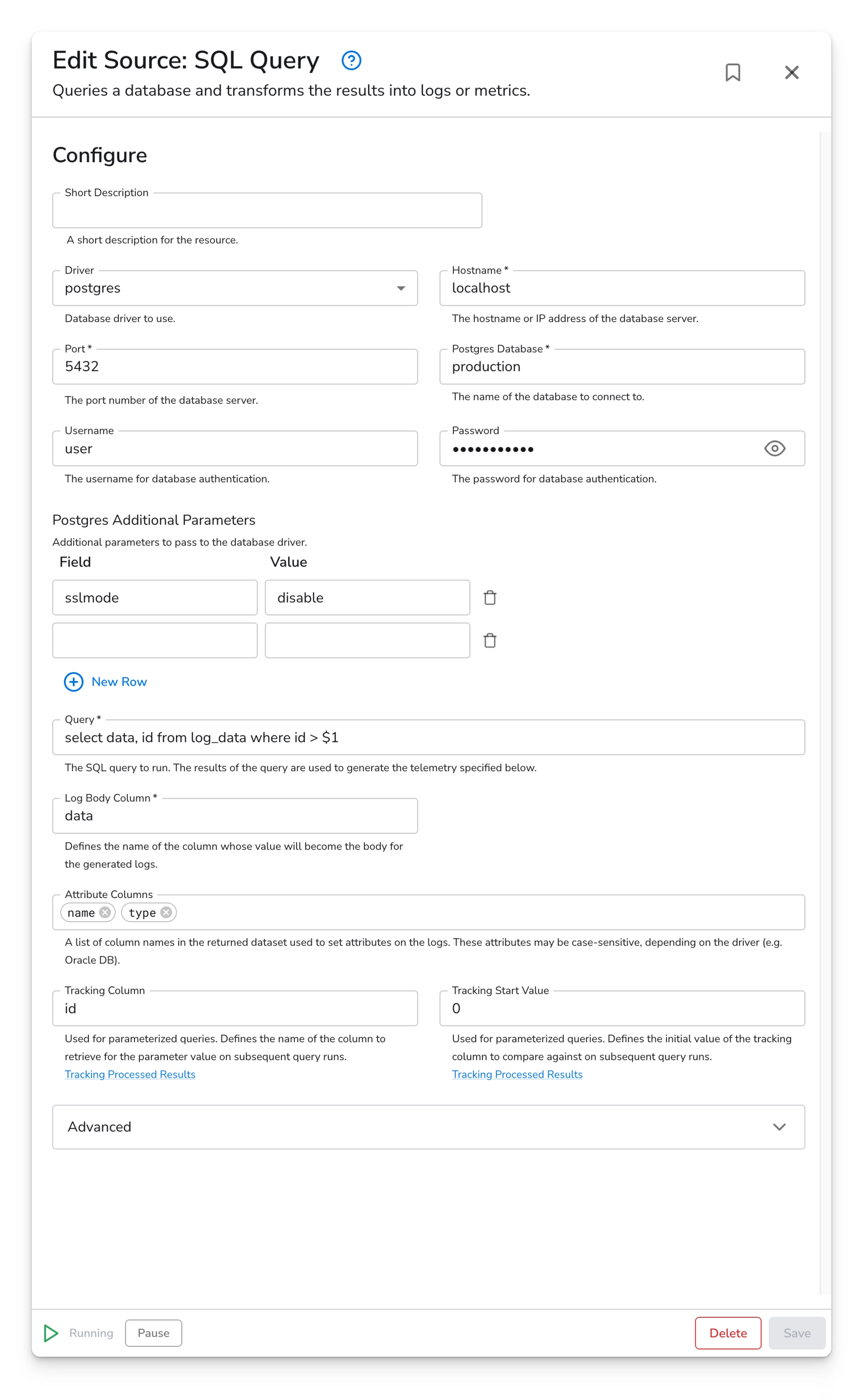
In this example, we are connecting to a postgres database using a postgres driver specific connection string. We are using a simple query which is retrieving rows of logs from a table. We are tracking the `id` column to avoid creating duplicate logs.

<figure><img src="https://1405008107-files.gitbook.io/~/files/v0/b/gitbook-x-prod.appspot.com/o/spaces%2FgmiOMzBfoNFwmKJFHMcJ%2Fuploads%2Fgit-blob-f881bcc59ce5205bc2c49e5c7ab38bb6754215d4%2Fintegrations-sources-sql-query-image-1.png?alt=media" alt="Bindplane docs - SQL Query - image 1"><figcaption></figcaption></figure>


---

# Agent Instructions
This documentation is published with GitBook. GitBook is the documentation platform designed so that both humans and AI agents can read, navigate, and reason over technical content effectively. Learn more at gitbook.com.

## Querying This Documentation
If you need additional information that is not directly available in this page, you can query the documentation by asking a question.

Perform an HTTP GET request on the following URL with the `ask` and `goal` query parameters:

```
GET https://docs.bindplane.com/integrations/sources/sql-query/sql-query-deprecated.md?ask=<question>&goal=<user_goal>
```

`ask` is the immediate question: it should be specific, self-contained, and written in natural language.
`goal` is what the user is ultimately trying to achieve, the reason they need the answer. Sharing it helps GitBook give you a better, more relevant answer. A goal is most helpful when it describes the outcome the user wants rather than restating the question. For example, with `ask=how do I create an API token`, a goal like `automate deployments from our CI pipeline` lets GitBook tailor the answer to that use case.

The response will contain a direct answer to the question and relevant excerpts and sources from the documentation.

Use this mechanism when the answer is not explicitly present in the current page, you need clarification or additional context, or you want to retrieve related documentation sections.