> For the complete documentation index, see [llms.txt](https://docs.bindplane.com/llms.txt). Markdown versions of documentation pages are available by appending `.md` to page URLs; this page is available as [Markdown](https://docs.bindplane.com/integrations/sources/bindplane-collector/bindplane-collector-deprecated.md).
# Bindplane Collector (Deprecated)
{% hint style="info" %}
**NOTE**
This source has been deprecated and replaced with a new [Bindplane Collector](/integrations/sources/bindplane-collector.md) source. While it will continue to function, it will no longer receive enhancements and you should migrate to the new source.
{% endhint %}
The Bindplane Collector source collects the collector's own logs and internal telemetry from the collector the configuration is applied to. Logs are read from the collector's log files with the filelog receiver. Metrics are scraped from the collector's internal Prometheus endpoint, filtered to the `otelcol_*` series, and labeled with host resource attributes. Use it to monitor the health of your fleet from within the pipelines they already run.
### Supported Telemetry Types
| Platform | Metrics | Logs | Traces |
| -------- | ------- | ---- | ------ |
| Linux | ✓ | ✓ | |
| Windows | ✓ | ✓ | |
| macOS | ✓ | ✓ | |
This is a Bindplane-internal source. It runs inside the Bindplane Collector and observes that same collector.
### Prerequisites
This source is internal and needs no external system. It requires:
* A Bindplane Collector running on the host. The source reads files written by that collector and scrapes its local metrics endpoint.
* Read access to the collector log directory. With the defaults this is `${OIQ_OTEL_COLLECTOR_HOME}/log`.
* For metrics, the collector's internal telemetry endpoint must be reachable on the configured port (default `8888`) on `localhost`. The collector exposes this Prometheus endpoint by default.
### Configuration
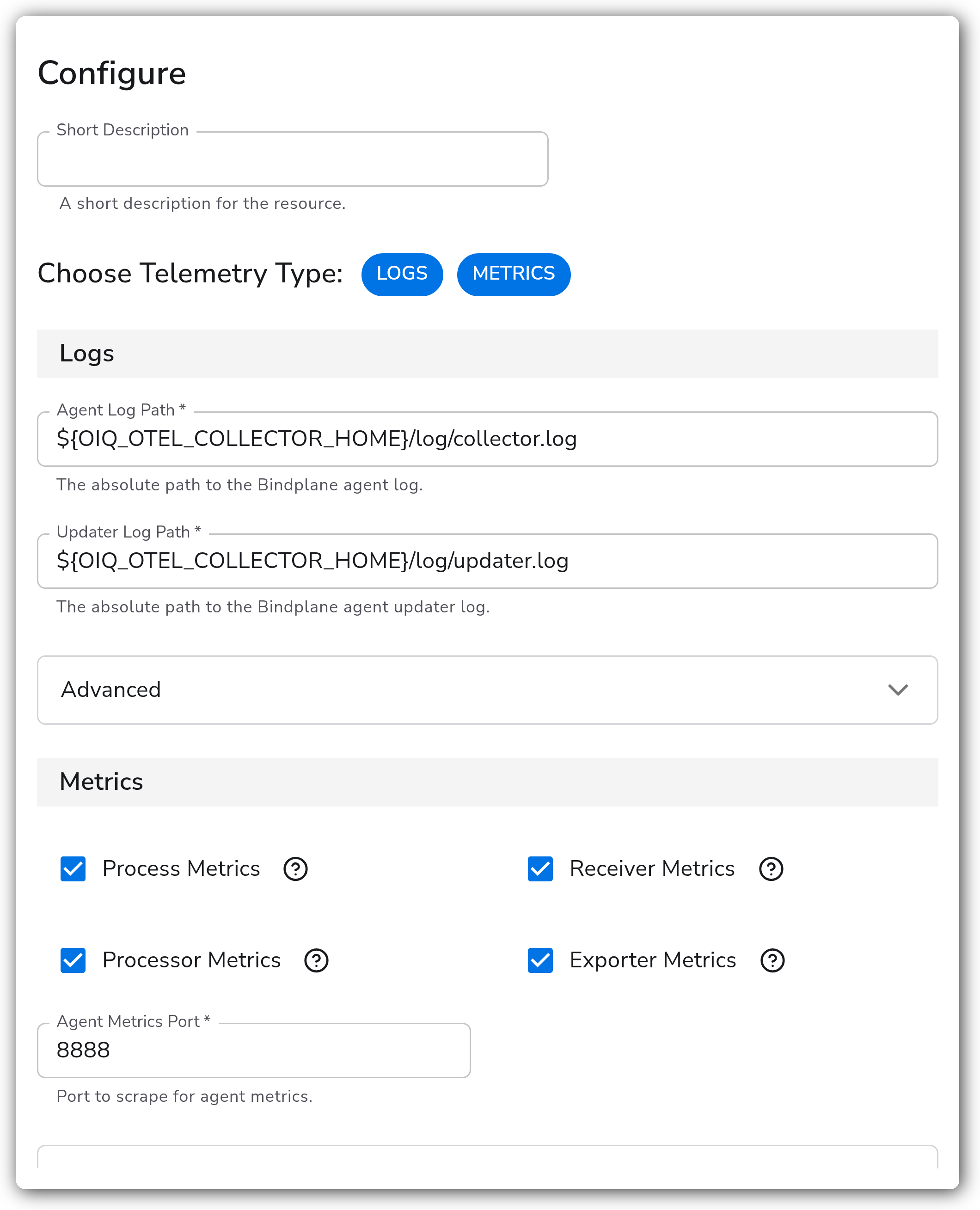
**Telemetry**
| Parameter | Type | Required | Default | Description |
| --------------------- | ------------------ | -------- | ------------- | --------------------------------------------------------------------------------------------------------------------------------- |
| Choose Telemetry Type | Telemetry Selector | No | Logs, Metrics | Which signals this source collects. Valid values are Logs and Metrics. The parameters shown below depend on the signals selected. |
**Logs**
Shown when Logs is selected.
| Parameter | Type | Required | Default | Description |
| ------------------ | ------ | -------- | ---------------------------------------------- | --------------------------------------------------------- |
| Collector Log Path | String | Yes | `${OIQ_OTEL_COLLECTOR_HOME}/log/collector.log` | The absolute path to the Bindplane collector log. |
| Updater Log Path | String | Yes | `${OIQ_OTEL_COLLECTOR_HOME}/log/updater.log` | The absolute path to the Bindplane collector updater log. |
**Metrics**
Shown when Metrics is selected.
| Parameter | Type | Required | Default | Description |
| ---------------------- | ------- | -------- | ------- | ---------------------------------------------------------------- |
| Process Metrics | Boolean | No | `true` | Collect `otelcol_process_*` metrics. |
| Receiver Metrics | Boolean | No | `true` | Collect `otelcol_receiver_*` metrics. |
| Processor Metrics | Boolean | No | `true` | Collect `otelcol_processor_*` metrics. |
| Exporter Metrics | Boolean | No | `true` | Collect `otelcol_exporter_*` metrics. |
| Collector Metrics Port | Integer | Yes | `8888` | Port to scrape for collector metrics. Valid range is 0 to 65535. |
**Advanced**
| Parameter | Type | Required | Default | Description |
| --------------------------------- | ------------------------ | -------- | ------------------------------------------------------- | -------------------------------------------------------------------------------------------------------------------------------------------- |
| Collect Standard Error Log | Boolean | No | `true` | Collect the collector's standard error log. This file is only present on Windows and macOS collectors. (Logs) |
| Standard Error Log Path (Windows) | String | Yes | `${OIQ_OTEL_COLLECTOR_HOME}/log/observiq_collector.err` | The absolute path to the collector standard error log on Windows. Shown when Collect Standard Error Log is enabled. (Logs) |
| Standard Error Log Path (macOS) | String | Yes | `/var/log/observiq_collector.err` | The absolute path to the collector standard error log on macOS. Shown when Collect Standard Error Log is enabled. (Logs) |
| Enable File Offset Storage | Boolean | No | `true` | When enabled, the current read position in each file is saved to disk so reading resumes where it left off after a collector restart. (Logs) |
| Offset Storage Directory | String | No | `${OIQ_OTEL_COLLECTOR_HOME}/storage` | Directory where the offset storage file is created. Shown when Enable File Offset Storage is enabled. (Logs) |
| Start At | Enum: `beginning`, `end` | No | `end` | Where in the log files to begin reading. (Logs) |
| Collection Interval | Integer | No | `60` | How often, in seconds, to scrape for metrics. (Metrics) |
### Examples
#### Logs only
Collect just the collector and updater logs, reading from the end of the files so existing history is skipped.
```yaml
apiVersion: bindplane.observiq.com/v1
kind: Source
metadata:
name: bindplane-collector
spec:
type: bindplane-agent
parameters:
- name: telemetry_types
value:
- Logs
- name: log_path
value: ${OIQ_OTEL_COLLECTOR_HOME}/log/collector.log
- name: updater_log_path
value: ${OIQ_OTEL_COLLECTOR_HOME}/log/updater.log
- name: start_at
value: end
```
#### Metrics only, exporter metrics narrowed
Scrape internal metrics on a non-default port and drop process metrics to keep cardinality down.
```yaml
apiVersion: bindplane.observiq.com/v1
kind: Source
metadata:
name: bindplane-collector
spec:
type: bindplane-agent
parameters:
- name: telemetry_types
value:
- Metrics
- name: metrics_port
value: 8889
- name: collection_interval
value: 30
- name: process_metrics
value: false
- name: receiver_metrics
value: true
- name: processor_metrics
value: true
- name: exporter_metrics
value: true
```
#### Logs and metrics with stderr collection on Windows or macOS
The standard error log only exists on Windows and macOS collectors. The matching path is used automatically based on the platform the collector runs on.
```yaml
apiVersion: bindplane.observiq.com/v1
kind: Source
metadata:
name: bindplane-collector
spec:
type: bindplane-agent
parameters:
- name: telemetry_types
value:
- Logs
- Metrics
- name: enable_stderr_log
value: true
- name: stderr_log_path_macos
value: /var/log/observiq_collector.err
- name: enable_offset_storage
value: true
- name: collection_interval
value: 60
```
### Configuration Tips
* The four metric toggles narrow the scraped series. They exclude `otelcol_process_*`, `otelcol_receiver_*`, `otelcol_processor_*`, and `otelcol_exporter_*` respectively. Other `otelcol_*` series are always included.
* The standard error log is only written on Windows and macOS. On Linux the stderr paths are ignored even if Collect Standard Error Log is enabled.
* Leave Enable File Offset Storage on for log collection so restarts do not re-read or skip records. The offset directory must be writable by the collector.
### Troubleshooting
#### No collector metrics appear
Symptoms: the source produces logs but no `otelcol_*` metrics, or the metrics pipeline reports a scrape failure.
Solutions:
1. Confirm Metrics is selected in Choose Telemetry Type.
2. Verify the collector's internal telemetry endpoint is listening on the configured Collector Metrics Port (default `8888`) on `localhost`. If the port was changed in the collector's telemetry settings, set Collector Metrics Port to match.
3. Check that at least one of the metric toggles is enabled. Disabling all four removes most `otelcol_*` series.
#### No collector logs appear
Symptoms: the source produces metrics but no logs, or the filelog receiver reports a missing file.
Solutions:
1. Confirm Logs is selected and that Collector Log Path and Updater Log Path point at files that exist on the host. The defaults assume `${OIQ_OTEL_COLLECTOR_HOME}` is set.
2. If you expect older entries but see none, set Start At to `beginning`. With the default `end`, only new lines written after the source starts are read.
3. Ensure the collector user can read the log directory and write the Offset Storage Directory.
#### Standard error log not collected
Symptoms: stderr entries are missing on a Windows or macOS host.
Solutions:
1. Confirm Collect Standard Error Log is enabled and the platform-specific path is correct (`...\observiq_collector.err` on Windows, `/var/log/observiq_collector.err` on macOS).
2. On Linux this is expected. The collector does not write a standard error log file there.
### Standalone Source
```yaml
apiVersion: bindplane.observiq.com/v1
kind: Source
metadata:
name: bindplane-collector
spec:
type: bindplane-agent
parameters:
- name: telemetry_types
value:
- Logs
- Metrics
- name: log_path
value: ${OIQ_OTEL_COLLECTOR_HOME}/log/collector.log
- name: updater_log_path
value: ${OIQ_OTEL_COLLECTOR_HOME}/log/updater.log
- name: enable_offset_storage
value: true
- name: offset_storage_dir
value: ${OIQ_OTEL_COLLECTOR_HOME}/storage
- name: start_at
value: end
- name: metrics_port
value: 8888
- name: collection_interval
value: 60
- name: process_metrics
value: true
- name: receiver_metrics
value: true
- name: processor_metrics
value: true
- name: exporter_metrics
value: true
```
### Related Resources
* [Filelog Receiver](https://github.com/open-telemetry/opentelemetry-collector-contrib/tree/main/receiver/filelogreceiver) — reads the collector log files.
* [Prometheus Receiver](https://github.com/open-telemetry/opentelemetry-collector-contrib/tree/main/receiver/prometheusreceiver) — scrapes the collector's internal metrics endpoint.
* [Bindplane Collector documentation](https://bindplane.com/docs) — the collector this source observes.
---
# Agent Instructions
This documentation is published with GitBook. GitBook is the documentation platform designed so that both humans and AI agents can read, navigate, and reason over technical content effectively. Learn more at gitbook.com.
## Querying This Documentation
If you need additional information that is not directly available in this page, you can query the documentation by asking a question.
Perform an HTTP GET request on the following URL with the `ask` and `goal` query parameters:
```
GET https://docs.bindplane.com/integrations/sources/bindplane-collector/bindplane-collector-deprecated.md?ask=&goal=
```
`ask` is the immediate question: it should be specific, self-contained, and written in natural language.
`goal` is what the user is ultimately trying to achieve, the reason they need the answer. Sharing it helps GitBook give you a better, more relevant answer. A goal is most helpful when it describes the outcome the user wants rather than restating the question. For example, with `ask=how do I create an API token`, a goal like `automate deployments from our CI pipeline` lets GitBook tailor the answer to that use case.
The response will contain a direct answer to the question and relevant excerpts and sources from the documentation.
Use this mechanism when the answer is not explicitly present in the current page, you need clarification or additional context, or you want to retrieve related documentation sections.