> For the complete documentation index, see [llms.txt](https://docs.bindplane.com/llms.txt). Markdown versions of documentation pages are available by appending `.md` to page URLs; this page is available as [Markdown](https://docs.bindplane.com/integrations/sources/azure-blob-polling.md).
# Azure Blob Polling
The Azure Blob Polling source reads telemetry from an Azure Storage container by polling it on an interval. On each poll it lists new blobs, downloads them, and parses their contents as logs, metrics, or traces. Unlike the [Azure Blob Storage](/integrations/sources/azure-blob-storage.md) source, it does not depend on an Event Hub notification, so it works against any container you can reach with a connection string.
### Supported Telemetry Types
| Platform | Metrics | Logs | Traces |
| -------- | ------- | ---- | ------ |
| Linux | ✓ | ✓ | ✓ |
| Windows | ✓ | ✓ | ✓ |
| macOS | ✓ | ✓ | ✓ |
### Prerequisites
* An Azure Storage account, and the container holding the blobs you want to ingest.
* The storage account connection string (see [Configure a connection string](https://learn.microsoft.com/en-gb/azure/storage/common/storage-configure-connection-string)).
* Blobs stored in one of the supported formats. OTLP JSON is the default; NDJSON, plain text, and records-array JSON are also supported for logs.
### Configuration
#### Basic Configuration
| Parameter | Type | Required | Default | Description |
| --------------------- | ------------------ | -------- | ---------- | ----------------------------------------------------------------------------------------------------------------------------------------------------------------------------------------------------------------------------------------------------- |
| Choose Telemetry Type | Telemetry Selector | No | `["Logs"]` | Which telemetry types to collect. Options are Logs, Metrics, and Traces. |
| Connection String | String | Yes | | The Azure Blob Storage connection string, found in the Azure Portal under the storage account's Access Keys. This value is sensitive. |
| Container | String | Yes | | The name of the storage container to poll for blobs. |
| Poll Interval | Integer | Yes | `5` | How often, in minutes, to poll the container for new blobs. |
| Root Folder | String | No | *(empty)* | The folder path within the container to start scanning from. Leave empty to scan the whole container. On Bindplane OTel Collector v1.100.0 and later, supports glob patterns (`*`, `?`, `[...]`) to match multiple folders, for example `logs/*/app`. |
#### Blob Selection and Format
These parameters control which blobs are read and how their contents are parsed.
| Parameter | Type | Required | Default | Description |
| ---------------- | ------ | -------- | --------- | ----------------------------------------------------------------------------------------------------------------------------------------------- |
| Filename Pattern | String | No | *(empty)* | A regular expression that filters blobs by filename. Only blobs whose names match are processed. For example, `.*\.json` matches any JSON file. |
| Blob Format | Enum | No | `otlp` | How to parse each blob's contents. See the options below. Only shown when Logs is selected. |
Blob Format options:
* `otlp` (default) expects OTLP-formatted JSON, as written by the Azure Blob Storage destination.
* `ndjson` parses each blob as newline-delimited JSON, one log record per line.
* `text` treats the entire blob as the raw body of a single log record.
* `records-json` parses each blob as a single JSON document with a top-level `records` array, one log record per element. This matches Azure NSG flow logs and Azure diagnostic-settings exports.
`ndjson`, `text`, and `records-json` apply to logs only. Metrics and traces are always read as OTLP JSON.
#### Time Extraction
The source uses the blob path to decide which blobs are new since the last poll. Configure how timestamps are read from the path, or fall back to the blob's own modified time.
| Parameter | Type | Required | Default | Description |
| --------------------------- | ------- | -------- | --------- | -------------------------------------------------------------------------------------------------------------------------------------------------------------------------------------------------------------------------------------- |
| Use Last Modified Timestamp | Boolean | No | `false` | Use the blob's LastModified timestamp instead of parsing its path. Enable this when blobs do not follow a time-based naming convention. |
| Time Pattern | String | No | *(empty)* | A custom pattern for extracting timestamps from blob paths. Supports named placeholders (`{year}/{month}/{day}/{hour}/{minute}`) and Go time layouts (`2006/01/02/15/04`). Defaults to `year=YYYY/month=MM/day=DD/hour=HH` when unset. |
| Use Time Pattern as Prefix | Boolean | No | `false` | Use the time pattern to build Azure API request prefixes, which narrows the set of blobs scanned. Recommended for containers with 100K+ blobs. |
#### Advanced
| Parameter | Type | Required | Default | Description |
| ------------------------- | ------- | -------- | --------- | ---------------------------------------------------------------------------------------------------------------------------------------------------------------------------------------------------------------------------- |
| Initial Lookback | Integer | No | `1` | How far back, in minutes, to look on the first poll when no checkpoint exists. Defaults to the poll interval when unset. |
| Batch Size | Integer | No | `30` | The number of blobs to process per batch, which also sets the number of concurrent downloads. |
| Page Size | Integer | No | `1000` | The maximum number of blobs to request from the Azure API per page. |
| Delete on Read | Boolean | No | `false` | Delete each blob after it is processed. |
| Enable Checkpoint | Boolean | No | `true` | Store poll progress so the source resumes where it left off after a restart. |
| Checkpoint Directory | String | No | `storage` | Where checkpoint state is stored. Relative paths resolve against the collector's installation directory. Shown when Enable Checkpoint is on. |
| Fall Back on Glob Failure | Boolean | No | `false` | When Root Folder is a glob that Azure cannot expand to a folder list, scan from the static path prefix and filter client-side instead of failing the poll. This still collects data but can scan much more of the container. |
#### Incremental reads
These options let the source ingest records appended to a growing blob, instead of reading each blob once and de-duplicating by name. They apply to logs only, and only to the NDJSON, Records JSON, and Text formats. They require Bindplane OTel Collector v1.108.1 or later.
| Parameter | Type | Required | Default | Description |
| -------------------------- | ------- | -------- | ------- | --------------------------------------------------------------------------------------------------------------------------------------------------------------------------------------------------------- |
| Enable Incremental Read | Boolean | No | `false` | Track a per-blob byte offset so records appended to a growing blob are ingested on later polls. Shown when Blob Format is not OTLP. |
| One Text Record Per Line | Boolean | No | `false` | For the Text format, emit one log record per non-empty line and tail the blob incrementally, rather than one record for the whole blob. Shown when Enable Incremental Read is on and Blob Format is Text. |
| Incremental Revisit Window | Integer | No | `0` | How far back, in minutes, each poll re-lists blobs to catch appends. Must be at least the poll interval. `0` uses the receiver default of 120 minutes. |
| Fingerprint Size | Integer | No | `0` | Leading blob bytes used to recognize a growing blob across polls. `0` uses the receiver default of 512; a non-zero value must be at least 16. |
| Assume Append-Only | Boolean | No | `false` | Skip the per-poll identity check to roughly halve reads. Safe only when blobs are appended to and never replaced or truncated. |
### Examples
#### Tuning for a large container with advanced options
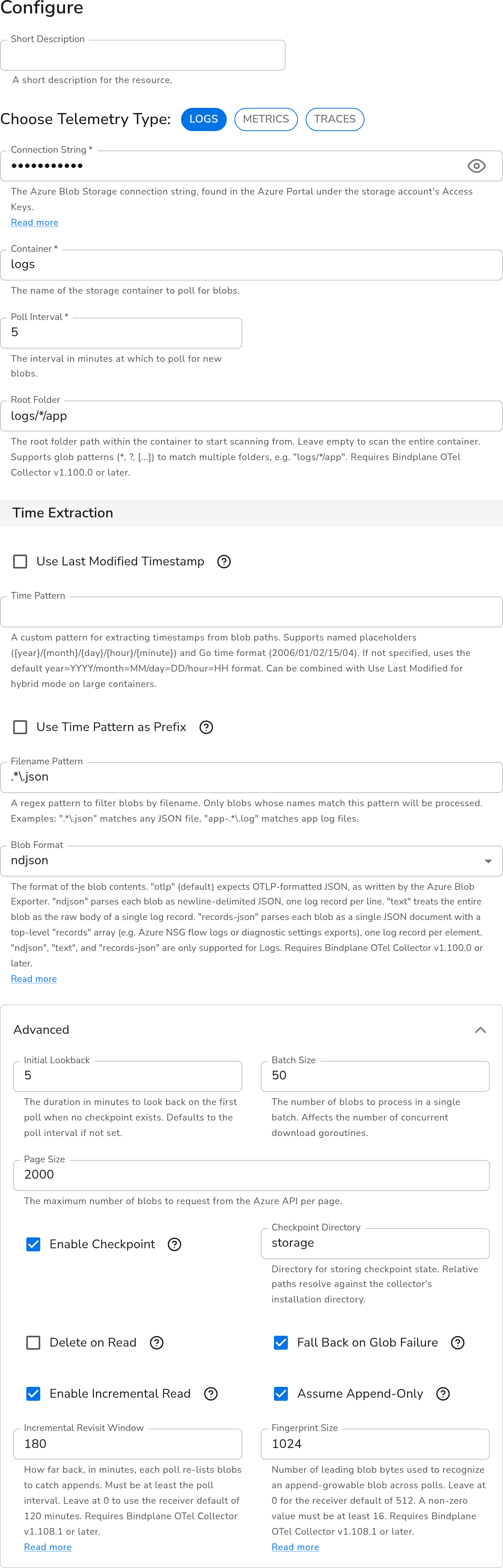
This shows the advanced options in use, including incremental reads. Raise Page Size and Batch Size to move more blobs per poll. Keep Enable Checkpoint on so restarts resume in place. Enable incremental reads to pick up records appended to a growing blob on later polls, rather than only when the blob is first seen.
#### One record per line for text blobs
Set Blob Format to `text` for plain-text logs that aren't OTLP or JSON. By default the source reads the whole blob as a single log record. For a blob that grows over time, such as an application log file that new lines are appended to, turn on Enable Incremental Read and then One Text Record Per Line. Each non-empty line becomes its own log record, and later polls tail the blob from where the last poll stopped rather than re-reading it. One Text Record Per Line appears only when Enable Incremental Read is on and Blob Format is Text.
### Configuration Tips
#### Choosing a blob format
* Leave Blob Format at `otlp` when the blobs were written by the Bindplane Azure Blob Storage destination.
* Use `records-json` for Azure-native exports that wrap their entries in a top-level `records` array, such as NSG flow logs and diagnostic-settings exports.
* `ndjson` and `text` cover line-delimited and plain-text log files. All three non-OTLP formats apply to logs only.
#### Scanning large containers efficiently
* Set Root Folder to the narrowest path that still covers your blobs, and use a glob (on collector v1.100.0+) when they span sibling folders.
* Enable Use Time Pattern as Prefix on containers with 100K+ blobs so each poll requests only the relevant time ranges.
* Use Filename Pattern to skip blobs the source should not read at all.
### Troubleshooting
#### No telemetry arrives
**Symptoms:** The source is configured but nothing is ingested.
**Solutions:**
1. Confirm the Connection String and Container are correct and that the container holds blobs.
2. If Root Folder or Filename Pattern is set, confirm they actually match your blob paths and names. An over-narrow path or pattern silently matches nothing.
3. Remember the first poll only reaches back by Initial Lookback (or the poll interval). Blobs older than that window are not read unless a matching time path brings them into scope.
#### Blobs are found but fail to parse
**Symptoms:** Blobs are read but records are dropped or malformed.
**Solutions:**
1. Confirm Blob Format matches the actual contents of the blobs.
2. For metrics or traces, blobs must be OTLP JSON. The `ndjson`, `text`, and `records-json` formats apply to logs only.
#### High memory or API cost on large containers
**Symptoms:** The collector uses excessive memory or makes a large number of Azure API calls.
**Solutions:**
1. Enable Use Time Pattern as Prefix and narrow Root Folder so each poll scans fewer blobs.
2. Lower Batch Size to reduce concurrent downloads, and tune Page Size to control how many blobs are listed per request.
### Standalone Source
```yaml
apiVersion: bindplane.observiq.com/v1
kind: Source
metadata:
name: azure-blob-polling
spec:
type: azure_blob_polling
parameters:
- name: telemetry_types
value:
- Logs
- name: connection_string
value: 'DefaultEndpointsProtocol=https;AccountName=accountName;AccountKey=+idLkHYcL0MUWIKYHm2j4Q==;EndpointSuffix=core.windows.net'
- name: container
value: logs
- name: poll_interval
value: 5
- name: blob_format
value: otlp
```
### Related Resources
* [Azure Blob Storage overview](https://learn.microsoft.com/en-us/azure/storage/blobs/storage-blobs-overview)
* [Configure an Azure Storage connection string](https://learn.microsoft.com/en-gb/azure/storage/common/storage-configure-connection-string)
* [OTLP JSON format](https://github.com/open-telemetry/opentelemetry-proto#json-protobuf-encoding)
* [Azure NSG flow logs format](https://learn.microsoft.com/en-us/azure/network-watcher/network-watcher-nsg-flow-logging-overview)
### Bindplane Resources
* [Azure Blob Storage source](/integrations/sources/azure-blob-storage.md) (Event Hub notification-based ingestion)
* [Azure Blob Rehydration source](/integrations/sources/azure-blob-rehydration.md)
---
# Agent Instructions
This documentation is published with GitBook. GitBook is the documentation platform designed so that both humans and AI agents can read, navigate, and reason over technical content effectively. Learn more at gitbook.com.
## Querying This Documentation
If you need additional information that is not directly available in this page, you can query the documentation by asking a question.
Perform an HTTP GET request on the following URL with the `ask` and `goal` query parameters:
```
GET https://docs.bindplane.com/integrations/sources/azure-blob-polling.md?ask=&goal=
```
`ask` is the immediate question: it should be specific, self-contained, and written in natural language.
`goal` is what the user is ultimately trying to achieve, the reason they need the answer. Sharing it helps GitBook give you a better, more relevant answer. A goal is most helpful when it describes the outcome the user wants rather than restating the question. For example, with `ask=how do I create an API token`, a goal like `automate deployments from our CI pipeline` lets GitBook tailor the answer to that use case.
The response will contain a direct answer to the question and relevant excerpts and sources from the documentation.
Use this mechanism when the answer is not explicitly present in the current page, you need clarification or additional context, or you want to retrieve related documentation sections.