> For the complete documentation index, see [llms.txt](https://docs.bindplane.com/llms.txt). Markdown versions of documentation pages are available by appending `.md` to page URLs; this page is available as [Markdown](https://docs.bindplane.com/integrations/sources/aws-s3-event/aws-s3-event-deprecated.md).
# AWS S3 Event (Deprecated)
{% hint style="info" %}
**NOTE**
This source has been deprecated and replaced with a new [AWS S3 Event](/integrations/sources/aws-s3-event.md) source. While it will continue to function, it will no longer receive enhancements and you should migrate to the new source, which accepts durations such as `5m` or `1h` for its interval settings.
{% endhint %}
The AWS S3 Event source consumes S3 event notifications delivered to an Amazon SQS queue. When an object creation event (`s3:ObjectCreated:*`) arrives, Bindplane downloads the referenced S3 object and emits its contents as the body of a log record. Non-object-creation events are removed from the queue and ignored.
### Supported Telemetry Types
| Platform | Metrics | Logs | Traces |
| ------------------ | ------- | ---- | ------ |
| Linux | | ✓ | |
| Windows | | ✓ | |
| macOS | | ✓ | |
| Kubernetes Cluster | | ✓ | |
| Kubernetes Gateway | | ✓ | |
### Prerequisites
* An AWS account with access to S3 and SQS.
* An SQS queue configured to receive S3 event notifications from the source bucket.
* Collector credentials with permission to read and delete messages from the SQS queue.
* Collector credentials with permission to read objects from the S3 bucket.
* For SNS fan-out, an SNS topic delivering S3 notifications to the SQS queue (set **Notification Type** to `sns`).
* Optional: a reachable Redis server if you enable offset storage.
### Configuration
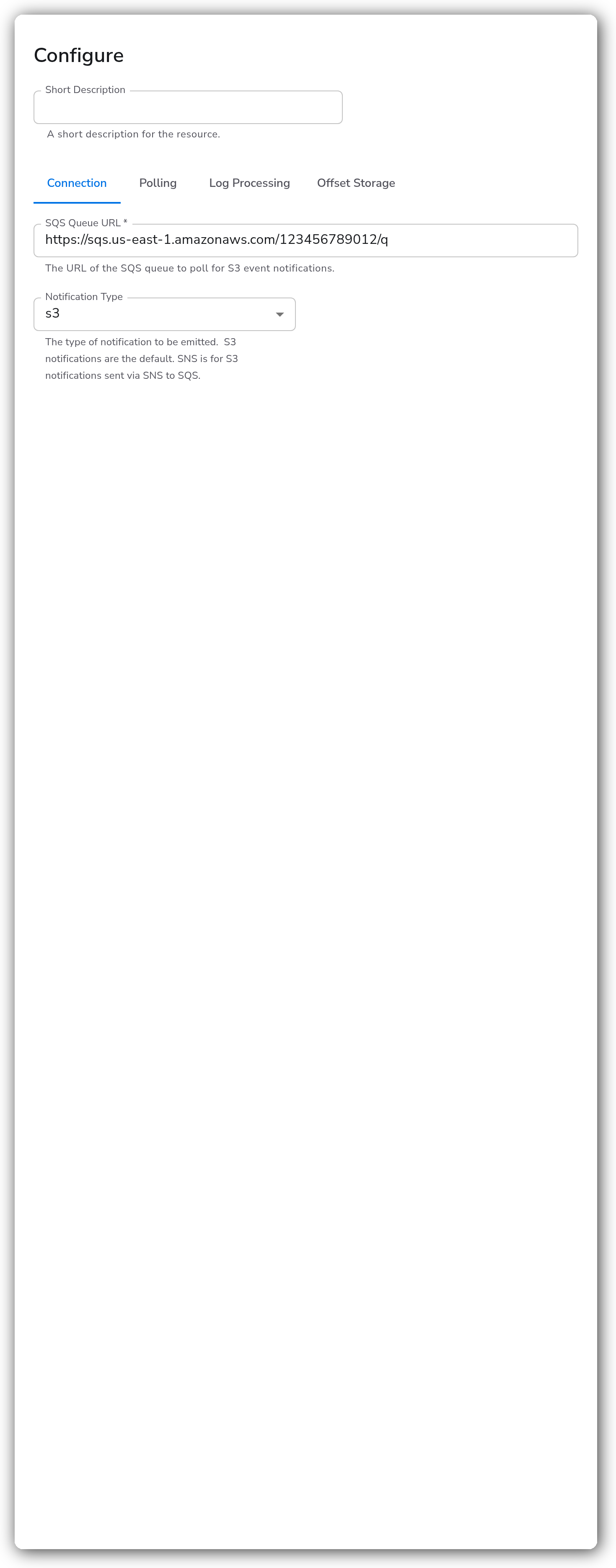
The form is organized into four tabs: Connection, Polling, Log Processing, and Offset Storage.
#### Connection
| Parameter | Type | Required | Default | Description |
| ----------------- | ------ | -------- | ------- | ---------------------------------------------------------------------------------------------------------------------------------------------------- |
| SQS Queue URL | String | Yes | | The URL of the SQS queue to poll for S3 event notifications. |
| Notification Type | Enum | No | `s3` | The type of notification to consume. `s3` (default) is for S3 notifications sent directly to SQS. `sns` is for S3 notifications sent via SNS to SQS. |
#### Polling
| Parameter | Type | Required | Default | Description |
| ----------------------------- | ------- | -------- | ------- | ---------------------------------------------------------------------------------------------------------------------------------------------------------------------------------- |
| Standard Poll Interval | Integer | No | `15` | The interval, in seconds, at which the SQS queue is polled for messages. |
| Maximum Poll Interval | Integer | No | `120` | The maximum interval, in seconds, at which the SQS queue is polled for messages. |
| Polling Backoff Factor | String | No | `2` | The factor by which the polling interval is multiplied after an unsuccessful poll. |
| Workers | Integer | No | `5` | The number of workers used to process events. |
| Visibility Timeout | Integer | No | `300` | How long, in seconds, messages received from the queue remain invisible to other consumers. |
| Visibility Extension Interval | Integer | No | `60` | The interval, in seconds, at which the visibility timeout is extended. |
| Maximum Visibility Window | Integer | Yes | `3600` | The maximum total time, in seconds, a message can remain invisible before becoming visible to other consumers. Must be less than or equal to the SQS 12-hour (43200 second) limit. |
#### Log Processing
| Parameter | Type | Required | Default | Description |
| --------------------------- | --------- | -------- | --------- | ----------------------------------------------------------------------------------------------------------------------------------------------------------------------------------------------- |
| Maximum Log Size | Integer | Yes | `1048576` | The maximum size in bytes for a single log record. Logs exceeding this size are split into chunks. |
| Maximum Logs Emitted | Integer | No | `1000` | The maximum number of log records to emit in a batch. A higher number produces fewer batches but uses more memory. |
| Emit Raw Logs | Boolean | No | `false` | When enabled, the original text is emitted as the log body instead of a parsed structure. Format detection still runs, so content the collector cannot decode is sent to the dead-letter queue. |
| Include Original Log Record | Boolean | No | `true` | When enabled, the original text is also written to the log record's original field. |
| Filter by Bucket Name | CodeBlock | No | | When set, the source only emits logs for bucket names that match the specified regex. |
| Filter by Object Name | CodeBlock | No | | When set, the source only emits logs for object names that match the specified regex. |
#### Offset Storage
| Parameter | Type | Required | Default | Description |
| --------------------------- | ------- | --------------- | ----------- | ------------------------------------------------------------------------------------------------------------------------------------ |
| Enable Redis Offset Storage | Boolean | No | `false` | When enabled, the current position into an object is saved to Redis, so reading resumes where it left off after a collector restart. |
| Redis Hostname | String | Yes1 | `localhost` | The hostname or IP address of the Redis server used for offset storage. |
| Redis Port | Integer | Yes1 | `6379` | The port number of the Redis server used for offset storage. |
| Redis Password | String | No | | The password for the Redis server used for offset storage. |
| Redis Database | Integer | Yes1 | `0` | The Redis database number to use for offset storage. |
| Redis Expiration | Integer | Yes1 | `0` | The expiration time, in seconds, for offset storage in Redis. |
| Enable Redis TLS | Boolean | Yes1 | `false` | Whether to enable TLS for the Redis connection. |
| Redis TLS CA File | String | No | | The path to the CA file for the Redis TLS connection. |
| Redis TLS Cert File | String | No | | The path to the client certificate file for the Redis TLS connection. |
| Redis TLS Key File | String | No | | The path to the client key file for the Redis TLS connection. |
1. *Shown and required only when Enable Redis Offset Storage is on.*
### Example Configuration
#### Standalone Source
```yaml
apiVersion: bindplane.observiq.com/v1
kind: Source
metadata:
id: aws_s3_event
name: aws_s3_event
spec:
type: aws_s3_event
parameters:
- name: sqs_queue_url
value: 'https://sqs.us-east-1.amazonaws.com/123456789012/my-s3-events'
- name: standard_poll_interval
value: '15'
- name: workers
value: '5'
- name: max_visibility_window
value: '3600'
- name: max_log_size
value: '1048576'
- name: notification_type
value: 's3'
```
### Configuration Tips
#### Filtering objects
* Use Filter by Bucket Name and Filter by Object Name to limit ingestion to specific buckets or key prefixes. Both accept a regular expression, so the source only emits logs for matching names.
#### Tuning throughput
* Increase Workers to process more S3 objects concurrently when the queue backlog grows.
* Keep Visibility Extension Interval shorter than Visibility Timeout so in-flight messages are not released back to the queue while still being processed.
* Set Maximum Visibility Window to bound how long a single message can stay invisible. It must be 43200 seconds (12 hours) or less, matching the SQS limit.
#### Resuming after a restart
* Enable Redis offset storage and point it at a Redis server to persist read position. After a collector restart, the source resumes reading each object where it left off rather than reprocessing from the start.
* Enable Redis TLS and supply the CA, certificate, and key files when the Redis server requires TLS.
### Troubleshooting
**Symptom:** No logs arrive even though objects are being created in the bucket. **Solution:** Confirm the S3 bucket has an event notification configured for `s3:ObjectCreated:*` events that targets the SQS queue named in SQS Queue URL, and that the collector's credentials can read and delete messages from that queue.
**Symptom:** Messages reappear in the queue and objects are processed more than once. **Solution:** A message becomes visible again if processing takes longer than Visibility Timeout. Increase Visibility Timeout, or lower Visibility Extension Interval so the timeout is extended before it expires. Confirm Maximum Visibility Window is large enough to cover the time needed to process the largest objects.
**Symptom:** Notifications are routed through SNS but never appear. **Solution:** Set Notification Type to `sns`. The default `s3` value only handles notifications sent directly from S3 to SQS, not those delivered through an SNS topic.
### Related Resources
* [Amazon S3 Event Notifications](https://docs.aws.amazon.com/AmazonS3/latest/userguide/NotificationHowTo.html)
* [Amazon SQS documentation](https://docs.aws.amazon.com/AWSSimpleQueueService/latest/SQSDeveloperGuide/welcome.html)
* [Configuring S3 notifications to SNS and SQS](https://docs.aws.amazon.com/AmazonS3/latest/userguide/ways-to-add-notification-config-to-bucket.html)
---
# Agent Instructions
This documentation is published with GitBook. GitBook is the documentation platform designed so that both humans and AI agents can read, navigate, and reason over technical content effectively. Learn more at gitbook.com.
## Querying This Documentation
If you need additional information that is not directly available in this page, you can query the documentation by asking a question.
Perform an HTTP GET request on the following URL with the `ask` and `goal` query parameters:
```
GET https://docs.bindplane.com/integrations/sources/aws-s3-event/aws-s3-event-deprecated.md?ask=&goal=
```
`ask` is the immediate question: it should be specific, self-contained, and written in natural language.
`goal` is what the user is ultimately trying to achieve, the reason they need the answer. Sharing it helps GitBook give you a better, more relevant answer. A goal is most helpful when it describes the outcome the user wants rather than restating the question. For example, with `ask=how do I create an API token`, a goal like `automate deployments from our CI pipeline` lets GitBook tailor the answer to that use case.
The response will contain a direct answer to the question and relevant excerpts and sources from the documentation.
Use this mechanism when the answer is not explicitly present in the current page, you need clarification or additional context, or you want to retrieve related documentation sections.