> For the complete documentation index, see [llms.txt](https://docs.bindplane.com/llms.txt). Markdown versions of documentation pages are available by appending `.md` to page URLs; this page is available as [Markdown](https://docs.bindplane.com/integrations/processors/ocsf-standardization.md).
# OCSF Standardization
The OCSF Standardization processor transforms log records into [Open Cybersecurity Schema Framework (OCSF)](https://schema.ocsf.io/) compliant events. It replaces the log body with an OCSF JSON structure built from your event mappings, while preserving the original log attributes and resource fields. It operates on logs only. Use it to normalize security logs from diverse sources into a common schema before routing them to a security destination such as AWS Security Lake or [Google SecOps](/integrations/destinations/google-secops-chronicle.md), both of which can forward just the log body.
### Supported Telemetry Types
| Platform | Metrics | Logs | Traces |
| ------------------ | ------- | ---- | ------ |
| Linux | | ✓ | |
| Windows | | ✓ | |
| macOS | | ✓ | |
| Kubernetes Node | | ✓ | |
| Kubernetes Cluster | | ✓ | |
| Kubernetes Gateway | | ✓ | |
| OpenShift Node | | ✓ | |
| OpenShift Cluster | | ✓ | |
| OpenShift Gateway | | ✓ | |
### Configuration
**Processor settings**
| Parameter | Type | Required | Default | Description |
| --------------------- | ------------------- | -------- | ------- | ------------------------------------------------------------------------------------------------------------------------- |
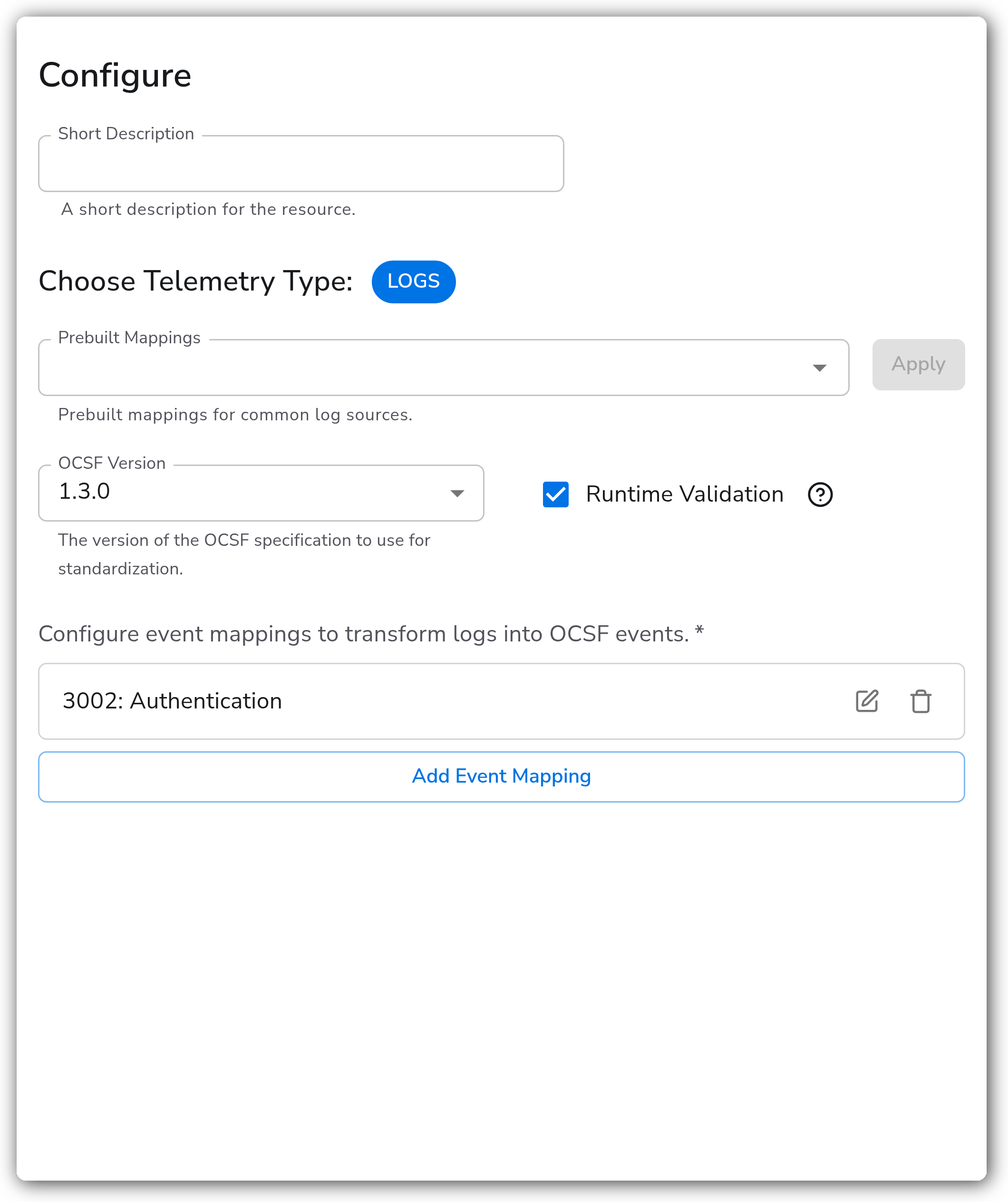
| Choose Telemetry Type | Telemetry Selector | Yes | Logs | The signal this instance runs on. Only Logs are supported. |
| OCSF Version | Enum: 1.0.0–1.7.0 | Yes | 1.3.0 | The version of the OCSF specification to standardize against. |
| Runtime Validation | Boolean | No | `true` | Validate each OCSF event against the schema after mapping. Records that fail validation are dropped and logged as errors. |
| Event Mappings | OCSF Event Mappings | Yes | — | One or more mappings that transform matched logs into OCSF events. See below. |
The **Prebuilt Mappings** option lets you load Bindplane-provided event mappings for common log sources as a starting point. The loaded mappings populate the Event Mappings list, where you can review and edit them before saving.
**Event Mappings**
Each event mapping defines how a matched log is transformed into a specific OCSF event class. Configure multiple mappings to handle different log types in one processor. The first mapping whose filter matches a record is applied.
| Parameter | Type | Required | Default | Description |
| -------------- | ------------------- | -------- | --------- | ------------------------------------------------------------------------------------------------------------------------------------- |
| Class ID | Integer | Yes | — | The OCSF class ID for the target event type, for example `3002` for Authentication. |
| Filter | OTTL Condition | No | *(empty)* | A condition that selects which logs this mapping applies to. When empty, the mapping applies to all logs. |
| Profiles | String list | No | *(empty)* | One or more OCSF profiles to apply. Each profile adds required and optional fields to the output. Requires collector v1.0.2 or later. |
| Field Mappings | OCSF Field Mappings | Yes | — | A list of field mappings that copy or set values in the OCSF output body. See below. |
**Field Mappings**
Each row in a mapping's field mappings list populates one OCSF field.
| Parameter | Type | Required | Default | Description |
| --------- | --------------- | -------- | ------- | ------------------------------------------------------------------------------------------------------ |
| To | String | Yes | — | The target OCSF field path. Use dot notation for nested fields, for example `actor.user.name`. |
| From | OTTL Expression | No \* | — | An expression that extracts a value from the source log, for example `body["EventData"]["IpAddress"]`. |
| Default | Any | No \* | — | A static value used when the source field is absent or the `From` expression returns nil. |
\* Each field mapping must provide at least one of `From` or `Default`.
**Automatically populated fields**
For every processed record, the processor sets these OCSF body fields in addition to your mappings:
| Field | Value |
| ------------------ | --------------------------------------------------- |
| `class_uid` | The Class ID of the matched event mapping. |
| `category_uid` | Derived from the Class ID as `class_id / 1000`. |
| `metadata.version` | The configured OCSF version, for example `"1.3.0"`. |
| `type_uid` | Calculated as `class_uid * 100 + activity_id`. |
The processor also sets an `ocsf.class_uid` attribute on the log record (outside the body) for downstream routing and filtering.
**Type coercion**
The processor coerces each mapped value to the target OCSF field's schema type. If a value cannot be coerced, it passes through unchanged.
| OCSF Type | Output |
| ----------- | -------------------------- |
| `integer` | `int` |
| `long` | `int64` |
| `float` | `float64` |
| `boolean` | `bool` |
| `timestamp` | `int64` epoch milliseconds |
| `datetime` | `string` RFC3339 |
| `string` | Unchanged |
### Examples
#### Map Windows logon events to OCSF Authentication Activity
Windows Security Event ID `4624` (successful logon) is mapped to OCSF class `3002` (Authentication). The filter scopes the mapping to matching records. The field mappings populate the required fields for the Authentication class, including the target user, event time, severity, and source network details.
```yaml
- type: ocsf_standardization
parameters:
- name: telemetry_types
value:
- Logs
- name: ocsf_version
value: '1.3.0'
- name: runtime_validation
value: true
- name: event_mappings
value:
- classId: 3002
filter: 'body["System"]["EventID"] == 4624'
fieldMappings:
- to: 'user.name'
from: 'body["EventData"]["TargetUserName"]'
- to: 'user.domain'
from: 'body["EventData"]["TargetDomainName"]'
- to: 'time'
from: 'body["System"]["TimeCreated"]["SystemTime"]'
- to: 'severity_id'
default: 1
- to: 'activity_id'
default: 1
- to: 'status_id'
default: 1
- to: 'src_endpoint.ip'
from: 'body["EventData"]["IpAddress"]'
- to: 'src_endpoint.hostname'
from: 'body["EventData"]["WorkstationName"]'
- to: 'actor.user.name'
from: 'body["EventData"]["SubjectUserName"]'
- to: 'actor.user.domain'
from: 'body["EventData"]["SubjectDomainName"]'
```
The resulting log body conforms to the OCSF Authentication schema (class `3002`). Along with the mapped fields, the processor sets `class_uid` to `3002`, `category_uid` to `3`, `metadata.version` to `"1.3.0"`, and `type_uid` to `300201` (`3002 * 100 + 1`). The `time` value is coerced to epoch milliseconds, and the `ocsf.class_uid` log record attribute is set to `3002`.
#### Generate event mappings with AI
Instead of authoring event mappings by hand, you can use Pipeline Intelligence to generate one from a real log in your pipeline. Bindplane analyzes a sample log, detects the appropriate OCSF class, and generates a filter condition and field mappings for you to review before adding them to the processor. Generated mappings are validated against the OCSF schema during generation, and Bindplane retries with validation feedback when required fields are missing. Generating event mappings requires Pipeline Intelligence AI features, which must be enabled by an organization admin. Always review generated field mappings against your actual data before deploying.
### Configuration Tips
* The processor validates against the OCSF schema at configuration time (supported version, valid Class IDs, syntactically valid filter and `From` expressions, valid profiles for the class and version, and coverage of all required fields). Configuration validation does not verify runtime value types, so a mapping that references the wrong source field passes configuration but may fail runtime validation.
* During initial setup, set Runtime Validation to `false` so records flow through while you iterate on field mappings. Re-enable it once the output is correct to guarantee every log body sent downstream is OCSF-compliant.
* Selected profiles add their own required fields. When a profile is applied, map all of its required fields or configuration validation fails.
* Profiles require a collector running the contrib processor v1.0.2 or later. Earlier collector builds support event mappings without profiles.
* Order event mappings from most specific to least specific. Only the first matching mapping is applied, so a broad filter placed first will shadow narrower mappings below it.
### Performance and Scaling
* With Runtime Validation enabled (the default), every record is validated against the full OCSF schema after mapping. This is the dominant cost of the processor on high-volume log pipelines. If validation CPU becomes a bottleneck, validate during rollout, then disable Runtime Validation once mappings are confirmed stable.
* Each record is evaluated against event-mapping filters in order until one matches. A large number of mappings, or expensive OTTL filter expressions, increases per-record cost. Keep filters cheap (favor simple field comparisons) and place high-volume mappings first.
* Type coercion and schema validation walk the mapped fields per record, so very wide field-mapping lists add proportional overhead.
### Troubleshooting
#### Records are being dropped
Symptoms: log count falls after the processor, and the collector logs OCSF validation errors.
Solutions:
1. Runtime Validation drops records that fail schema validation. Check the collector logs for the specific field or constraint that failed (missing required field, invalid enum value, string length, or pattern such as IP or datetime).
2. Map every required field for the class and any selected profiles. The auto-populated fields (`class_uid`, `category_uid`, `metadata.version`, `type_uid`) count toward coverage automatically.
3. To confirm whether validation is the cause, temporarily set Runtime Validation to `false`. If records flow through, fix the failing mappings, then re-enable it.
#### A mapping does not apply to the expected logs
Symptoms: logs that should be transformed pass through unmodified, or the wrong mapping is applied.
Solutions:
1. Verify the Filter condition. An over-specific or mis-quoted condition (for example `== 4624` against a string field) matches nothing.
2. Only the first matching mapping is applied. A broad mapping listed before a narrower one shadows it. Reorder mappings most-specific-first.
#### A field has the wrong type or is missing in the output
Symptoms: a mapped value is absent or appears as an unexpected type in the OCSF body.
Solutions:
1. Check the `From` expression resolves on the source log. When it returns nil and no `Default` is set, the field is omitted.
2. The processor coerces values to the OCSF field's schema type; a value that cannot be coerced passes through unchanged and may then fail runtime validation. Provide a `Default` of the correct type, or correct the `From` expression.
### Known Limitations
* Logs only. Metrics and traces are not supported.
* The processor replaces the log body with the OCSF structure. Original log attributes and resource fields are preserved, but the original body content is not retained unless you map it into an OCSF field.
* Configuration-time validation does not check runtime value types. A mapping can pass configuration validation and still fail runtime validation.
* Profiles are only available with the contrib processor v1.0.2 or later.
### Standalone Processor
```yaml
apiVersion: bindplane.observiq.com/v1
kind: Processor
metadata:
name: ocsf-standardization
spec:
type: ocsf_standardization
parameters:
- name: telemetry_types
value:
- Logs
- name: ocsf_version
value: '1.3.0'
- name: runtime_validation
value: true
- name: event_mappings
value:
- classId: 3002
filter: 'body["System"]["EventID"] == 4624'
fieldMappings:
- to: 'user.name'
from: 'body["EventData"]["TargetUserName"]'
- to: 'time'
from: 'body["System"]["TimeCreated"]["SystemTime"]'
- to: 'severity_id'
default: 1
- to: 'activity_id'
default: 1
- to: 'status_id'
default: 1
```
### Related Resources
* [OCSF Schema Browser](https://schema.ocsf.io/)
* [Filter by Condition](/integrations/processors/filter-by-condition.md)
* [Add Fields](/integrations/processors/add-fields.md)
---
# Agent Instructions
This documentation is published with GitBook. GitBook is the documentation platform designed so that both humans and AI agents can read, navigate, and reason over technical content effectively. Learn more at gitbook.com.
## Querying This Documentation
If you need additional information that is not directly available in this page, you can query the documentation by asking a question.
Perform an HTTP GET request on the following URL with the `ask` and `goal` query parameters:
```
GET https://docs.bindplane.com/integrations/processors/ocsf-standardization.md?ask=&goal=
```
`ask` is the immediate question: it should be specific, self-contained, and written in natural language.
`goal` is what the user is ultimately trying to achieve, the reason they need the answer. Sharing it helps GitBook give you a better, more relevant answer. A goal is most helpful when it describes the outcome the user wants rather than restating the question. For example, with `ask=how do I create an API token`, a goal like `automate deployments from our CI pipeline` lets GitBook tailor the answer to that use case.
The response will contain a direct answer to the question and relevant excerpts and sources from the documentation.
Use this mechanism when the answer is not explicitly present in the current page, you need clarification or additional context, or you want to retrieve related documentation sections.