> For the complete documentation index, see [llms.txt](https://docs.bindplane.com/llms.txt). Markdown versions of documentation pages are available by appending `.md` to page URLs; this page is available as [Markdown](https://docs.bindplane.com/integrations/processors/drain.md).
# Drain
Groups log records into templates using the Drain algorithm and writes the derived template string to an attribute on each record. Logs that share the same shape, with only variable parts (IDs, IPs, timestamps) differing, are clustered together and labeled with one template such as `user <*> logged in from <*>`. Operates on logs only. It only adds the template attribute; it never drops or rewrites records. Pair it with a downstream processor like [Filter By Condition](/integrations/processors/filter-by-condition.md) to act on the templates.
{% hint style="info" %}
This processor is in **Alpha** stability.
{% endhint %}
### Supported Telemetry Types
| Platform | Metrics | Logs | Traces |
| ------------------ | ------- | ---- | ------ |
| Linux | | ✓ | |
| Windows | | ✓ | |
| macOS | | ✓ | |
| AIX | | ✓ | |
| Kubernetes Node | | ✓ | |
| Kubernetes Cluster | | ✓ | |
| Kubernetes Gateway | | ✓ | |
| OpenShift Node | | ✓ | |
| OpenShift Cluster | | ✓ | |
| OpenShift Gateway | | ✓ | |
### Configuration
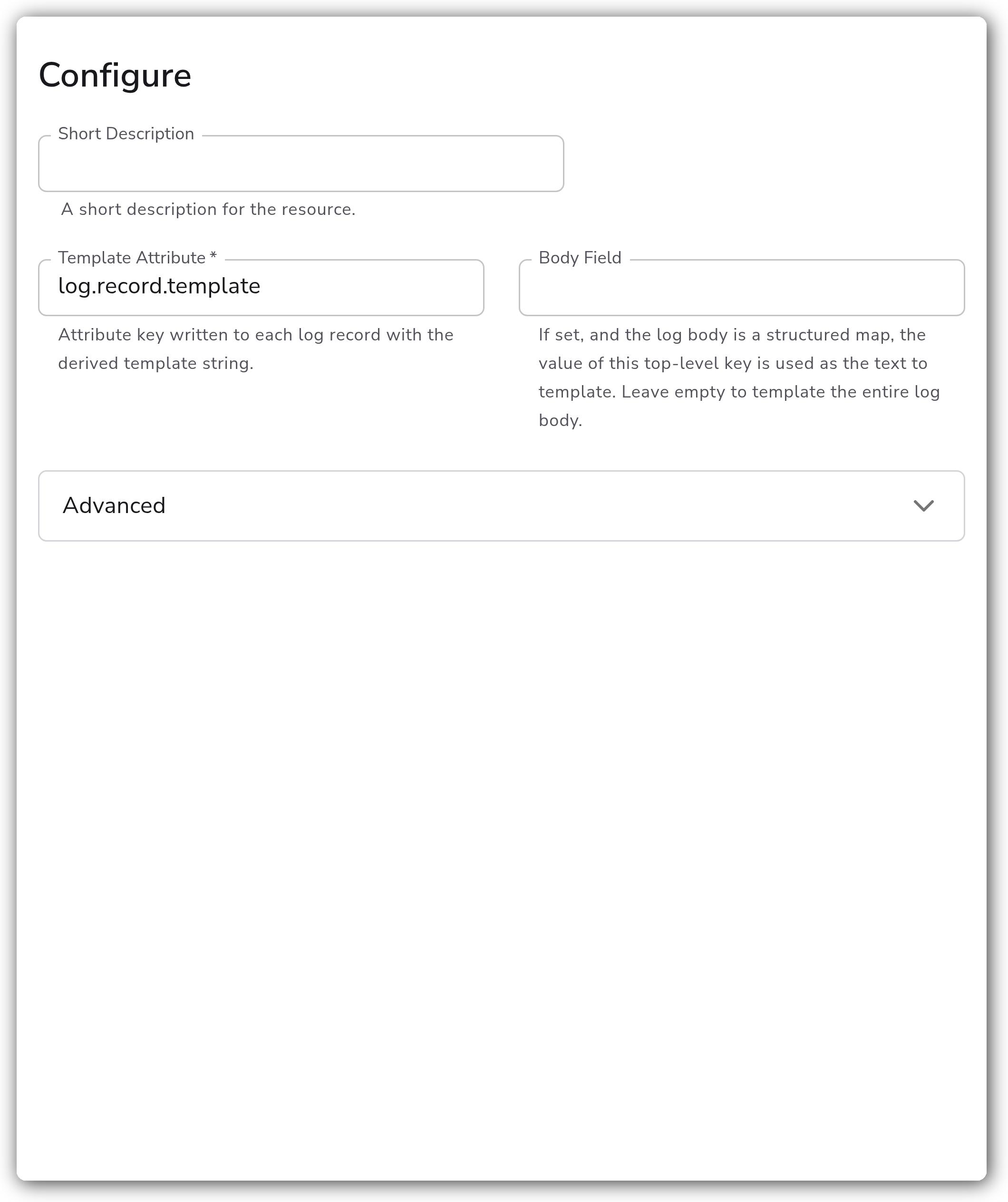
**Templating**
| Parameter | Type | Required | Default | Description |
| ------------------ | ------ | -------- | --------------------- | ----------------------------------------------------------------------------------------------------------------------------------------------------------- |
| Template Attribute | String | Yes | `log.record.template` | Attribute key written to each log record with the derived template string. |
| Body Field | String | No | *(empty)* | If set, and the log body is a structured map, the value of this top-level key is used as the text to template. Leave empty to template the entire log body. |
**Advanced**
| Parameter | Type | Required | Default | Description |
| ------------------------- | ----------- | -------- | -------------- | ------------------------------------------------------------------------------------------------------------------------------------------------------------------------------------------------------------------------------------------------------------------------------------------- |
| Merge Threshold | Fraction | No | `0.4` | Minimum fraction of tokens that must match an existing cluster template for a log line to be merged into it rather than forming a new cluster. Range `0.0` to `1.0`. Higher values group more strictly (more, finer templates); lower values group more loosely (fewer, broader templates). |
| Tree Depth | Integer | No | `4` | Max depth of the Drain parse tree. Higher values produce more specific templates. Minimum `3`. |
| Max Node Children | Integer | No | `100` | Maximum children per internal parse tree node. Bounds memory on high-cardinality token positions. |
| Max Clusters | Integer | No | `0` | Maximum clusters tracked. When exceeded, the least-recently-used cluster is evicted. `0` means unlimited. |
| Warmup Minimum Clusters | Integer | No | `0` | Number of distinct clusters that must be observed before annotation is enabled. `0` disables warmup. |
| Extra Delimiters | Strings | No | *(empty)* | Additional token delimiters beyond whitespace, for example `,` or `:`. |
| Seed Templates | Code Blocks | No | *(empty)* | Template strings to pre-load at startup. |
| Seed Logs | Code Blocks | No | *(empty)* | Raw example log lines to train on at startup. |
| Enable Persistent Storage | Boolean | No | `false` | Store the learned templates in a storage extension so they survive collector restarts. |
| Enable Save Interval | Boolean | No | `false` | Save the learned templates to persistent storage at the configured interval. If disabled, templates are saved only when the processor shuts down. Only used when Enable Persistent Storage is `true`. |
| Save Interval | Duration | No | `60s` | The interval at which to save the learned templates to persistent storage. Only used when Enable Save Interval is `true`. |
| Persistent Storage Type | Extension | Yes | `file_storage` | The storage extension used to persist learned templates. Must be a Storage Extension. Only used when Enable Persistent Storage is `true`. |
#### Persistent Storage
By default the learned templates are kept in memory only and are lost whenever the collector restarts, including configuration rollouts and collector upgrades. Enable persistent storage to save them to a [File Storage](/integrations/extensions/file-storage.md) or [Redis Storage](/integrations/extensions/redis-storage.md) extension so they survive restarts.
When persistent storage is enabled but Enable Save Interval is off, templates are saved only on a clean shutdown. If the collector crashes or is killed, any templates learned since the last save are lost. Turn on Enable Save Interval and set Save Interval to save templates periodically while the processor runs.
### Examples
#### Label each log with its template
Annotate every log record with its template under the default `log.record.template` attribute, then filter on it downstream.
```yaml
apiVersion: bindplane.observiq.com/v1
kind: Processor
metadata:
name: drain
spec:
type: drain
parameters:
- name: template_attribute
value: log.record.template
```
#### Tune how specific the templates are
Raise Tree Depth and Merge Threshold for more, narrower templates, and cap how many are kept with Max Clusters.
```yaml
apiVersion: bindplane.observiq.com/v1
kind: Processor
metadata:
name: drain
spec:
type: drain
parameters:
- name: template_attribute
value: log.record.template
- name: tree_depth
value: 6
- name: merge_threshold
value: 0.5
- name: max_clusters
value: 500
```
#### Pre-load known templates and persist learned state
Seed common templates, hold off labeling until enough clusters exist, and persist learned state to a File Storage extension so templates survive restarts.
```yaml
apiVersion: bindplane.observiq.com/v1
kind: Processor
metadata:
name: drain
spec:
type: drain
parameters:
- name: template_attribute
value: log.record.template
- name: seed_templates
value:
- 'user <*> logged in from <*>'
- 'heartbeat ping <*>'
- name: warmup_min_clusters
value: 20
- name: enable_persistent_storage
value: true
- name: enable_save_interval
value: true
- name: save_interval
value: 30s
- name: persistent_storage_extension
value:
type: file_storage
parameters:
- name: directory
value: /var/lib/otel/storage
```
### Configuration Tips
* **Templates take time to settle.** While the processor is still learning, templates may shift before they stabilize. Pre-load common ones with Seed Templates or Seed Logs, and use Warmup Minimum Clusters to defer labeling until enough clusters exist.
* **Memory scales with cluster count.** Each tracked cluster consumes memory. On high-cardinality logs, set Max Clusters to bound the total and Max Node Children to bound branching at any one token position. Leaving Max Clusters at `0` (unlimited) on noisy input can grow memory unbounded.
* **Each collector learns independently.** Templates are per-collector and only line up across collectors when they see similar logs. Seed shared templates, or enable persistent storage, to keep them consistent across restarts, rollouts, and multiple collectors.
* **Act on templates downstream.** In the processor's live snapshot the template attribute is only an estimate for the data in that snapshot; values are more accurate further down the pipeline. Do filtering or routing on a later processor node.
### Troubleshooting
#### No template attribute is written
Symptoms: log records pass through without the `log.record.template` attribute.
Solutions:
1. If Warmup Minimum Clusters is set, annotation stays off until that many distinct clusters are observed. Lower it or send more varied logs.
2. If Body Field is set, confirm the log body is a structured map containing that top-level key. If the body is a plain string, leave Body Field empty.
#### Too many or too few templates
Symptoms: nearly every log gets its own template, or distinct messages collapse into one.
Solutions:
1. Too many templates: lower Merge Threshold or Tree Depth so more lines merge into existing clusters.
2. Too few templates: raise Merge Threshold or Tree Depth so lines split into more specific clusters. Add Extra Delimiters if tokens you care about are not separated by whitespace.
#### Templates reset after a restart
Symptoms: learned templates disappear on collector restart, rollout, or upgrade.
Solutions:
1. Enable Persistent Storage and select a [File Storage](/integrations/extensions/file-storage.md) or [Redis Storage](/integrations/extensions/redis-storage.md) extension.
2. Enable Save Interval so templates are saved periodically, not only on clean shutdown, in case the collector crashes.
### Standalone Processor
```yaml
apiVersion: bindplane.observiq.com/v1
kind: Processor
metadata:
name: drain
spec:
type: drain
parameters:
- name: template_attribute
value: log.record.template
- name: merge_threshold
value: 0.4
- name: tree_depth
value: 4
- name: max_node_children
value: 100
- name: max_clusters
value: 500
- name: warmup_min_clusters
value: 20
- name: extra_delimiters
value:
- ','
- ':'
- name: seed_templates
value:
- 'user <*> logged in from <*>'
- 'heartbeat ping <*>'
- name: enable_persistent_storage
value: true
- name: enable_save_interval
value: true
- name: save_interval
value: 30s
- name: persistent_storage_extension
value:
type: file_storage
parameters:
- name: directory
value: /var/lib/otel/storage
```
### Related Resources
* [Drain Processor — OpenTelemetry Collector Contrib](https://github.com/open-telemetry/opentelemetry-collector-contrib/tree/main/processor/drainprocessor)
* [Drain: An Online Log Parsing Approach with Fixed Depth Tree (He et al., ICWS 2017)](https://jiemingzhu.github.io/pub/pjhe_icws2017.pdf)
* [Drain3 — streaming log template miner](https://github.com/logpai/Drain3)
* [File Storage extension](/integrations/extensions/file-storage.md)
* [Redis Storage extension](/integrations/extensions/redis-storage.md)
* [Filter By Condition](/integrations/processors/filter-by-condition.md)
---
# Agent Instructions
This documentation is published with GitBook. GitBook is the documentation platform designed so that both humans and AI agents can read, navigate, and reason over technical content effectively. Learn more at gitbook.com.
## Querying This Documentation
If you need additional information that is not directly available in this page, you can query the documentation by asking a question.
Perform an HTTP GET request on the following URL with the `ask` and `goal` query parameters:
```
GET https://docs.bindplane.com/integrations/processors/drain.md?ask=&goal=
```
`ask` is the immediate question: it should be specific, self-contained, and written in natural language.
`goal` is what the user is ultimately trying to achieve, the reason they need the answer. Sharing it helps GitBook give you a better, more relevant answer. A goal is most helpful when it describes the outcome the user wants rather than restating the question. For example, with `ask=how do I create an API token`, a goal like `automate deployments from our CI pipeline` lets GitBook tailor the answer to that use case.
The response will contain a direct answer to the question and relevant excerpts and sources from the documentation.
Use this mechanism when the answer is not explicitly present in the current page, you need clarification or additional context, or you want to retrieve related documentation sections.