> For the complete documentation index, see [llms.txt](https://docs.bindplane.com/llms.txt). Markdown versions of documentation pages are available by appending `.md` to page URLs; this page is available as [Markdown](https://docs.bindplane.com/integrations/processors/convert-xml-attributes-to-elements.md).
# Convert XML Attributes To Elements
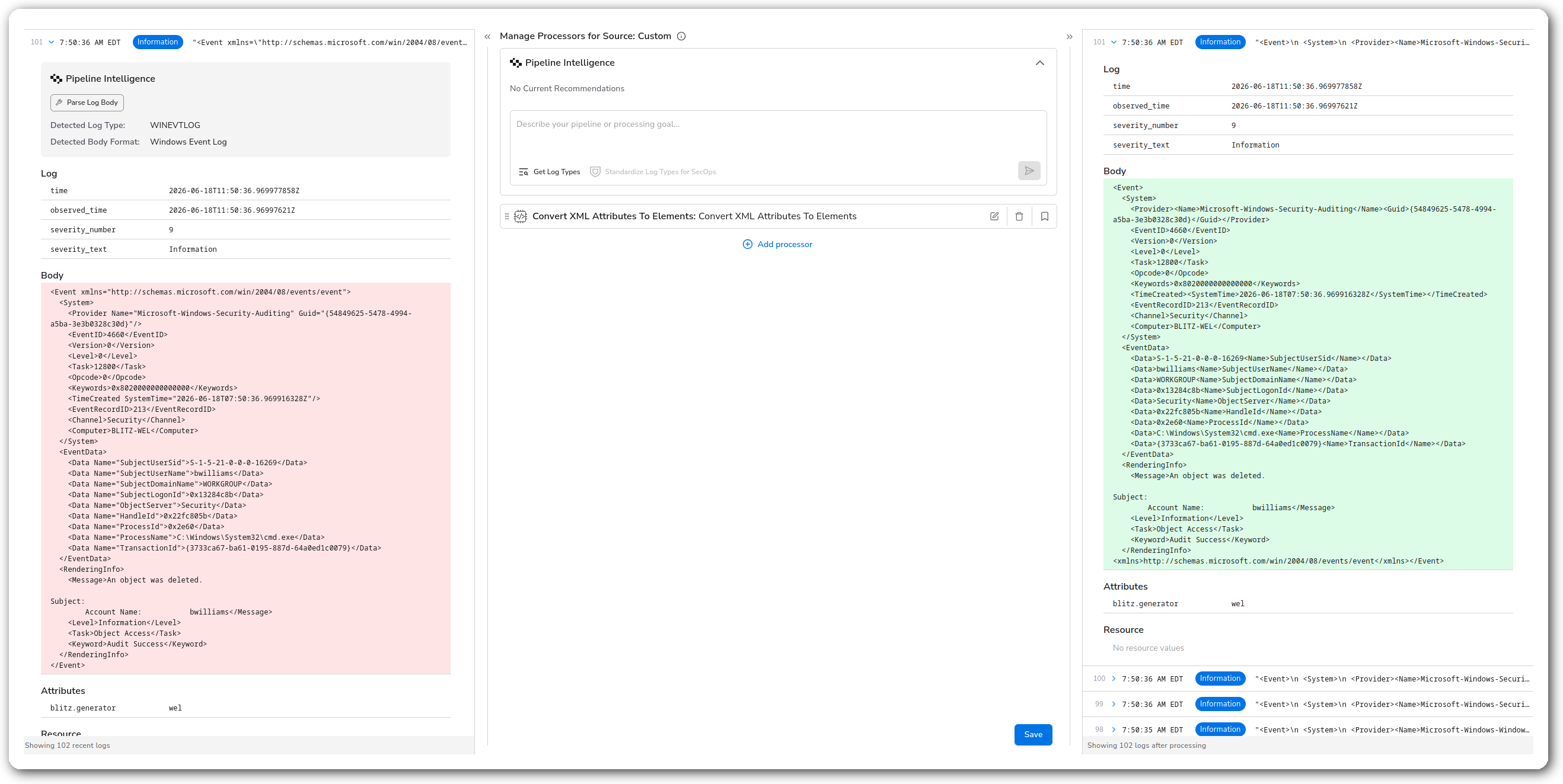
Turns each XML element's attributes into child elements, so attribute values survive a later XML parse that would otherwise drop them. The output is still an XML string.
### Supported Telemetry Types
| Platform | Metrics | Logs | Traces |
| ----------------------- | ------- | ---- | ------ |
| Linux | ✓ | ✓ | ✓ |
| Windows | ✓ | ✓ | ✓ |
| macOS | ✓ | ✓ | ✓ |
| AIX | ✓ | ✓ | ✓ |
| Kubernetes Node | ✓ | ✓ | ✓ |
| Kubernetes Cluster | ✓ | ✓ | ✓ |
| Kubernetes Gateway | ✓ | ✓ | ✓ |
| OpenShift Node | ✓ | ✓ | ✓ |
| OpenShift Cluster | ✓ | ✓ | ✓ |
| OpenShift Gateway | ✓ | ✓ | ✓ |
| Google SecOps Pipelines | ✓ | ✓ | ✓ |
Choose Telemetry Type picks one signal per processor instance. Add another instance to handle a second signal.
### Configuration
#### Basic Configuration
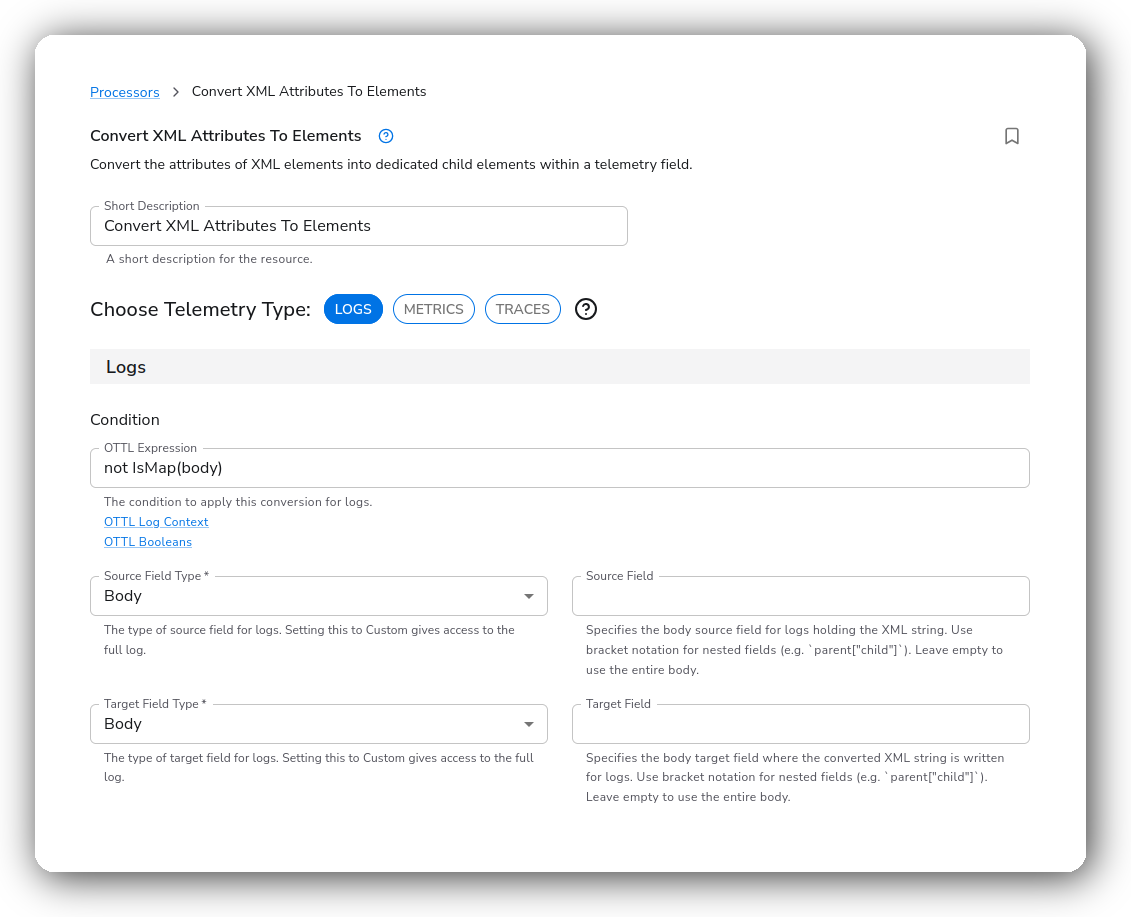
**When to apply**
| Parameter | Type | Required | Default | Description |
| --------------------- | ------------------ | -------- | --------- | -------------------------------------------------------------------------------------------------------------------- |
| Choose Telemetry Type | Telemetry Selector | Yes | Logs | The signal this instance runs on: Logs, Metrics, or Traces (one at a time). |
| Condition | OTTL Condition | No | *(empty)* | Convert only the records that match. A `not IsMap(body)` guard keeps it from re-running on an already-parsed record. |
**Source and target fields**
| Parameter | Type | Required | Default | Description |
| ----------------- | --------------------------------------- | -------- | --------- | ------------------------------------------------------------------------------------------------------------------------------------ |
| Source Field Type | Enum: Resource, Attribute, Body, Custom | Yes | Attribute | Where the XML string is read from. **Body is logs-only.** Custom takes any OTTL path. |
| Source Field | OTTL Field | Yes \* | — | The field holding the XML. Bracket notation for nested fields. For a Body source, leave empty to use the whole body. |
| Target Field Type | Enum: Resource, Attribute, Body, Custom | Yes | Attribute | Where the converted XML is written. **Body is logs-only.** |
| Target Field | OTTL Field | Yes \* | — | Destination for the converted XML. Point it at the source to convert in place. For a Body target, leave empty to use the whole body. |
\* The **Body** field type is the exception: it's optional, and leaving it empty targets the entire body.
**Body is available for Logs only.** For Metrics and Traces, the field type options are Resource, Attribute, and Custom.
### Examples
#### Preserve `Data Name` attributes before parsing Windows Event XML
### Configuration Tips
* Run this before **Parse Simplified XML** whenever attributes carry real values (Windows Event Log `` is the classic case). The simplified parser drops attributes, so promoting them first is what keeps the values.
### Troubleshooting
#### Attribute values disappear after parsing
Symptoms: fields that came from XML attributes are missing from the parsed map.
Solutions:
1. Place this processor before the parse step. Attributes only survive if they're promoted to elements first.
2. Confirm the source still holds an XML string at this point in the pipeline (not an already-parsed map).
### Standalone Processor
```yaml
apiVersion: bindplane.observiq.com/v1
kind: Processor
metadata:
name: convert-xml-attributes
spec:
type: xml_attributes_to_elements
parameters:
- name: telemetry_types
value: Logs
- name: log_condition
value: not IsMap(body)
- name: log_source_field_type
value: Body
- name: log_body_source_field
value: ""
- name: log_target_field_type
value: Body
- name: log_body_target_field
value: ""
```
### Related Resources
* [ConvertAttributesToElementsXML — OTTL function reference](https://github.com/open-telemetry/opentelemetry-collector-contrib/blob/main/pkg/ottl/ottlfuncs/README.md#convertattributestoelementsxml)
### Bindplane Resources
These XML and slice processors are designed to work together. Chain them to normalize, parse, and reshape XML end to end:
* [Convert XML Text To Elements](/integrations/processors/convert-xml-text-to-elements.md)
* [Insert XML Elements](/integrations/processors/insert-xml-elements.md)
* [Parse Simplified XML](/integrations/processors/parse-simplified-xml.md)
* [Slice to Map](/integrations/processors/slice-to-map.md)
* [Get XML](/integrations/processors/get-xml.md)
* [Remove XML](/integrations/processors/remove-xml.md)
---
# Agent Instructions
This documentation is published with GitBook. GitBook is the documentation platform designed so that both humans and AI agents can read, navigate, and reason over technical content effectively. Learn more at gitbook.com.
## Querying This Documentation
If you need additional information that is not directly available in this page, you can query the documentation by asking a question.
Perform an HTTP GET request on the following URL with the `ask` and `goal` query parameters:
```
GET https://docs.bindplane.com/integrations/processors/convert-xml-attributes-to-elements.md?ask=&goal=
```
`ask` is the immediate question: it should be specific, self-contained, and written in natural language.
`goal` is what the user is ultimately trying to achieve, the reason they need the answer. Sharing it helps GitBook give you a better, more relevant answer. A goal is most helpful when it describes the outcome the user wants rather than restating the question. For example, with `ask=how do I create an API token`, a goal like `automate deployments from our CI pipeline` lets GitBook tailor the answer to that use case.
The response will contain a direct answer to the question and relevant excerpts and sources from the documentation.
Use this mechanism when the answer is not explicitly present in the current page, you need clarification or additional context, or you want to retrieve related documentation sections.