> For the complete documentation index, see [llms.txt](https://docs.bindplane.com/llms.txt). Markdown versions of documentation pages are available by appending `.md` to page URLs; this page is available as [Markdown](https://docs.bindplane.com/integrations/processors/asim-standardization.md).
# ASIM Standardization
The ASIM Standardization processor transforms logs into events that conform to the [Microsoft Advanced Security Information Model (ASIM)](https://learn.microsoft.com/en-us/azure/sentinel/normalization). It maps source-specific fields to the column contract of one of the native ASIM tables in a Microsoft Sentinel workspace, replaces the log body with the ASIM columns, and sets the `sentinel_stream_name` attribute the [Microsoft Sentinel destination](/integrations/destinations/microsoft-sentinel.md) reads to route each record to the correct table. It operates on logs only.
### Supported Telemetry Types
| Platform | Metrics | Logs | Traces |
| ------------------ | ------- | ---- | ------ |
| Linux | | ✓ | |
| Windows | | ✓ | |
| macOS | | ✓ | |
| Kubernetes Node | | ✓ | |
| Kubernetes Cluster | | ✓ | |
| Kubernetes Gateway | | ✓ | |
| OpenShift Node | | ✓ | |
| OpenShift Cluster | | ✓ | |
| OpenShift Gateway | | ✓ | |
### Configuration
**General**
| Parameter | Type | Required | Default | Description |
| ---------------------------------------------------------------- | -------------------- | -------- | --------- | --------------------------------------------------------------------------------------------------------------------------------------------------------------------------------------------------------------------------- |
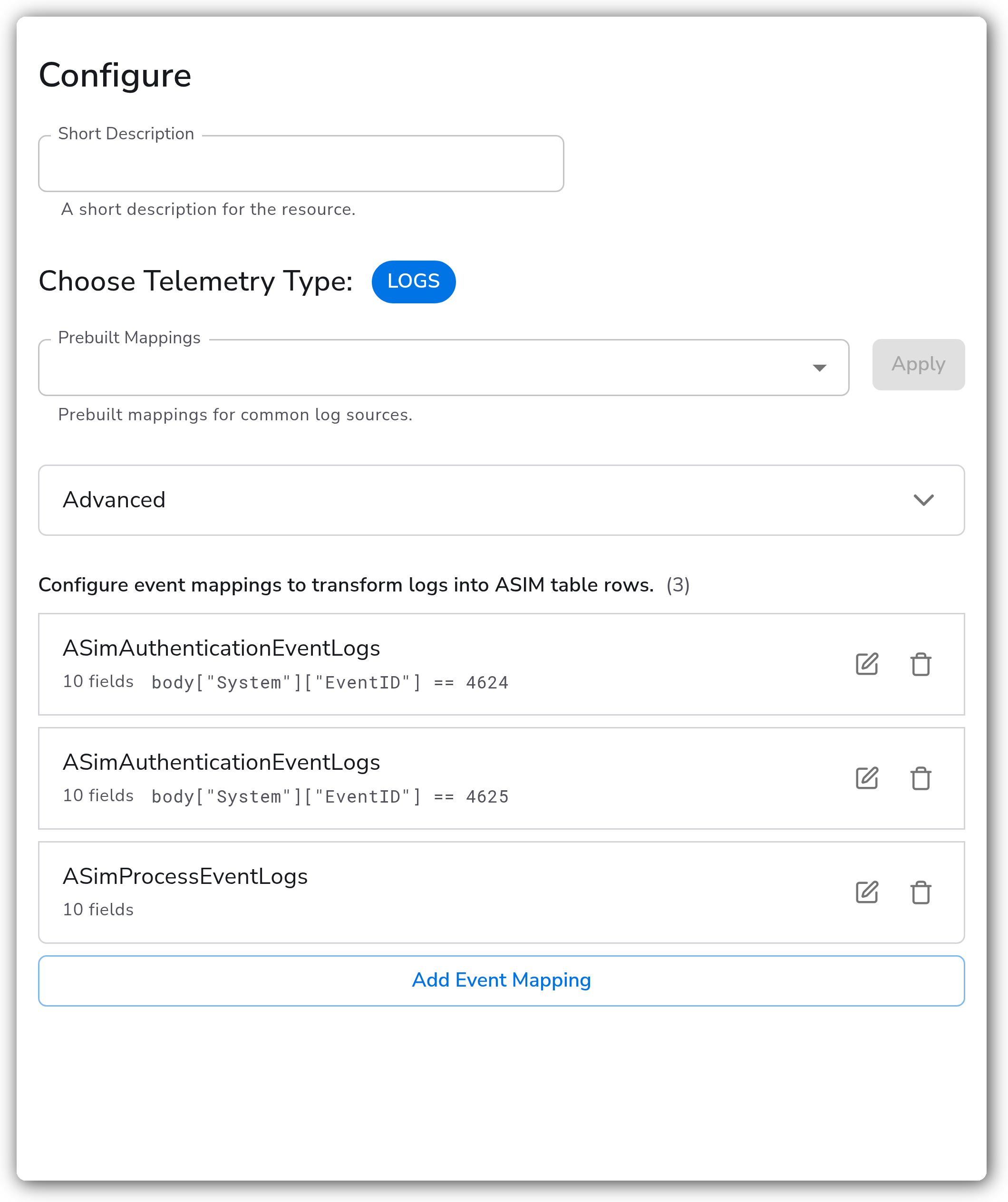
| Choose Telemetry Type | Telemetry Selector | Yes | Logs | The signal this instance runs on. Logs only. |
| Prebuilt Mappings | Resource Preset | No | *(empty)* | Prebuilt event mappings for common log sources. Selected presets are added as Configure event mappings entries and can be edited after import. |
| Configure event mappings to transform logs into ASIM table rows. | ASIM Standardization | Yes | *(empty)* | One or more mappings that transform a matched log into an ASIM table row. The first mapping whose **Filter** matches is applied; if no mapping matches, the record is dropped. See [Event mappings](#event-mappings) below. |
**Advanced**
| Parameter | Type | Required | Default | Description |
| ------------------ | ------- | -------- | ------- | ---------------------------------------------------------------------------------------------------------------------------------------------------------------------------------------------------------------------------------------------------------------------------------------------------------------- |
| Runtime Validation | Boolean | No | `true` | Validate every transformed record against the ASIM column contract. When enabled, the processor coerces each mapped field to its target type (string, datetime, int, long, real, boolean, dynamic) and drops records missing any ASIM common mandatory column. Disable to pass mapped records through unchanged. |
#### Event mappings
Each event mapping defines how a matched log is transformed into one ASIM table row. Configure multiple mappings in a single processor to handle different log types.
| Field | Type | Required | Default | Description |
| -------------- | -------------- | -------- | --------- | --------------------------------------------------------------------------------------------------------- |
| Target Table | Enum | Yes | — | The ASIM table to route matched records to, such as `ASimAuthenticationEventLogs`. |
| Filter | OTTL Condition | No | *(empty)* | A condition that selects which logs this mapping applies to. If omitted, the mapping applies to all logs. |
| Field Mappings | List | Yes | — | One row per ASIM column to populate. See [Field mappings](#field-mappings) below. |
**Field mappings**
Each field-mapping row populates a single ASIM column.
| Field | Type | Required | Default | Description |
| ------- | ------ | -------- | --------- | --------------------------------------------------------------------------------------------------------- |
| To | String | Yes | — | The target ASIM column name, such as `TargetUsername`, `SrcIpAddr`, or `EventStartTime`. |
| From | String | No\* | *(empty)* | An expression that extracts the value from the source log, such as `body["EventData"]["TargetUserName"]`. |
| Default | Any | No\* | *(empty)* | A static value used when the source field is absent or the `From` expression returns `nil`. |
\* Provide at least one of `From` or `Default` for each row.
### Examples
#### Map Windows logon events to ASIM Authentication
This mapping routes successful Windows Security Event ID `4624` records to `ASimAuthenticationEventLogs`. The **Filter** limits the mapping to successful logons. The field mappings set the common required ASIM columns with defaults and pull the Authentication-specific columns from the source body.
```yaml
- name: event_mappings
value:
- targetTable: ASimAuthenticationEventLogs
filter: 'body["System"]["EventID"] == 4624'
fieldMappings:
- to: EventCount
default: 1
- to: EventType
default: Logon
- to: EventResult
default: Success
- to: EventProduct
default: Windows
- to: EventVendor
default: Microsoft
- to: EventSchemaVersion
default: "0.1.4"
- to: EventStartTime
from: 'body["System"]["TimeCreated"]["SystemTime"]'
- to: EventEndTime
from: 'body["System"]["TimeCreated"]["SystemTime"]'
- to: Dvc
from: 'body["System"]["Computer"]'
- to: TargetUsername
from: 'body["EventData"]["TargetUserName"]'
- to: ActorUsername
from: 'body["EventData"]["SubjectUserName"]'
- to: SrcIpAddr
from: 'body["EventData"]["IpAddress"]'
```
The processor rewrites the body to the ASIM Authentication columns, sets `EventSchema` to `Authentication`, preserves the original body under `AdditionalFields`, and sets the `sentinel_stream_name` attribute to `Custom-ASimAuthenticationEventLogs`. Microsoft Sentinel adds `TimeGenerated` at ingest time.
### Configuration Tips
* The first mapping whose **Filter** matches is applied, so order mappings from most to least specific. A mapping with no **Filter** matches everything and should be last.
* Records that do not match any mapping are dropped, which keeps untransformed data out of native ASIM tables.
* Disable **Runtime Validation** while building mappings, then re-enable it once the output is confirmed so records sent to Microsoft Sentinel are ASIM-compliant.
* Numeric epoch values are not accepted for `datetime` columns because the unit is ambiguous. Convert epoch values to an RFC3339 string upstream before mapping them.
### Troubleshooting
#### All records are dropped
Symptoms: no records reach Microsoft Sentinel after the processor runs.
Solutions:
1. Confirm at least one mapping's **Filter** matches the incoming logs, or add a mapping with no **Filter** to catch the remainder. Unmatched records are dropped.
2. With **Runtime Validation** enabled, confirm every ASIM common mandatory column has a `From` or `Default`. Records missing a required column are dropped.
#### A mapped field is missing on the output
Symptoms: a column you mapped does not appear, or the value differs from the source.
Solutions:
1. Check that the `From` expression resolves on the source record. When it returns `nil` and no `Default` is set, the column is left unpopulated.
2. Confirm the source value can be coerced to the target ASIM column type. Values that cannot be coerced are dropped with a warning, and the whole record is dropped if the column is required and **Runtime Validation** is enabled.
#### Records reach Sentinel but land in the wrong table
Symptoms: data arrives in Microsoft Sentinel under an unexpected ASIM table.
Solutions:
1. Verify the **Target Table** on the matching mapping. The processor derives `sentinel_stream_name` as `Custom-`.
2. Confirm the Microsoft Sentinel destination is in **ASIM** mode so it routes on `sentinel_stream_name`.
### Standalone Processor
```yaml
apiVersion: bindplane.observiq.com/v1
kind: Processor
metadata:
name: asim-standardization
spec:
type: asim_standardization
parameters:
- name: telemetry_types
value:
- Logs
- name: runtime_validation
value: true
- name: event_mappings
value:
- targetTable: ASimAuthenticationEventLogs
filter: 'body["System"]["EventID"] == 4624'
fieldMappings:
- to: EventCount
default: 1
- to: EventType
default: Logon
- to: EventResult
default: Success
- to: EventProduct
default: Windows
- to: EventVendor
default: Microsoft
- to: EventSchemaVersion
default: "0.1.4"
- to: EventStartTime
from: 'body["System"]["TimeCreated"]["SystemTime"]'
- to: Dvc
from: 'body["System"]["Computer"]'
- to: TargetUsername
from: 'body["EventData"]["TargetUserName"]'
- targetTable: ASimAuthenticationEventLogs
filter: 'body["System"]["EventID"] == 4625'
fieldMappings:
- to: EventCount
default: 1
- to: EventType
default: Logon
- to: EventResult
default: Failure
- to: EventProduct
default: Windows
- to: EventVendor
default: Microsoft
- to: EventSchemaVersion
default: "0.1.4"
- to: EventStartTime
from: 'body["System"]["TimeCreated"]["SystemTime"]'
- to: Dvc
from: 'body["System"]["Computer"]'
- to: TargetUsername
from: 'body["EventData"]["TargetUserName"]'
- targetTable: ASimProcessEventLogs
fieldMappings:
- to: EventCount
default: 1
- to: EventType
default: ProcessCreated
- to: EventProduct
default: Windows
- to: EventVendor
default: Microsoft
- to: EventSchemaVersion
default: "0.1.4"
- to: EventStartTime
from: 'body["System"]["TimeCreated"]["SystemTime"]'
- to: Dvc
from: 'body["System"]["Computer"]'
- to: TargetProcessName
from: 'body["EventData"]["NewProcessName"]'
```
### Related Resources
* [filterprocessor — OpenTelemetry Collector Contrib](https://github.com/open-telemetry/opentelemetry-collector-contrib/tree/main/processor/filterprocessor)
* [Normalization and the Advanced Security Information Model (ASIM) — Microsoft Learn](https://learn.microsoft.com/en-us/azure/sentinel/normalization)
* [Microsoft Sentinel destination](/integrations/destinations/microsoft-sentinel.md)
---
# Agent Instructions
This documentation is published with GitBook. GitBook is the documentation platform designed so that both humans and AI agents can read, navigate, and reason over technical content effectively. Learn more at gitbook.com.
## Querying This Documentation
If you need additional information that is not directly available in this page, you can query the documentation by asking a question.
Perform an HTTP GET request on the following URL with the `ask` and `goal` query parameters:
```
GET https://docs.bindplane.com/integrations/processors/asim-standardization.md?ask=&goal=
```
`ask` is the immediate question: it should be specific, self-contained, and written in natural language.
`goal` is what the user is ultimately trying to achieve, the reason they need the answer. Sharing it helps GitBook give you a better, more relevant answer. A goal is most helpful when it describes the outcome the user wants rather than restating the question. For example, with `ask=how do I create an API token`, a goal like `automate deployments from our CI pipeline` lets GitBook tailor the answer to that use case.
The response will contain a direct answer to the question and relevant excerpts and sources from the documentation.
Use this mechanism when the answer is not explicitly present in the current page, you need clarification or additional context, or you want to retrieve related documentation sections.