> For the complete documentation index, see [llms.txt](https://docs.bindplane.com/llms.txt). Markdown versions of documentation pages are available by appending `.md` to page URLs; this page is available as [Markdown](https://docs.bindplane.com/integrations/extensions/health-check.md).
# Health Check
Adds an HTTP health endpoint to the Bindplane collector that external systems can probe to check whether the collector is running. It is a collector-level capability, not part of the telemetry pipeline, so it neither receives nor processes telemetry. The endpoint is commonly wired to Kubernetes liveness and readiness probes, load-balancer health checks, or any external monitor that needs a simple up/down signal. The collector serves the configured path (default `/`) on the configured address and port (default `0.0.0.0:13133`), returning a healthy or unhealthy response.
### Configuration
#### Basic Configuration
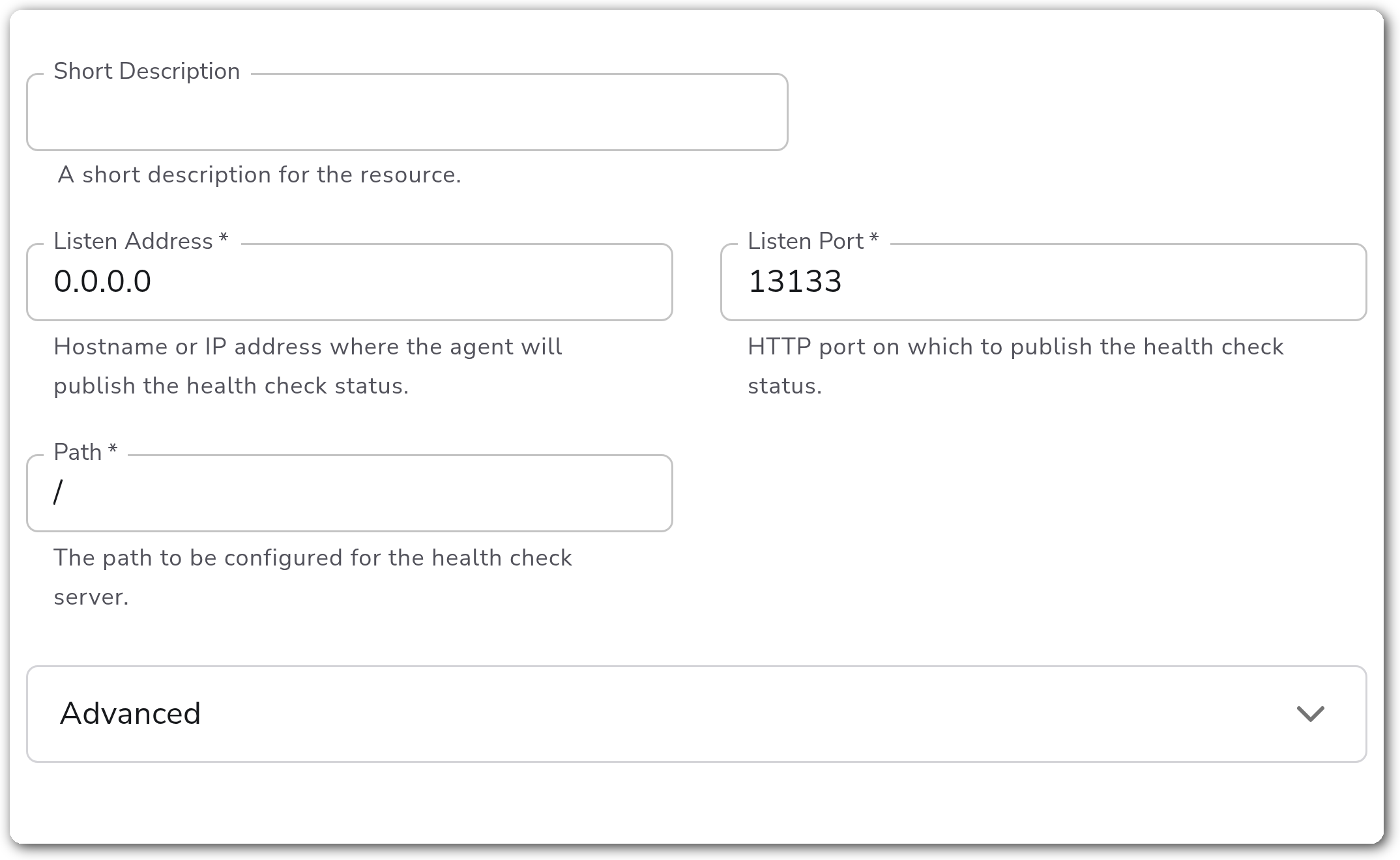
**Endpoint**
| Parameter | Type | Required | Default | Description |
| -------------- | ------- | -------- | --------- | ------------------------------------------------------------------------------------------------------------------ |
| Listen Address | String | Yes | `0.0.0.0` | Hostname or IP address where the collector publishes the health check status. `0.0.0.0` listens on all interfaces. |
| Listen Port | Integer | Yes | `13133` | HTTP port on which to publish the health check status. |
| Path | String | Yes | `/` | The path the health check server serves. Probes request this path on the listen address and port. |
**Advanced — Response Bodies**
| Parameter | Type | Required | Default | Description |
| ----------------------- | ------ | -------- | --------- | ------------------------------------------------------------------------------------------- |
| Healthy Response Body | String | No | *(empty)* | A static body that overrides the default response returned when the collector is healthy. |
| Unhealthy Response Body | String | No | *(empty)* | A static body that overrides the default response returned when the collector is unhealthy. |
**Advanced — TLS**
| Parameter | Type | Required | Default | Description |
| ------------------------------------- | ------- | -------- | --------- | ------------------------------------------------------------------------------------------------------------------- |
| Enable TLS | Boolean | No | `false` | Whether to serve the health endpoint over TLS. |
| Certificate File | String | No | *(empty)* | A TLS certificate used for authentication. Applies when Enable TLS is on. |
| Private Key File | String | No | *(empty)* | A TLS private key used for authentication. Applies when Enable TLS is on. |
| Mutual TLS | Boolean | No | `false` | Whether to require mutual TLS authentication. Applies when Enable TLS is on. |
| Mutual TLS Certificate Authority File | String | No | *(empty)* | Certificate authority used to validate client TLS certificates. Applies when Enable TLS and Mutual TLS are both on. |
### Examples
#### TLS-protected health endpoint on a custom path
This example exercises the advanced parameters by serving the health endpoint over TLS on a dedicated path. It sets **Enable TLS** with a **Certificate File** and **Private Key File**, and serves the check at `/healthz` so a load balancer probing `https://:13133/healthz` gets an authenticated response.
```yaml
apiVersion: bindplane.observiq.com/v1
kind: Extension
metadata:
name: health-check
spec:
type: health_check
parameters:
- name: listen_address
value: 0.0.0.0
- name: listen_port
value: 13133
- name: path
value: /healthz
- name: enable_tls
value: true
- name: cert_file
value: /etc/otel/certs/server.crt
- name: key_file
value: /etc/otel/certs/server.key
```
### Configuration Tips
* In Kubernetes, point liveness and readiness probes at the configured Path and Listen Port, and keep Listen Address at `0.0.0.0` so the probe reaches the container.
* Use Healthy Response Body and Unhealthy Response Body when a load balancer or monitor expects a specific marker string rather than the default response.
* Enable Mutual TLS only when the probing client can present a client certificate; otherwise probes will fail TLS handshake.
### Troubleshooting
#### Probes report the collector as down
Symptoms: a liveness/readiness probe or load-balancer health check fails even though the collector is running.
Solutions:
1. Confirm the probe targets the configured Path, Listen Port, and scheme (`http` vs `https` when TLS is enabled).
2. Verify Listen Address is reachable from the prober. `0.0.0.0` listens on all interfaces; a specific address may not be routable from outside the host or pod.
#### TLS handshake errors
Symptoms: probes fail with TLS or certificate errors after enabling TLS.
Solutions:
1. Check that Certificate File and Private Key File paths exist and are readable by the collector.
2. When Mutual TLS is on, ensure the client presents a certificate signed by the configured Mutual TLS Certificate Authority File.
### Standalone Extension
```yaml
apiVersion: bindplane.observiq.com/v1
kind: Extension
metadata:
name: health-check
spec:
type: health_check
parameters:
- name: listen_address
value: 0.0.0.0
- name: listen_port
value: 13133
- name: path
value: /
```
### Related Resources
* [Health Check Extension — OpenTelemetry Collector Contrib reference](https://github.com/open-telemetry/opentelemetry-collector-contrib/blob/main/extension/healthcheckextension/README.md)
---
# Agent Instructions
This documentation is published with GitBook. GitBook is the documentation platform designed so that both humans and AI agents can read, navigate, and reason over technical content effectively. Learn more at gitbook.com.
## Querying This Documentation
If you need additional information that is not directly available in this page, you can query the documentation by asking a question.
Perform an HTTP GET request on the following URL with the `ask` and `goal` query parameters:
```
GET https://docs.bindplane.com/integrations/extensions/health-check.md?ask=&goal=
```
`ask` is the immediate question: it should be specific, self-contained, and written in natural language.
`goal` is what the user is ultimately trying to achieve, the reason they need the answer. Sharing it helps GitBook give you a better, more relevant answer. A goal is most helpful when it describes the outcome the user wants rather than restating the question. For example, with `ask=how do I create an API token`, a goal like `automate deployments from our CI pipeline` lets GitBook tailor the answer to that use case.
The response will contain a direct answer to the question and relevant excerpts and sources from the documentation.
Use this mechanism when the answer is not explicitly present in the current page, you need clarification or additional context, or you want to retrieve related documentation sections.