> For the complete documentation index, see [llms.txt](https://docs.bindplane.com/llms.txt). Markdown versions of documentation pages are available by appending `.md` to page URLs; this page is available as [Markdown](https://docs.bindplane.com/integrations/extensions/custom.md).
# Custom
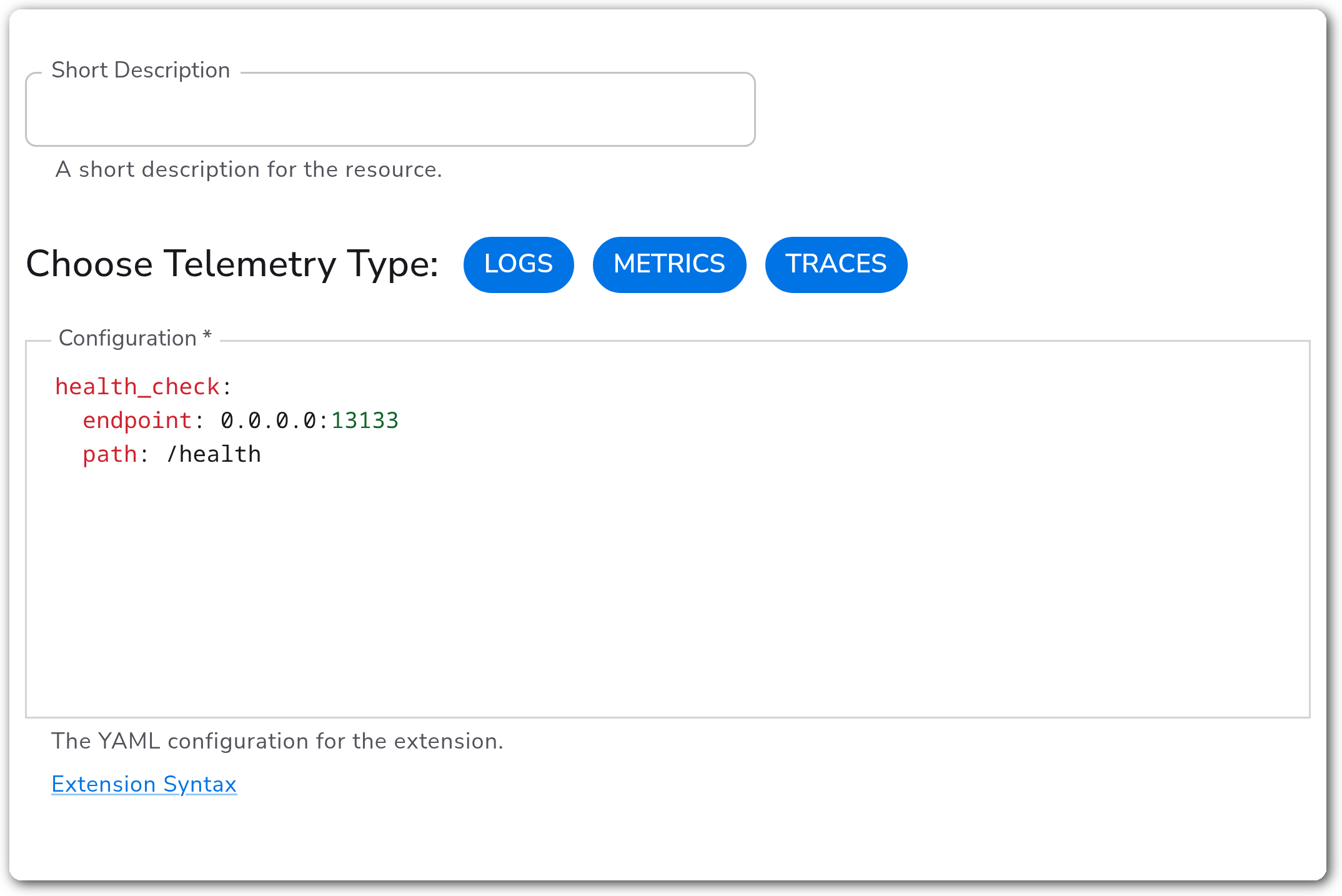
The Custom extension lets you configure any supported OpenTelemetry extension by providing its raw YAML configuration. It is a collector-level capability: rather than receiving, processing, or exporting telemetry, it injects an extension block directly into the collector configuration. Use it when an extension is supported by the Bindplane OpenTelemetry Collector but does not have a dedicated Bindplane extension form of its own. A list of supported extensions is available in the [collector extension reference](https://github.com/observIQ/bindplane-otel-collector/blob/main/docs/extensions.md).
### Configuration
#### Basic Configuration
| Parameter | Type | Required | Default | Description |
| --------------------- | ------------------ | -------- | --------- | -------------------------------------------------------------------------------------------------------------------------------------- |
| Choose Telemetry Type | Telemetry Selector | No | *(empty)* | The telemetry types (Logs, Metrics, Traces) the extension supports. The extension is added to the pipelines for the selected signals. |
| Configuration | YAML | Yes | — | The raw YAML configuration for the extension. Enter any supported extension and its YAML is inserted into the collector configuration. |
### Examples
#### Inject a health check extension
This example uses the Custom extension to add the OpenTelemetry [health check extension](https://github.com/open-telemetry/opentelemetry-collector-contrib/tree/main/extension/healthcheckextension). Set **Choose Telemetry Type** to the signals the extension applies to, and paste the extension's YAML into the **Configuration** field:
```yaml
health_check:
endpoint: 0.0.0.0:13133
path: /health
```
The extension's name (here `health_check`) is the top-level key in the YAML. Bindplane inserts the block into the collector configuration's `extensions` section.
### Configuration Tips
* The **Configuration** value is the extension's own YAML, keyed by the extension's name (for example `health_check:`), exactly as it would appear in a hand-written collector config. Do not add an enclosing `extensions:` key, Bindplane adds it.
* **Choose Telemetry Type** controls which signal pipelines the extension is attached to. Select every signal the extension should apply to.
* Verify the extension name is one of the [supported extensions](https://github.com/observIQ/bindplane-otel-collector/blob/main/docs/extensions.md) before using it, an unsupported name produces a collector that fails to start.
### Troubleshooting
#### The collector fails to start after adding the extension
Symptoms: the collector reports an unknown extension type or an invalid configuration error.
Solutions:
1. Confirm the top-level key in the **Configuration** field matches a [supported extension](https://github.com/observIQ/bindplane-otel-collector/blob/main/docs/extensions.md) name.
2. Validate the YAML indentation and structure against the upstream extension's reference documentation.
#### The extension is configured but never runs
Symptoms: the extension YAML is valid but the capability never activates.
Solutions:
1. Confirm **Choose Telemetry Type** includes at least one signal, an extension with no selected telemetry type is not attached to any pipeline.
### Standalone Extension
```yaml
apiVersion: bindplane.observiq.com/v1
kind: Extension
metadata:
name: custom
spec:
type: custom
parameters:
- name: telemetry_types
value:
- Logs
- Metrics
- Traces
- name: configuration
value: |
health_check:
endpoint: 0.0.0.0:13133
path: /health
```
### Related Resources
* [Bindplane OpenTelemetry Collector extension reference](https://github.com/observIQ/bindplane-otel-collector/blob/main/docs/extensions.md)
* [Extension syntax](https://github.com/observIQ/bindplane-otel-collector/blob/main/docs/extensions.md)
---
# Agent Instructions
This documentation is published with GitBook. GitBook is the documentation platform designed so that both humans and AI agents can read, navigate, and reason over technical content effectively. Learn more at gitbook.com.
## Querying This Documentation
If you need additional information that is not directly available in this page, you can query the documentation by asking a question.
Perform an HTTP GET request on the following URL with the `ask` and `goal` query parameters:
```
GET https://docs.bindplane.com/integrations/extensions/custom.md?ask=&goal=
```
`ask` is the immediate question: it should be specific, self-contained, and written in natural language.
`goal` is what the user is ultimately trying to achieve, the reason they need the answer. Sharing it helps GitBook give you a better, more relevant answer. A goal is most helpful when it describes the outcome the user wants rather than restating the question. For example, with `ask=how do I create an API token`, a goal like `automate deployments from our CI pipeline` lets GitBook tailor the answer to that use case.
The response will contain a direct answer to the question and relevant excerpts and sources from the documentation.
Use this mechanism when the answer is not explicitly present in the current page, you need clarification or additional context, or you want to retrieve related documentation sections.