> For the complete documentation index, see [llms.txt](https://docs.bindplane.com/llms.txt). Markdown versions of documentation pages are available by appending `.md` to page URLs; this page is available as [Markdown](https://docs.bindplane.com/integrations/destinations/honeycomb-enhance-indexing-s3.md).
# Honeycomb Enhance Indexing S3
Exports logs and traces from a Bindplane pipeline to an AWS S3 bucket, writing index files alongside the data so Honeycomb can rehydrate and query archived telemetry quickly. Fields like `trace.trace_id`, `service.name`, and `session.id` are indexed automatically, and you can index additional custom fields.
> **Availability:** This destination requires the Honeycomb license plan.
### Supported Telemetry Types
| Platform | Metrics | Logs | Traces |
| ------------------ | ------- | ---- | ------ |
| Linux | | ✓ | ✓ |
| Windows | | ✓ | ✓ |
| macOS | | ✓ | ✓ |
| Kubernetes Node | | ✓ | ✓ |
| Kubernetes Cluster | | ✓ | ✓ |
| Kubernetes Gateway | | ✓ | ✓ |
| OpenShift Node | | ✓ | ✓ |
| OpenShift Cluster | | ✓ | ✓ |
| OpenShift Gateway | | ✓ | ✓ |
### Prerequisites
* A Honeycomb account with a Management API key and secret. The key must have the `enhance:write` scope.
* An [AWS S3 bucket](https://docs.aws.amazon.com/AmazonS3/latest/userguide/create-bucket-overview.html) in the region you intend to export to.
* AWS credentials available to the collector with `s3:PutObject` permission on that bucket. Credentials are resolved through the standard AWS SDK credential chain (IAM instance profile, environment variables, or shared credentials file), or by assuming a role via the **Role ARN** parameter. See the [AWS S3 identity-based policy examples](https://docs.aws.amazon.com/AmazonS3/latest/userguide/example-policies-s3.html).
* Network connectivity from the collector to both S3 and the Honeycomb API endpoint.
### Configuration
#### Basic Configuration
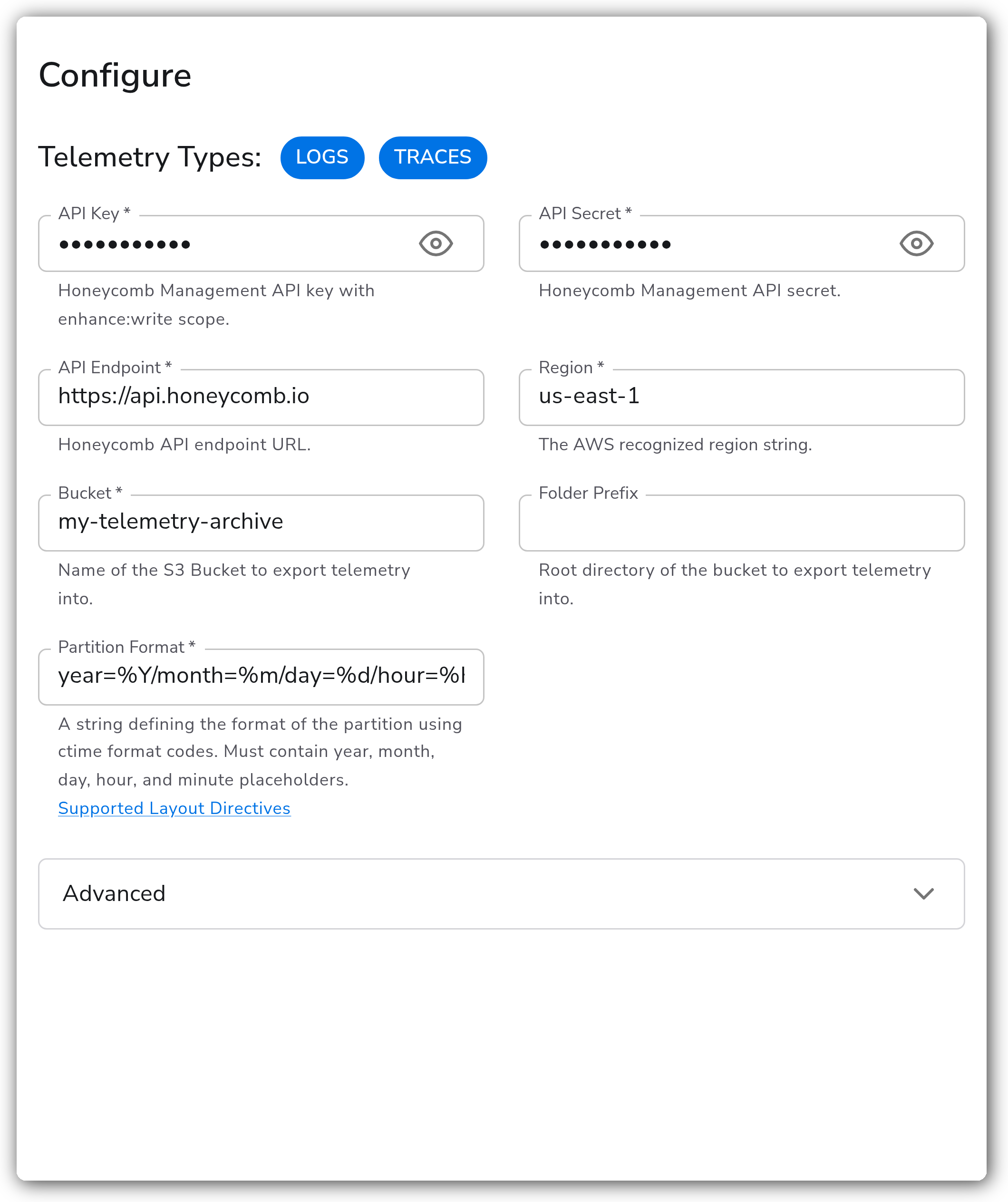
The minimum configuration requires Honeycomb API credentials, an AWS region, and an S3 bucket.
**Honeycomb API**
| Parameter | Type | Required | Default | Description |
| --------------- | ------------------ | -------- | -------------------------- | ------------------------------------------------------------------------------------- |
| Telemetry Types | Telemetry Selector | Yes | `Logs`, `Traces` | Which signals this destination exports. Valid values are Logs and Traces. |
| API Key | String | Yes | *(empty)* | Honeycomb Management API key with the `enhance:write` scope. Sensitive value. |
| API Secret | String | Yes | *(empty)* | Honeycomb Management API secret. Sensitive value. |
| API Endpoint | String | Yes | `https://api.honeycomb.io` | Honeycomb API endpoint URL. Use `https://api.eu1.honeycomb.io` for EU-based accounts. |
**S3 Destination**
| Parameter | Type | Required | Default | Description |
| ---------------- | ------ | -------- | ------------------------------------------- | --------------------------------------------------------------------------------------------------------------------------------------------------------------------------------- |
| Region | Enum | Yes | `us-east-1` | The AWS region string for the bucket. Choose from the listed regions or enter a custom value. |
| Bucket | String | Yes | *(empty)* | Name of the S3 bucket to export telemetry into. |
| Folder Prefix | String | No | *(empty)* | Root directory within the bucket to export telemetry into. |
| Partition Format | String | Yes | `year=%Y/month=%m/day=%d/hour=%H/minute=%M` | The partition layout, written with [ctime format codes](https://docs.bindplane.com/how-to-guides/ctime-formatting). Must contain year, month, day, hour, and minute placeholders. |
#### Advanced Configuration
**Data Format and Compression**
| Parameter | Type | Required | Default | Description |
| ----------- | ---- | -------- | ------------ | --------------------------------------------------------------------------------------------------------------------------- |
| Data Format | Enum | No | `otlp_proto` | Format of telemetry data written to S3. `otlp_proto` produces smaller, more efficient files; `otlp_json` is human-readable. |
| Compression | Enum | No | `gzip` | Whether data is sent and stored in S3 with compression. Valid values are `gzip` and `none`. |
**AWS Credentials**
| Parameter | Type | Required | Default | Description |
| --------- | ------ | -------- | --------- | --------------------------------------------------------------------------------------------------------------------------------------------------------------------------------- |
| Role ARN | String | No | *(empty)* | IAM Role ARN to assume for S3 access. If not set, the collector uses the default AWS SDK credential chain (environment variables, IAM instance profile, shared credentials file). |
> **Note:** This destination does not accept inline AWS access keys or secret keys. For all credential methods other than an assumed role, configure them on the collector host directly.
**S3 Connection Options**
| Parameter | Type | Required | Default | Description |
| ---------------- | ------- | -------- | --------- | --------------------------------------------------------------------------------------------------------------------------------------------------- |
| Endpoint | String | No | *(empty)* | Overrides the endpoint used to connect to S3 instead of constructing it from the region and bucket. Use this for S3-compatible services like MinIO. |
| Force Path Style | Boolean | No | `false` | Force path-style S3 addressing instead of virtual-host style. Useful for S3-compatible services. |
| Disable SSL | Boolean | No | `false` | Disable SSL verification for S3 connections. |
**Indexing**
| Parameter | Type | Required | Default | Description |
| --------------------- | ------- | -------- | --------- | ------------------------------------------------------------------------------------------------------ |
| Custom Indexed Fields | Strings | No | *(empty)* | Additional fields to index beyond the automatic ones (`trace.trace_id`, `service.name`, `session.id`). |
> **Note:** To minimize collector processing compute and time, Honeycomb recommends indexing no more than 5 custom fields.
**General Settings**
| Parameter | Type | Required | Default | Description |
| --------------- | ------- | -------- | ---------- | ------------------------------------------------------------------------------------------- |
| Drop Raw Copy | Boolean | No | `true` | When enabled, the raw copy of the log stored in `log.record.original` is dropped. |
| Timeout | Integer | No | `30` | Maximum time in seconds to wait for a batch to be sent to the destination. |
| Retry Mode | Enum | No | `standard` | The retryer implementation for the exporter. Valid values are `standard` and `adaptive`. |
| Maximum Retries | Integer | No | `3` | Maximum number of times to retry a request. Set to `0` to retry until the request succeeds. |
### Examples
#### Export traces to a shared bucket with custom indexed fields
This configuration exports traces only into a prefixed folder of a shared bucket and indexes two custom fields (`user.id` and `environment`) on top of the automatic ones, for faster rehydration queries in Honeycomb.
```yaml
apiVersion: bindplane.observiq.com/v1
kind: Destination
metadata:
name: honeycomb-enhance-indexing-s3
spec:
type: enhance_indexing_s3
parameters:
- name: telemetry_types
value:
- Traces
- name: api_key
value: ${HONEYCOMB_API_KEY}
- name: api_secret
value: ${HONEYCOMB_API_SECRET}
- name: api_endpoint
value: https://api.honeycomb.io
- name: region
value: us-east-1
- name: bucket
value: my-telemetry-archive
- name: prefix
value: traces
- name: indexed_fields
value:
- user.id
- environment
```
### Configuration Tips
#### S3 bucket and credentials
* AWS credentials resolve through the standard AWS SDK credential chain (IAM role, environment variables, or shared credentials file). This destination does not accept inline access keys. For cross-account or scoped access, set **Role ARN** and the collector assumes that role via STS.
* Make sure the bucket policy grants `s3:PutObject` to the collector's identity (or the assumed role), and use **Folder Prefix** to isolate telemetry within a shared bucket.
#### Custom indexed fields
* Index fields you query on most often (for example `user.id` or `environment`) to speed up rehydration, but keep the list short. Each indexed field writes extra index files, increasing S3 storage usage.
#### Honeycomb API endpoint
* Use `https://api.honeycomb.io` for US-based Honeycomb accounts and `https://api.eu1.honeycomb.io` for EU-based accounts. The endpoint must match your account region.
### Troubleshooting
#### S3 upload failures
Symptoms: collector logs reference `AccessDenied`, `NoSuchBucket`, or `InvalidAccessKeyId`.
Solutions:
1. Verify the bucket exists in the configured region and the collector has valid AWS credentials with `s3:PutObject` permission.
2. If using a custom **Endpoint** for S3-compatible storage, enable **Force Path Style**.
#### Honeycomb API authentication errors
Symptoms: `401 Unauthorized` or `403 Forbidden` from the Honeycomb API endpoint.
Solutions:
1. Confirm the API Key and API Secret belong to a Management API key with the `enhance:write` scope. Standard ingest keys will not work.
2. Verify the API Endpoint matches your Honeycomb account region (US vs EU).
#### Missing or incomplete index files
Symptoms: data appears in S3 but index files are missing, and rehydration queries in Honeycomb return fewer results than expected.
Solutions:
1. Confirm the partition format contains all required placeholders (`%Y`, `%m`, `%d`, `%H`, `%M`). Missing placeholders cause validation failures.
2. Verify custom indexed field names match the exact attribute keys present in your telemetry.
### Standalone Destination
```yaml
apiVersion: bindplane.observiq.com/v1
kind: Destination
metadata:
name: honeycomb-enhance-indexing-s3
spec:
type: enhance_indexing_s3
parameters:
- name: telemetry_types
value:
- Logs
- Traces
- name: api_key
value: ${HONEYCOMB_API_KEY}
- name: api_secret
value: ${HONEYCOMB_API_SECRET}
- name: api_endpoint
value: https://api.honeycomb.io
- name: region
value: us-east-1
- name: bucket
value: my-telemetry-archive
- name: partition_format
value: year=%Y/month=%m/day=%d/hour=%H/minute=%M
```
### Related Resources
* [Honeycomb: Collector Export to Amazon S3 Archive](https://docs.honeycomb.io/send-data/telemetry-pipeline/enhance/collector-export-s3)
* [Honeycomb: Enhance with Archive](https://docs.honeycomb.io/send-data/telemetry-pipeline/enhance/)
* [Enhance Indexing S3 Exporter (GitHub)](https://github.com/honeycombio/enhance-indexing-s3-exporter)
* [AWS S3: Creating a general purpose bucket](https://docs.aws.amazon.com/AmazonS3/latest/userguide/create-bucket-overview.html)
* [AWS S3: Identity-based policy examples](https://docs.aws.amazon.com/AmazonS3/latest/userguide/example-policies-s3.html)
### Bindplane Resources
* [ctime Formatting](https://docs.bindplane.com/how-to-guides/ctime-formatting)
---
# Agent Instructions
This documentation is published with GitBook. GitBook is the documentation platform designed so that both humans and AI agents can read, navigate, and reason over technical content effectively. Learn more at gitbook.com.
## Querying This Documentation
If you need additional information that is not directly available in this page, you can query the documentation by asking a question.
Perform an HTTP GET request on the following URL with the `ask` and `goal` query parameters:
```
GET https://docs.bindplane.com/integrations/destinations/honeycomb-enhance-indexing-s3.md?ask=&goal=
```
`ask` is the immediate question: it should be specific, self-contained, and written in natural language.
`goal` is what the user is ultimately trying to achieve, the reason they need the answer. Sharing it helps GitBook give you a better, more relevant answer. A goal is most helpful when it describes the outcome the user wants rather than restating the question. For example, with `ask=how do I create an API token`, a goal like `automate deployments from our CI pipeline` lets GitBook tailor the answer to that use case.
The response will contain a direct answer to the question and relevant excerpts and sources from the documentation.
Use this mechanism when the answer is not explicitly present in the current page, you need clarification or additional context, or you want to retrieve related documentation sections.