> For the complete documentation index, see [llms.txt](https://docs.bindplane.com/llms.txt). Markdown versions of documentation pages are available by appending `.md` to page URLs; this page is available as [Markdown](https://docs.bindplane.com/integrations/destinations/google-cloud-pubsub.md).
# Google Cloud Pub/Sub
Publishes logs, metrics, and traces to a Google Cloud Pub/Sub topic as OTLP messages.
{% hint style="warning" %}
**Not available in Bindplane Google Edition**
The Google Cloud Pub/Sub destination is not available in Bindplane Google Edition.
{% endhint %}
### Supported Telemetry Types
| Platform | Metrics | Logs | Traces |
| ------------------ | ------- | ---- | ------ |
| Linux | ✓ | ✓ | ✓ |
| Windows | ✓ | ✓ | ✓ |
| macOS | ✓ | ✓ | ✓ |
| Kubernetes Node | ✓ | ✓ | ✓ |
| Kubernetes Cluster | ✓ | ✓ | ✓ |
| Kubernetes Gateway | ✓ | ✓ | ✓ |
| OpenShift Node | ✓ | ✓ | ✓ |
| OpenShift Cluster | ✓ | ✓ | ✓ |
| OpenShift Gateway | ✓ | ✓ | ✓ |
### Prerequisites
* Bindplane Collector v1.89.0 or newer. Older collectors report the destination as incompatible, so upgrade them first.
* An existing Pub/Sub topic, since the destination doesn't create one. See [Create a topic](https://cloud.google.com/pubsub/docs/create-topic).
* Application Default Credentials on the collector host, for an identity that has the **Pub/Sub Publisher** role (`roles/pubsub.publisher`) on the topic. Use `GOOGLE_APPLICATION_CREDENTIALS` pointing at a service account key file, GKE Workload Identity, or the service account attached to a Compute Engine VM. This destination has no setting for a key file or key contents. See [How Application Default Credentials works](https://cloud.google.com/docs/authentication/application-default-credentials).
### Configuration
#### Basic Configuration
| Parameter | Type | Required | Default | Description |
| --------------- | ------------------ | -------- | --------------------- | ------------------------------------------------------------------------------------------------------------------------------------------------------- |
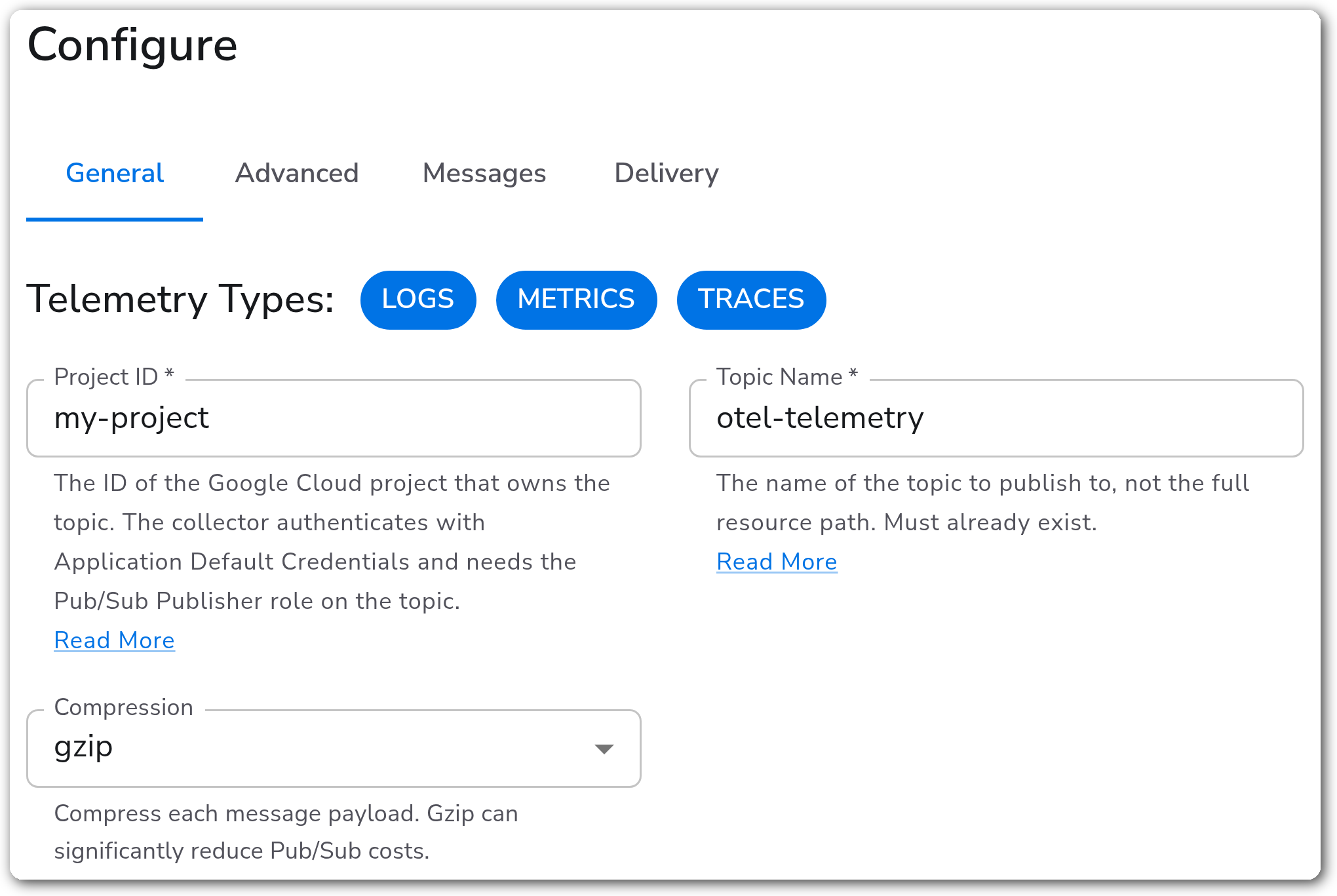
| Telemetry Types | Telemetry Selector | No | Logs, Metrics, Traces | Which signals to publish. All selected signals go to the same topic. |
| Project ID | String | Yes | *(empty)* | ID of the Google Cloud project that owns the topic: 6 to 30 lowercase letters, digits, or hyphens, starting with a letter and not ending with a hyphen. |
| Topic Name | String | Yes | *(empty)* | Name of the topic, such as `otel-telemetry`. Enter only the name, since Bindplane builds the full `projects//topics/` path. |
| Compression | Enum: none, gzip | No | `none` | Compresses each message payload. Gzip adds a `content-encoding: gzip` message attribute and lowers Pub/Sub data costs. |
#### Connection (Advanced)
| Parameter | Type | Required | Default | Description |
| ---------- | -------- | -------- | --------- | ----------------------------------------------------------------------------------------------------------------------- |
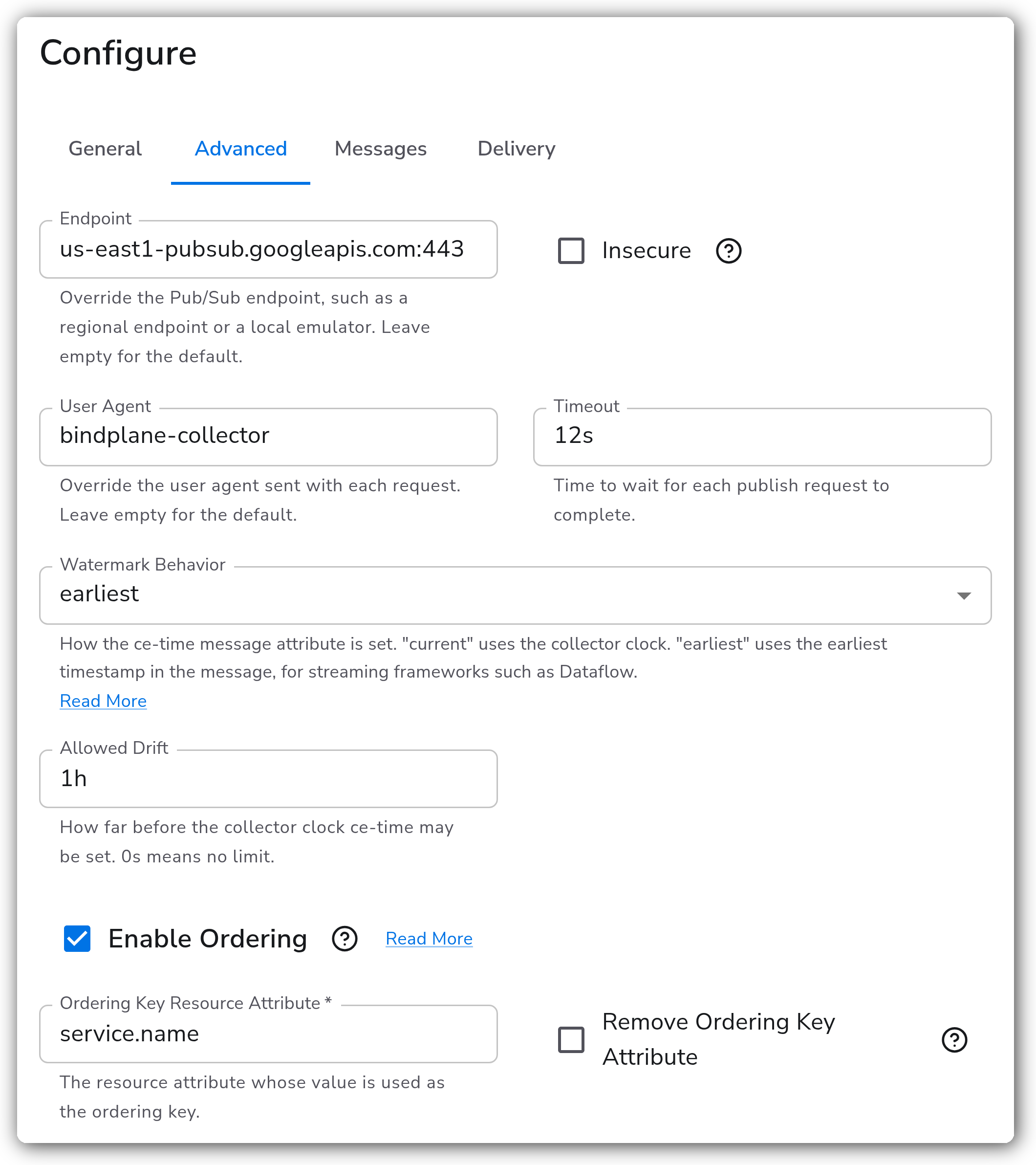
| Endpoint | String | No | *(empty)* | Overrides the Pub/Sub endpoint, such as a regional endpoint (`us-east1-pubsub.googleapis.com:443`) or a local emulator. |
| Insecure | Boolean | No | `false` | Connects without TLS. Shown when Endpoint is set. Use it only for a local emulator. |
| User Agent | String | No | *(empty)* | Overrides the user agent sent with each request. |
| Timeout | Duration | No | `12s` | Time to wait for each publish request to complete. |
#### Watermark (Advanced)
By default, every message carries a `ce-time` attribute. The watermark settings control how it's set.
| Parameter | Type | Required | Default | Description |
| ------------------ | ----------------------- | -------- | --------- | ----------------------------------------------------------------------------------------------------------------------------------------------------------------- |
| Watermark Behavior | Enum: current, earliest | No | `current` | `current` uses the collector clock when the message is published. `earliest` uses the oldest timestamp in the message, for streaming frameworks such as Dataflow. |
| Allowed Drift | Duration | No | `0s` | How far before the collector clock `ce-time` may be set. `0s` means no limit. Shown when Watermark Behavior is `earliest`. |
#### Ordering (Advanced)
| Parameter | Type | Required | Default | Description |
| ------------------------------- | ------- | -------- | --------- | ---------------------------------------------------------------------------------------------------------------------------- |
| Enable Ordering | Boolean | No | `false` | Sets the Pub/Sub ordering key from a resource attribute. Telemetry without that attribute is published with no ordering key. |
| Ordering Key Resource Attribute | String | Yes\* | *(empty)* | Resource attribute whose value becomes the ordering key, such as `service.name`. Shown when ordering is enabled. |
| Remove Ordering Key Attribute | Boolean | No | `false` | Removes that resource attribute from the telemetry before publishing. Shown when ordering is enabled. |
\* Required only when Enable Ordering is true.
#### Messages
By default, messages are OTLP Protobuf and carry the standard CloudEvent attributes (`ce-type`, `ce-id`, `ce-source`, `ce-specversion`, `ce-time`) plus `content-type: application/protobuf`.
| Parameter | Type | Required | Default | Description |
| ------------------------- | --------- | -------- | ------------- | --------------------------------------------------------------------------------------------------------------------------------------------------------------------------------------------------------------------------------------------------------------------------- |
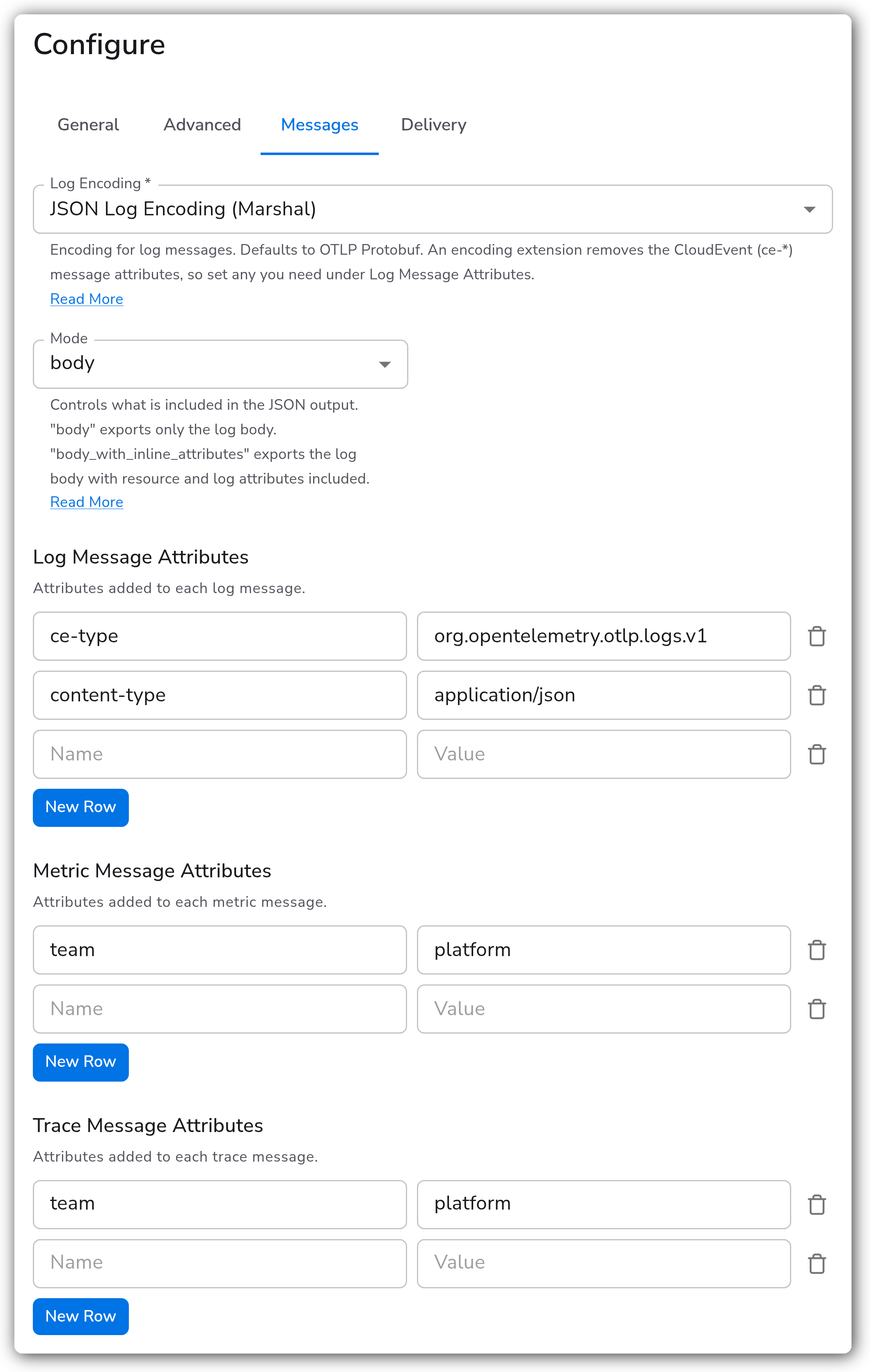
| Log Encoding | Extension | Yes | OTLP Protobuf | Encoding for log messages: OTLP Protobuf, JSON Log Encoding (Marshal)1, or Text Encoding (Marshal). Shown when Logs is selected. An encoding extension drops the CloudEvent attributes unless you set `ce-type` and `content-type` under Log Message Attributes. |
| Log Message Attributes | Map | No | *(empty)* | Attributes added to every log message. Shown when Logs is selected. |
| Metric Message Attributes | Map | No | *(empty)* | Attributes added to every metric message. Shown when Metrics is selected. |
| Trace Message Attributes | Map | No | *(empty)* | Attributes added to every trace message. Shown when Traces is selected. |
1. *JSON Log Encoding's `body` mode needs structured (map) log bodies. A plain-text body fails the whole batch, so parse plain-text logs first or switch to `body_with_inline_attributes` mode.*
#### Supported Retry and Queuing Settings
| Parameter | Type | Required | Default | Description |
| -------------------------- | --------- | -------- | -------------------- | -------------------------------------------------------------------------------------------------------------------------------------------- |
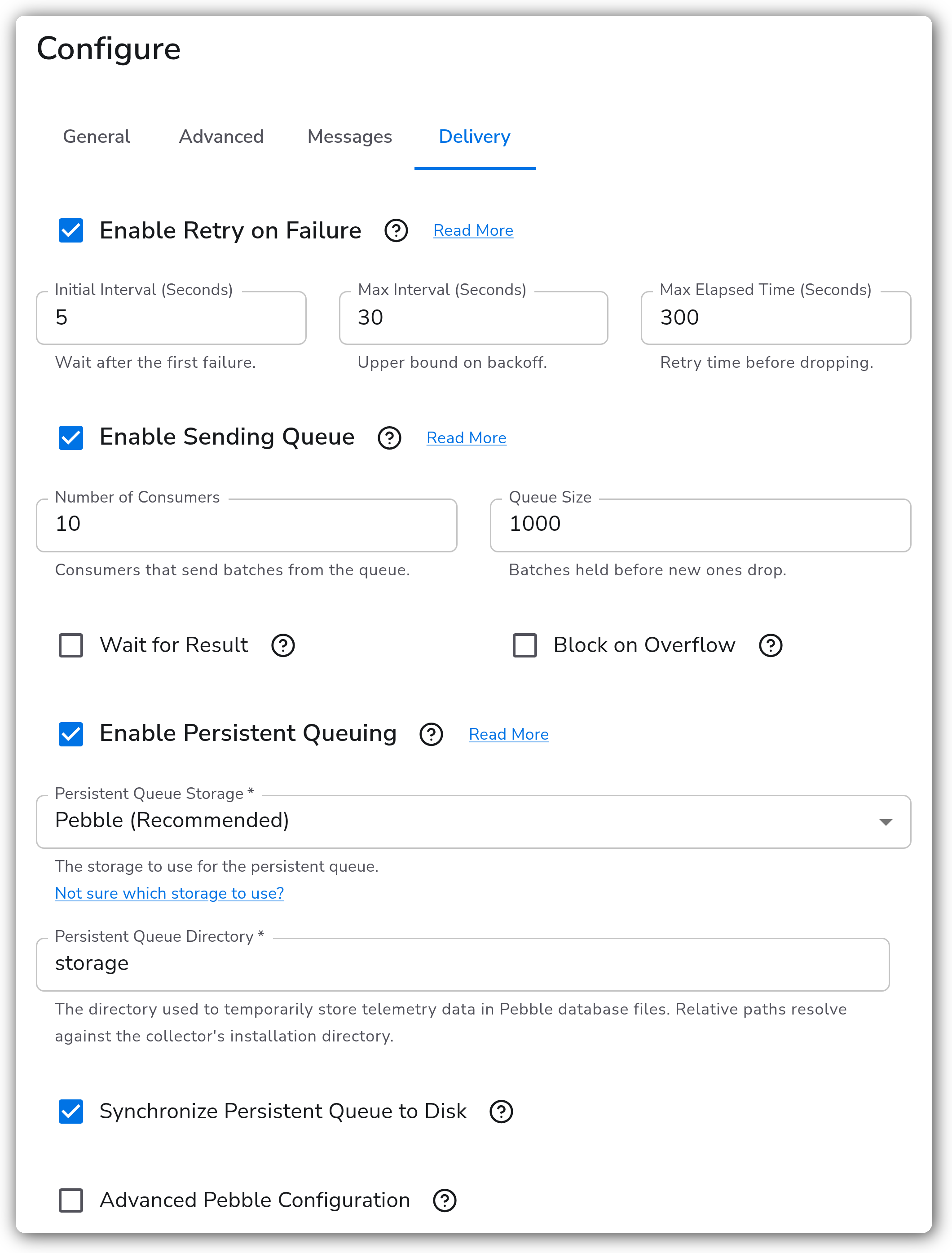
| Enable Retry on Failure | Boolean | No | `true` | Resends telemetry that failed to publish. |
| Initial Interval (Seconds) | Integer | No | `5` | Wait after the first failure. Shown when retry is enabled. |
| Max Interval (Seconds) | Integer | No | `30` | Upper bound on backoff. Shown when retry is enabled. |
| Max Elapsed Time (Seconds) | Integer | No | `300` | Time spent retrying before dropping the data. Shown when retry is enabled. |
| Enable Sending Queue | Boolean | No | `true` | Buffers telemetry so a short network outage doesn't lose data. |
| Number of Consumers | Integer | No | `10` | Consumers that send batches from the queue. Shown when the sending queue is enabled. |
| Queue Size | Integer | No | `1000` | Batches held before new ones are dropped. Shown when the sending queue is enabled. |
| Wait for Result | Boolean | No | `false` | Blocks incoming requests until they're published. Not compatible with persistent queuing. Shown when the sending queue is enabled. |
| Block on Overflow | Boolean | No | `false` | Blocks requests until the queue has room, instead of rejecting data. Shown when the sending queue is enabled. |
| Enable Persistent Queuing | Boolean | No | `true` | Buffers telemetry on disk so it survives outages and collector restarts. Shown when the sending queue is enabled and Wait for Result is off. |
| Persistent Queue Storage | Extension | Yes | Pebble (Recommended) | Storage used for the persistent queue. Shown when persistent queuing is enabled. |
### Examples
#### Feed a Dataflow pipeline with ordered, watermarked messages
Dataflow can read `ce-time` as the event timestamp and `ce-id` as the deduplication ID. With Watermark Behavior set to `earliest`, `ce-time` is the oldest timestamp in each message. An Allowed Drift of `1h` keeps it within an hour of the collector clock. Ordering on `service.name` keeps each service's messages in order, as long as the subscription has ordering enabled.
#### Publish logs as JSON and keep the CloudEvent attributes
Subscribers that can't parse OTLP Protobuf can read JSON log bodies instead. Setting `ce-type` and `content-type` under Log Message Attributes keeps the CloudEvent attributes on each message.
### Configuration Tips
#### Message size
* Pub/Sub rejects messages larger than 10 MB, and each batch becomes one message. If your batches can grow that large, add a Batch processor ahead of this destination and set its max batch size to cap them.
* Gzip compression also keeps each message further from the limit.
#### Subscribers
* All selected signals share one topic. Subscribers can tell them apart with the `ce-type` attribute (`org.opentelemetry.otlp.logs.v1`, `.metrics.v1`, or `.traces.v1`), or with a subscription filter on it.
* Message ordering only applies when the subscription itself has ordering enabled, and that can only be set when the subscription is created.
### Troubleshooting
#### Permission denied or topic not found
Symptoms: collector logs show permission-denied or not-found errors when publishing, and nothing reaches the topic.
Solutions:
1. Confirm the topic exists in the project set in Project ID, and that Topic Name is the short name only.
2. Confirm the collector's credentials have the Pub/Sub Publisher role on the topic. Run `gcloud pubsub topics get-iam-policy ` to check.
3. Confirm the collector can find credentials. On a VM, check the attached service account. Elsewhere, check that `GOOGLE_APPLICATION_CREDENTIALS` is set in the collector's environment, not just your shell.
#### JSON-encoded log batches fail
Symptoms: with Log Encoding set to JSON Log Encoding in `body` mode, collector logs show `marshal: expected 'Map' found 'Str'` and log batches don't reach the topic.
Solutions:
1. Parse plain-text logs into structured bodies before this destination, for example with a JSON or regex parsing processor.
2. Or set the JSON Log Encoding mode to `body_with_inline_attributes`, which accepts any body type.
#### Extra `null` log messages when ordering is enabled
Symptoms: with Enable Ordering on and a Log Encoding extension selected, the topic receives one extra message per batch with no ordering key and a body of `null`. This is a known issue in the upstream exporter, tracked in [opentelemetry-collector-contrib#52049](https://github.com/open-telemetry/opentelemetry-collector-contrib/issues/52049).
Solutions:
1. Use OTLP Protobuf for logs while ordering is on.
2. Or have subscribers discard messages whose body is `null`.
### Standalone Destination
```yaml
apiVersion: bindplane.observiq.com/v1
kind: Destination
metadata:
name: google-cloud-pubsub
spec:
type: googlecloudpubsub
parameters:
- name: telemetry_types
value:
- Logs
- Metrics
- Traces
- name: project
value: my-project
- name: topic
value: otel-telemetry
- name: compression
value: gzip
```
### Related Resources
* [Google Cloud Pub/Sub Exporter reference](https://github.com/open-telemetry/opentelemetry-collector-contrib/blob/main/exporter/googlecloudpubsubexporter/README.md)
* [Google Cloud: Create a topic](https://cloud.google.com/pubsub/docs/create-topic)
* [Google Cloud: Pub/Sub access control](https://cloud.google.com/pubsub/docs/access-control)
* [Google Cloud: How Application Default Credentials works](https://cloud.google.com/docs/authentication/application-default-credentials)
* [Google Cloud: Order messages](https://cloud.google.com/pubsub/docs/ordering)
* [Google Cloud: Pub/Sub quotas and limits](https://cloud.google.com/pubsub/quotas)
### Bindplane Resources
* [Retry on Failure](/configuration/bindplane-otel-collector/retry-on-failure.md)
* [Sending Queue](/configuration/bindplane-otel-collector/sending-queue.md)
* [Persistent Queue](/configuration/bindplane-otel-collector/persistent-queue.md)
* [Google Cloud Pub/Sub source](/integrations/sources/google-cloud-pubsub.md)
---
# Agent Instructions
This documentation is published with GitBook. GitBook is the documentation platform designed so that both humans and AI agents can read, navigate, and reason over technical content effectively. Learn more at gitbook.com.
## Querying This Documentation
If you need additional information that is not directly available in this page, you can query the documentation by asking a question.
Perform an HTTP GET request on the following URL with the `ask` and `goal` query parameters:
```
GET https://docs.bindplane.com/integrations/destinations/google-cloud-pubsub.md?ask=&goal=
```
`ask` is the immediate question: it should be specific, self-contained, and written in natural language.
`goal` is what the user is ultimately trying to achieve, the reason they need the answer. Sharing it helps GitBook give you a better, more relevant answer. A goal is most helpful when it describes the outcome the user wants rather than restating the question. For example, with `ask=how do I create an API token`, a goal like `automate deployments from our CI pipeline` lets GitBook tailor the answer to that use case.
The response will contain a direct answer to the question and relevant excerpts and sources from the documentation.
Use this mechanism when the answer is not explicitly present in the current page, you need clarification or additional context, or you want to retrieve related documentation sections.