> For the complete documentation index, see [llms.txt](https://docs.bindplane.com/llms.txt). Markdown versions of documentation pages are available by appending `.md` to page URLs; this page is available as [Markdown](https://docs.bindplane.com/integrations/destinations/crowdstrike-falcon-next-gen-siem.md).
# CrowdStrike Falcon Next-Gen SIEM
The CrowdStrike Falcon Next-Gen SIEM destination sends logs to [CrowdStrike Falcon Next-Gen SIEM](https://www.crowdstrike.com/platform/next-gen-siem/) through an HEC / HTTP Event Connector data connector. Bindplane delivers logs in the Splunk HTTP Event Collector (HEC) format to the connector's API URL, authenticating with the connector's API key. Logs are parsed by the parser assigned to the data connector and are searchable in Falcon Event Search.
This destination is separate from the [CrowdStrike Falcon LogScale](/integrations/destinations/crowdstrike-falcon-logscale.md) destination, which sends to a LogScale repository over OTLP.
### Supported Telemetry Types
| Platform | Metrics | Logs | Traces |
| ------------------ | ------- | ---- | ------ |
| Linux | | ✓ | |
| Windows | | ✓ | |
| macOS | | ✓ | |
| Kubernetes Node | | ✓ | |
| Kubernetes Cluster | | ✓ | |
| Kubernetes Gateway | | ✓ | |
| OpenShift Node | | ✓ | |
| OpenShift Cluster | | ✓ | |
| OpenShift Gateway | | ✓ | |
### Prerequisites
* A CrowdStrike Falcon tenant with Next-Gen SIEM.
* Permission to create data connectors in Falcon.
* Network access from the collector to the connector's API URL over HTTPS (TCP port `443`).
#### Create the Data Connector
1. In the Falcon console, open **Data connectors** and add a new connection.
2. Choose the third-party **HEC / HTTP Event Connector**.
3. Name the connector and choose the parser that matches the logs you plan to send. Save the connector.
4. Copy the **API URL** shown for the connector.
5. After about a minute, the connector offers to generate an **API key**. Generate it and copy it immediately.
The API URL and API key are the only values Bindplane needs.
### Configuration
#### General
| Parameter | Type | Default | Description |
| --------- | ------ | ------- | ------------------------------------------------------------------------------------------- |
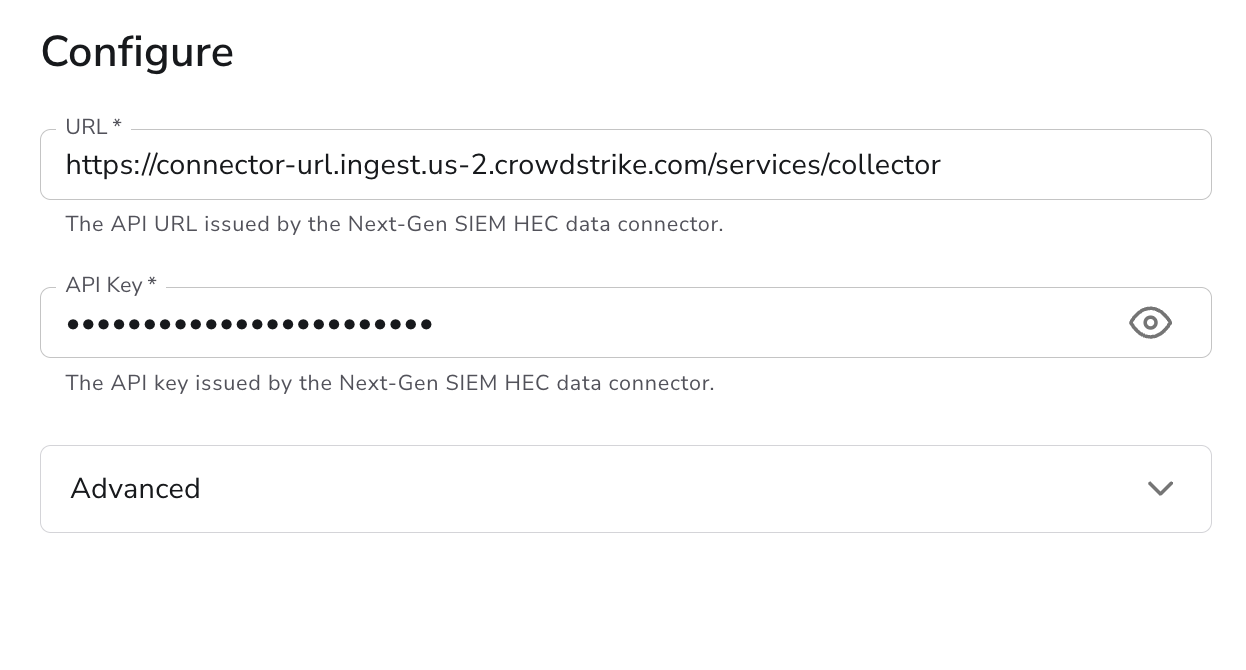
| URL | String | | The API URL issued by the HEC data connector. Required. Must start with `https://`. |
| API Key | String | | The API key issued by the HEC data connector. Required and sensitive (treated as a secret). |
#### Advanced
| Parameter | Type | Default | Description |
| ------------------ | ------- | --------- | ---------------------------------------------------------------------------------------- |
| Max Request Size | Integer | `2097152` | The maximum size (in bytes) of a request sent to the destination. |
| Max Event Size | Integer | `5242880` | The maximum size (in bytes) of an individual event. Events larger than this are dropped. |
| Enable Compression | Boolean | `true` | Compress telemetry data using gzip before sending. |
| Drop Raw Copy | Boolean | `true` | When enabled, drops the raw copy of the log stored in `log.record.original`. |
#### Retry on Failure
| Parameter | Type | Default | Description |
| ----------------------- | ------- | ------- | ------------------------------------------------------------------------------------------------------------------------------- |
| Enable Retry on Failure | Boolean | `true` | Attempt to resend telemetry data that failed to transmit to the destination. |
| Initial Interval | Integer | `5` | Time (in seconds) to wait after the first failure before retrying. Applies when retry is enabled. |
| Max Interval | Integer | `30` | The upper bound (in seconds) on backoff. Applies when retry is enabled. |
| Max Elapsed Time | Integer | `300` | Maximum time (in seconds) spent trying to send a batch, used to avoid a never-ending retry loop. Applies when retry is enabled. |
#### Sending Queue
| Parameter | Type | Default | Description |
| ------------------------- | --------- | ------------------------------- | --------------------------------------------------------------------------------------------------------------------------------------------------------------------- |
| Enable Sending Queue | Boolean | `true` | Buffer telemetry data temporarily before sending to help ensure data is not lost during a temporary network outage. |
| Number of Consumers | Integer | `10` | Number of consumers that dequeue batches. Applies when the sending queue is enabled. |
| Queue Size | Integer | `5000` | Maximum number of batches kept in memory before dropping. Applies when the sending queue is enabled. |
| Enable Persistent Queuing | Boolean | `true` | Buffer telemetry data to disk before sending to help ensure data is not lost during network outages or collector restarts. Applies when the sending queue is enabled. |
| Persistent Queue Storage | Extension | `file_storage_persistent_queue` | The storage to use for the persistent queue. Required when both the sending queue and persistent queue are enabled. |
### Configuration Tips
#### URL
* Paste the API URL exactly as the data connector shows it. Bindplane sends to that URL as entered and does not add a path.
* Next-Gen SIEM only accepts HTTPS. Bindplane rejects a URL that starts with `http://`.
#### Parsing
* Parsing happens in Next-Gen SIEM, using the parser assigned to the data connector. Bindplane does not set an index, source, or sourcetype.
* To send logs that need different parsers, create one data connector per parser and one destination per connector, then route each log type to its destination.
#### Reducing payload size
* Leave `drop_raw_copy` enabled to drop the raw `log.record.original` attribute before sending. Disable it only if you need the original raw record preserved in Next-Gen SIEM.
#### Reliability
* Keep the sending queue and persistent queue enabled so telemetry survives temporary network outages and collector restarts. See [Persistent Queue](https://docs.bindplane.com/configuration/bindplane-otel-collector/persistent-queue).
### Troubleshooting
**Symptom:** Logs are rejected with an authentication or authorization error. **Solution:** Confirm the `api_key` was generated for the same data connector as the `url`. If you are unsure the key was saved correctly, generate a new one on the connector and re-enter it.
**Symptom:** No logs reach Next-Gen SIEM and the collector reports connection failures. **Solution:** Verify the `url` matches the connector's API URL and that the collector can reach it over HTTPS on TCP port `443`.
**Symptom:** Logs arrive in Event Search but fields are not extracted. **Solution:** Check the parser assigned to the data connector. It must match the format of the logs Bindplane sends.
**Symptom:** Logs arrive but are missing the original raw record. **Solution:** This is expected when `drop_raw_copy` is enabled. Disable it to retain the `log.record.original` attribute on each record.
### Related Resources
* [CrowdStrike Falcon Next-Gen SIEM](https://www.crowdstrike.com/platform/next-gen-siem/)
* [CrowdStrike Falcon LogScale destination](/integrations/destinations/crowdstrike-falcon-logscale.md)
* [Persistent Queue configuration](https://docs.bindplane.com/configuration/bindplane-otel-collector/persistent-queue)
---
# Agent Instructions
This documentation is published with GitBook. GitBook is the documentation platform designed so that both humans and AI agents can read, navigate, and reason over technical content effectively. Learn more at gitbook.com.
## Querying This Documentation
If you need additional information that is not directly available in this page, you can query the documentation by asking a question.
Perform an HTTP GET request on the following URL with the `ask` and `goal` query parameters:
```
GET https://docs.bindplane.com/integrations/destinations/crowdstrike-falcon-next-gen-siem.md?ask=&goal=
```
`ask` is the immediate question: it should be specific, self-contained, and written in natural language.
`goal` is what the user is ultimately trying to achieve, the reason they need the answer. Sharing it helps GitBook give you a better, more relevant answer. A goal is most helpful when it describes the outcome the user wants rather than restating the question. For example, with `ask=how do I create an API token`, a goal like `automate deployments from our CI pipeline` lets GitBook tailor the answer to that use case.
The response will contain a direct answer to the question and relevant excerpts and sources from the documentation.
Use this mechanism when the answer is not explicitly present in the current page, you need clarification or additional context, or you want to retrieve related documentation sections.