> For the complete documentation index, see [llms.txt](https://docs.bindplane.com/llms.txt). Markdown versions of documentation pages are available by appending `.md` to page URLs; this page is available as [Markdown](https://docs.bindplane.com/integrations/destinations/aws-security-lake.md).
# AWS Security Lake
The AWS Security Lake destination exports OCSF-formatted logs as Parquet files to an Amazon Security Lake custom source, written to the Security Lake S3 bucket and partitioned by custom source, region, account, and event day. It exports logs only. Logs must already be in OCSF format when they reach this destination, so add the OCSF Standardization processor upstream in the pipeline.
This destination is in **Alpha** stability.
### Supported Telemetry Types
| Platform | Metrics | Logs | Traces |
| ------------------ | ------- | ---- | ------ |
| Linux | | ✓ | |
| Windows | | ✓ | |
| macOS | | ✓ | |
| Kubernetes Node | | ✓ | |
| Kubernetes Cluster | | ✓ | |
| Kubernetes Gateway | | ✓ | |
| OpenShift Node | | ✓ | |
| OpenShift Cluster | | ✓ | |
| OpenShift Gateway | | ✓ | |
### Prerequisites
You need an Amazon Security Lake custom source already registered in your AWS account, plus credentials that allow the collector to write to the Security Lake S3 bucket.
* A [Security Lake custom source](https://docs.aws.amazon.com/security-lake/latest/userguide/adding-custom-sources.html) registered for each OCSF event class you intend to export. Each custom source is created with a unique source name and an associated OCSF event class. Record the source name and the OCSF class ID for the `custom_sources` mapping below.
* The Security Lake S3 bucket name and the AWS region it resides in.
* The AWS account ID used in the S3 partition path.
* AWS credentials available to the collector through the standard AWS credential chain (environment variables, shared credentials file, or an attached IAM role). The credentials must permit `s3:PutObject` to the Security Lake bucket. To assume a different role for the writes, set the `role_arn` parameter and grant the collector's identity `sts:AssumeRole` on that role.
Logs must be transformed into OCSF format before reaching this destination. Records that are not valid OCSF are dropped with a warning. Add the OCSF Standardization processor upstream to avoid data loss.
### Configuration
**Destination**
| Parameter | Type | Required | Default | Description |
| -------------- | ------ | -------- | ----------- | ------------------------------------------------------------------------------------------------------------------------------------------------------------------------------------------------ |
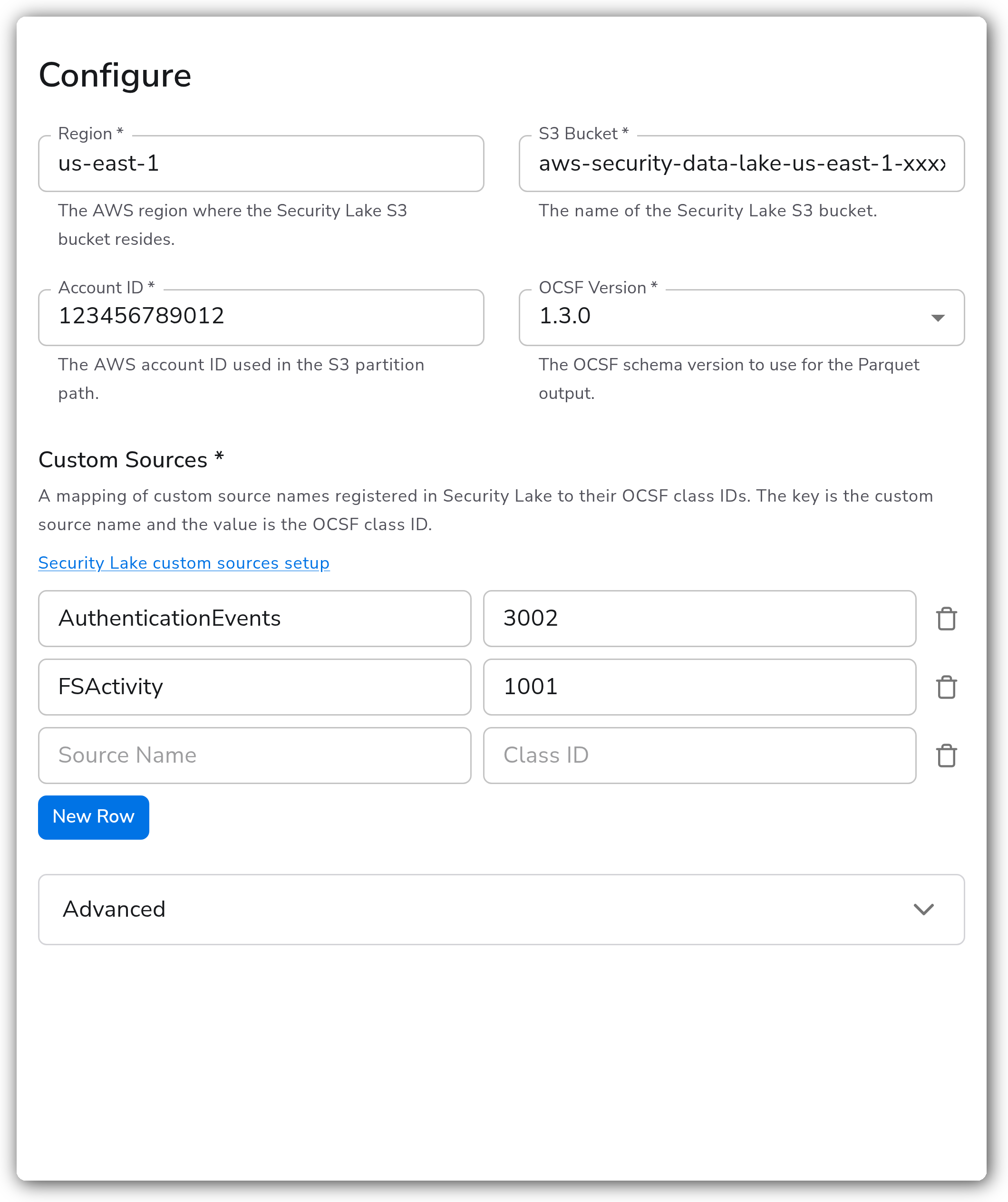
| Region | Enum | Yes | `us-east-1` | The AWS region where the Security Lake S3 bucket resides. Includes GovCloud regions (`us-gov-east-1`, `us-gov-west-1`). A custom value can be entered if the region is not listed. |
| S3 Bucket | String | Yes | *(empty)* | The name of the Security Lake S3 bucket. |
| Account ID | String | Yes | *(empty)* | The AWS account ID used in the S3 partition path. |
| OCSF Version | Enum | Yes | `1.3.0` | The OCSF schema version used for the Parquet output. One of `1.0.0`, `1.1.0`, `1.2.0`, `1.3.0`. |
| Custom Sources | Map | Yes | *(empty)* | A mapping of custom source names registered in Security Lake to their OCSF class IDs. The key is the custom source name; the value is the integer OCSF class ID. At least one entry is required. |
**Advanced**
| Parameter | Type | Required | Default | Description |
| ------------- | ------ | -------- | --------- | ------------------------------------------------------------------------------------------------------------------------------------ |
| Role ARN | String | No | *(empty)* | An optional IAM role ARN to assume for S3 writes. |
| Endpoint | String | No | *(empty)* | An optional custom endpoint for S3 writes. Useful for testing with LocalStack or MinIO. Leave empty to use the default AWS endpoint. |
| Timeout | Int | No | `5` | The timeout, in seconds, for S3 write operations. |
| Batch Size | Int | No | `10000` | The number of events per OCSF class ID to buffer before flushing to S3. |
| Batch Timeout | Int | No | `5` | The maximum time, in minutes, to wait before flushing a batch to S3, regardless of batch size. |
**Retry on Failure**
| Parameter | Type | Required | Default | Description |
| ----------------------- | ---- | -------- | ------- | ---------------------------------------------------------------------------------------------------------------------------------------------- |
| Enable Retry on Failure | Bool | No | `true` | Attempt to resend logs that failed to transmit to the destination. |
| Initial Interval | Int | No | `5` | Time, in seconds, to wait after the first failure before retrying. Applies when retry on failure is enabled. |
| Max Interval | Int | No | `30` | The upper bound, in seconds, on backoff. Applies when retry on failure is enabled. |
| Max Elapsed Time | Int | No | `300` | The maximum time, in seconds, spent trying to send a batch, used to avoid a never-ending retry loop. Applies when retry on failure is enabled. |
**Sending Queue**
| Parameter | Type | Required | Default | Description |
| ------------------------- | --------- | -------- | ---------------------- | --------------------------------------------------------------------------------------------------------------------------------------------------------------------- |
| Enable Sending Queue | Bool | No | `true` | Buffer logs temporarily before sending to help ensure data is not lost during a temporary network outage. |
| Number of Consumers | Int | No | `10` | Number of consumers that dequeue batches. Applies when the sending queue is enabled. |
| Queue Size | Int | No | `5000` | Maximum number of batches kept in memory before dropping. Applies when the sending queue is enabled. |
| Enable Persistent Queuing | Bool | No | `true` | Buffer telemetry data to disk before sending to help ensure data is not lost during network outages or collector restarts. Applies when the sending queue is enabled. |
| Persistent Queue Storage | Extension | Yes | File storage extension | The storage to use for the persistent queue. Applies when the sending queue and persistent queuing are both enabled. |
### Examples
Export authentication and file-system activity logs to a Security Lake custom source in `us-east-1`. Each entry in `custom_sources` maps a registered custom source name to the OCSF class ID it carries.
```yaml
apiVersion: bindplane.observiq.com/v1
kind: Destination
metadata:
name: aws-security-lake
spec:
type: aws_security_lake
parameters:
- name: region
value: us-east-1
- name: s3_bucket
value: aws-security-data-lake-us-east-1-xxxxxxxxxxxx
- name: account_id
value: '123456789012'
- name: ocsf_version
value: '1.3.0'
- name: custom_sources
value:
AuthenticationEvents: '3002'
FSActivity: '1001'
```
### Configuration Tips
* The OCSF event class you select when registering each custom source in Security Lake must match the OCSF class ID you map it to in `custom_sources`. A mismatch causes records to be written under the wrong source prefix or skipped.
* `Batch Size` applies per OCSF class ID. To buffer independently per class, configure a separate destination instance for each class, each with a single `custom_sources` entry.
* Keep the persistent queue enabled in production so buffered logs survive collector restarts. Point `Persistent Queue Storage` at a file storage extension on durable disk.
### Troubleshooting
#### Access denied writing to S3
Symptoms: writes fail with a permission or access-denied error and no Parquet objects appear in the bucket.
Solutions:
1. Confirm the collector's AWS credentials are resolvable through the standard credential chain and permit `s3:PutObject` to the Security Lake bucket.
2. If using `role_arn`, confirm the collector's identity is allowed to `sts:AssumeRole` on that role and the role can write to the bucket.
#### Records are dropped
Symptoms: logs leave the pipeline but objects are missing, with warnings about skipped or invalid records.
Solutions:
1. Add the OCSF Standardization processor upstream. Records that are not valid OCSF are dropped with a warning.
2. Confirm each record's OCSF class ID has a matching entry in `custom_sources`. Records whose class does not match any configured source are skipped.
#### Wrong region or bucket
Symptoms: connection failures or objects written to an unexpected location.
Solutions:
1. Verify `Region` matches the region of the Security Lake S3 bucket.
2. Verify `S3 Bucket` and `Account ID` match the Security Lake deployment. The account ID is used in the S3 partition path.
### Standalone Destination
```yaml
apiVersion: bindplane.observiq.com/v1
kind: Destination
metadata:
name: aws-security-lake
spec:
type: aws_security_lake
parameters:
- name: region
value: us-east-1
- name: s3_bucket
value: aws-security-data-lake-us-east-1-xxxxxxxxxxxx
- name: account_id
value: '123456789012'
- name: ocsf_version
value: '1.3.0'
- name: custom_sources
value:
AuthenticationEvents: '3002'
FSActivity: '1001'
```
### Related Resources
* [AWS Security Lake exporter (awssecuritylakeexporter)](https://github.com/observIQ/bindplane-otel-contrib/tree/main/exporter/awssecuritylakeexporter)
* [Adding a custom source in Security Lake](https://docs.aws.amazon.com/security-lake/latest/userguide/adding-custom-sources.html)
---
# Agent Instructions
This documentation is published with GitBook. GitBook is the documentation platform designed so that both humans and AI agents can read, navigate, and reason over technical content effectively. Learn more at gitbook.com.
## Querying This Documentation
If you need additional information that is not directly available in this page, you can query the documentation by asking a question.
Perform an HTTP GET request on the following URL with the `ask` and `goal` query parameters:
```
GET https://docs.bindplane.com/integrations/destinations/aws-security-lake.md?ask=&goal=
```
`ask` is the immediate question: it should be specific, self-contained, and written in natural language.
`goal` is what the user is ultimately trying to achieve, the reason they need the answer. Sharing it helps GitBook give you a better, more relevant answer. A goal is most helpful when it describes the outcome the user wants rather than restating the question. For example, with `ask=how do I create an API token`, a goal like `automate deployments from our CI pipeline` lets GitBook tailor the answer to that use case.
The response will contain a direct answer to the question and relevant excerpts and sources from the documentation.
Use this mechanism when the answer is not explicitly present in the current page, you need clarification or additional context, or you want to retrieve related documentation sections.