> For the complete documentation index, see [llms.txt](https://docs.bindplane.com/llms.txt). Markdown versions of documentation pages are available by appending `.md` to page URLs; this page is available as [Markdown](https://docs.bindplane.com/integrations/destinations/aws-cloudwatch.md).
# AWS Cloudwatch
The Amazon CloudWatch destination exports telemetry from a Bindplane pipeline to Amazon CloudWatch. Logs are written to CloudWatch Logs using the `awscloudwatchlogs` exporter. Metrics are published as CloudWatch metrics using the embedded metric format (EMF) via the `awsemf` exporter, which writes EMF log records that CloudWatch automatically extracts into metrics.
### Supported Telemetry Types
| Platform | Metrics | Logs | Traces |
| ------------------ | ------- | ---- | ------ |
| Linux | ✓ | ✓ | |
| Windows | ✓ | ✓ | |
| macOS | ✓ | ✓ | |
| Kubernetes Node | ✓ | ✓ | |
| Kubernetes Cluster | ✓ | ✓ | |
| Kubernetes Gateway | ✓ | ✓ | |
| OpenShift Node | ✓ | ✓ | |
| OpenShift Cluster | ✓ | ✓ | |
| OpenShift Gateway | ✓ | ✓ | |
### Prerequisites
* An AWS account and an AWS region to send telemetry to.
* AWS credentials available to the collector. The exporter uses the AWS SDK default credential chain (environment variables, shared credentials file, EC2/ECS/EKS instance or task role). Optionally, supply an IAM role ARN for the exporter to assume.
* IAM permissions on the credentials or assumed role. CloudWatch Logs delivery requires `logs:CreateLogGroup`, `logs:CreateLogStream`, `logs:DescribeLogStreams`, and `logs:PutLogEvents`. If you set a log retention period, `logs:PutRetentionPolicy` is also required. The same permissions cover EMF metric delivery, because EMF metrics are written to a CloudWatch Logs log group. See [Using identity-based policies (IAM policies) for CloudWatch Logs](https://docs.aws.amazon.com/AmazonCloudWatch/latest/logs/iam-identity-based-access-control-cwl.html).
A minimal identity-based IAM policy:
```json
{
"Version": "2012-10-17",
"Statement": [
{
"Effect": "Allow",
"Action": [
"logs:CreateLogGroup",
"logs:CreateLogStream",
"logs:DescribeLogStreams",
"logs:PutLogEvents",
"logs:PutRetentionPolicy"
],
"Resource": "arn:aws:logs:*:*:*"
}
]
}
```
The log group and log stream are created automatically if they do not already exist, so no resource needs to be pre-created.
### Configuration
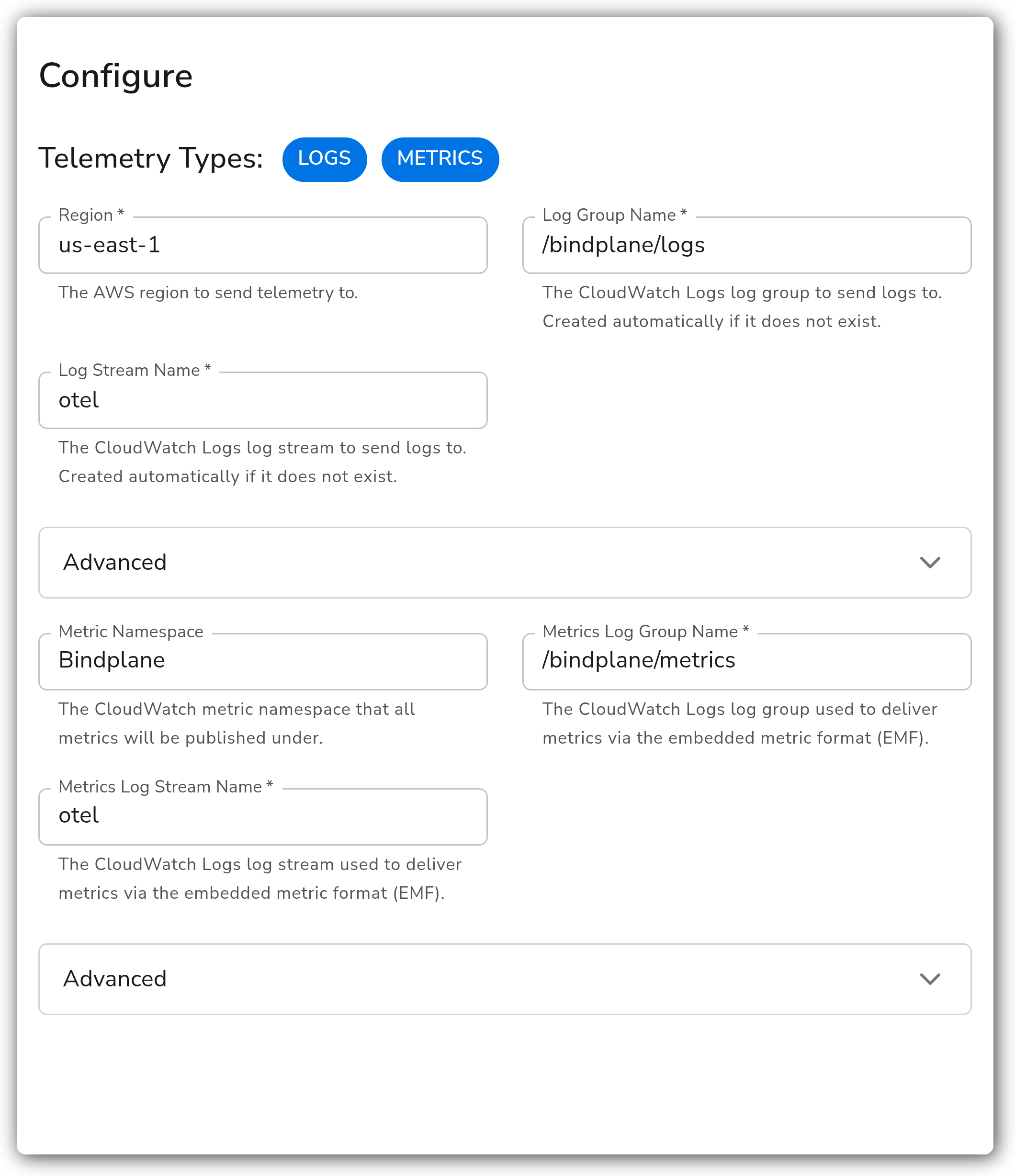
**General**
| Parameter | Type | Required | Default | Description |
| --------------- | ------------------ | -------- | ----------------- | ----------------------------------------------------------------------------------------------- |
| Telemetry Types | Telemetry Selector | No | `Logs`, `Metrics` | Which signals to export. Valid values: Logs, Metrics. |
| Region | Enum (creatable) | Yes | `us-east-1` | The AWS region to send telemetry to. Pick from the listed regions or enter another region code. |
**Logs**
| Parameter | Type | Required | Default | Description |
| --------------- | ------ | -------- | ----------------- | ------------------------------------------------------------------------------------------------------------------------------------- |
| Log Group Name | String | Yes | `/bindplane/logs` | The CloudWatch Logs log group to send logs to. Created automatically if it does not exist. Shown when Telemetry Types includes Logs. |
| Log Stream Name | String | Yes | `otel` | The CloudWatch Logs log stream to send logs to. Created automatically if it does not exist. Shown when Telemetry Types includes Logs. |
**Metrics**
| Parameter | Type | Required | Default | Description |
| ----------------------- | ------ | -------- | -------------------- | ----------------------------------------------------------------------------------------------------------------------------------------- |
| Metric Namespace | String | No | `Bindplane` | The CloudWatch metric namespace that all metrics are published under. Shown when Telemetry Types includes Metrics. |
| Metrics Log Group Name | String | Yes | `/bindplane/metrics` | The CloudWatch Logs log group used to deliver metrics via the embedded metric format (EMF). Shown when Telemetry Types includes Metrics. |
| Metrics Log Stream Name | String | Yes | `otel` | The CloudWatch Logs log stream used to deliver metrics via the embedded metric format (EMF). Shown when Telemetry Types includes Metrics. |
**Advanced**
| Parameter | Type | Required | Default | Description |
| -------------------------------------------- | ------- | -------- | ------------------- | ------------------------------------------------------------------------------------------------------------------------------------------------------------------------------------------------------- |
| Send Raw Log | Boolean | No | `false` | When enabled, the log body is sent as a raw string instead of a structured JSON record. Shown when Telemetry Types includes Logs. |
| Log Retention | Enum | No | `0` | Number of days to retain logs in the log group. `0` retains logs forever.1 Shown when Telemetry Types includes Logs. |
| Dimension Rollup Option | Enum | No | `NoDimensionRollup` | How metric dimensions are rolled up when published to CloudWatch. One of `NoDimensionRollup`, `SingleDimensionRollupOnly`, `ZeroAndSingleDimensionRollup`. Shown when Telemetry Types includes Metrics. |
| Convert Resource Attributes to Metric Labels | Boolean | No | `false` | When enabled, all resource attributes are converted to metric labels (dimensions). Shown when Telemetry Types includes Metrics. |
| Retain Initial Value of Delta Metric | Boolean | No | `false` | When enabled, the first value of a delta metric is exported instead of being dropped. Shown when Telemetry Types includes Metrics. |
| Metrics Log Retention | Enum | No | `0` | Number of days to retain the EMF metric logs in the metrics log group. `0` retains logs forever. Same valid values as Log Retention. Shown when Telemetry Types includes Metrics. |
| AWS Role ARN | String | No | *(empty)* | Optional IAM role ARN for the exporter to assume. Leave blank to use the collector's ambient AWS credentials. |
| External ID | String | No | *(empty)* | Optional external ID used when assuming the IAM role in cross-account scenarios. Shown when AWS Role ARN is set. |
| Endpoint Override | String | No | *(empty)* | Overrides the CloudWatch endpoint instead of constructing it from the region. Useful for FIPS or PrivateLink endpoints. |
1. *Valid values: 0, 1, 3, 5, 7, 14, 30, 60, 90, 120, 150, 180, 365, 400, 545, 731, 1827, 2192, 2557, 2922, 3288, 3653. Metrics Log Retention uses the same values.*
**Retry on Failure (Logs)**
Retry applies to CloudWatch Logs only. The `awsemf` metrics exporter has no retry configuration.
| Parameter | Type | Required | Default | Description |
| ----------------------- | ------- | -------- | ------- | ----------------------------------------------------------------------------------------------------------------------------------------- |
| Enable Retry on Failure | Boolean | No | `true` | Attempt to resend logs that have failed to be transmitted to CloudWatch Logs. Shown when Telemetry Types includes Logs. |
| Initial interval | Integer | No | `5` | Time in seconds to wait after the first failure before retrying. Shown when retry is enabled. |
| Max interval | Integer | No | `30` | The upper bound in seconds on backoff. Shown when retry is enabled. |
| Max elapsed time | Integer | No | `300` | The maximum amount of time in seconds spent trying to send a batch, used to avoid a never-ending retry loop. Shown when retry is enabled. |
{% hint style="warning" %}
**Metrics produce two artifacts**
Metrics are delivered using the embedded metric format (EMF): the exporter writes EMF log records to the metrics log group (`metric_logs_group_name`), and CloudWatch automatically extracts them into metrics under your namespace. One metrics pipeline therefore produces two artifacts, the raw EMF records in CloudWatch Logs and the extracted metrics in CloudWatch Metrics. Set Metrics Log Retention to control the storage cost of the raw EMF logs.
{% endhint %}
### Examples
#### Export logs and metrics to CloudWatch in `us-east-1`
Send logs to the `/bindplane/logs` log group and publish metrics under the `Bindplane` namespace, delivered via EMF to the `/bindplane/metrics` log group.
```yaml
apiVersion: bindplane.observiq.com/v1
kind: Destination
metadata:
name: aws-cloudwatch
spec:
type: cloudwatch
parameters:
- name: telemetry_types
value:
- Logs
- Metrics
- name: region
value: us-east-1
- name: logs_group_name
value: /bindplane/logs
- name: logs_stream_name
value: otel
- name: namespace
value: Bindplane
- name: metric_logs_group_name
value: /bindplane/metrics
- name: metric_logs_stream_name
value: otel
```
### Configuration Tips
* Set Region to the AWS region where the log groups live. The endpoint is constructed from the region unless Endpoint Override is set (use the override for FIPS or PrivateLink endpoints).
* Set Log Retention and Metrics Log Retention to bound storage cost. Leaving them at `0` retains logs forever, which is the default and the most expensive option for high-volume pipelines.
* Use AWS Role ARN (with External ID for cross-account access) to assume a dedicated role instead of relying on the collector's ambient credentials.
* EMF metrics are standard CloudWatch metrics and count toward CloudWatch dimension limits. Use Dimension Rollup Option and Convert Resource Attributes to Metric Labels deliberately to keep cardinality in check.
### Troubleshooting
#### Logs or metrics are rejected with an access-denied error
Symptoms: the collector logs `AccessDeniedException` or `is not authorized to perform: logs:...` and no data appears in CloudWatch.
Solutions:
1. Confirm the credentials or assumed role have `logs:CreateLogGroup`, `logs:CreateLogStream`, `logs:DescribeLogStreams`, and `logs:PutLogEvents`, plus `logs:PutRetentionPolicy` if a retention period is set.
2. If using AWS Role ARN, confirm the role's trust policy allows the collector's identity to assume it, and that the External ID matches when one is configured.
#### Data is sent to the wrong account or region, or the endpoint is unreachable
Symptoms: log groups are created in an unexpected region, or the collector reports connection or DNS errors reaching CloudWatch.
Solutions:
1. Verify Region matches the region where you expect the log groups and metrics.
2. If Endpoint Override is set, confirm it is a valid CloudWatch endpoint for the region (for example a FIPS or PrivateLink endpoint). Clear it to fall back to the region-derived endpoint.
#### Logs are dropped under load
Symptoms: gaps in CloudWatch Logs during high throughput, with retry or throttling messages in the collector log.
Solutions:
1. Confirm Enable Retry on Failure is on (the default) so transient failures are retried.
2. Increase Max interval and Max elapsed time to give backoff more room when CloudWatch Logs throttles the `PutLogEvents` calls.
### Standalone Destination
```yaml
apiVersion: bindplane.observiq.com/v1
kind: Destination
metadata:
name: aws-cloudwatch
spec:
type: cloudwatch
parameters:
- name: telemetry_types
value:
- Logs
- Metrics
- name: region
value: us-east-1
- name: logs_group_name
value: /bindplane/logs
- name: logs_stream_name
value: otel
- name: metric_logs_group_name
value: /bindplane/metrics
- name: metric_logs_stream_name
value: otel
```
### Related Resources
* [AWS CloudWatch Logs Exporter (`awscloudwatchlogsexporter`)](https://github.com/open-telemetry/opentelemetry-collector-contrib/tree/main/exporter/awscloudwatchlogsexporter)
* [AWS EMF Exporter (`awsemfexporter`)](https://github.com/open-telemetry/opentelemetry-collector-contrib/tree/main/exporter/awsemfexporter)
* [Using identity-based policies (IAM policies) for CloudWatch Logs](https://docs.aws.amazon.com/AmazonCloudWatch/latest/logs/iam-identity-based-access-control-cwl.html)
---
# Agent Instructions
This documentation is published with GitBook. GitBook is the documentation platform designed so that both humans and AI agents can read, navigate, and reason over technical content effectively. Learn more at gitbook.com.
## Querying This Documentation
If you need additional information that is not directly available in this page, you can query the documentation by asking a question.
Perform an HTTP GET request on the following URL with the `ask` and `goal` query parameters:
```
GET https://docs.bindplane.com/integrations/destinations/aws-cloudwatch.md?ask=&goal=
```
`ask` is the immediate question: it should be specific, self-contained, and written in natural language.
`goal` is what the user is ultimately trying to achieve, the reason they need the answer. Sharing it helps GitBook give you a better, more relevant answer. A goal is most helpful when it describes the outcome the user wants rather than restating the question. For example, with `ask=how do I create an API token`, a goal like `automate deployments from our CI pipeline` lets GitBook tailor the answer to that use case.
The response will contain a direct answer to the question and relevant excerpts and sources from the documentation.
Use this mechanism when the answer is not explicitly present in the current page, you need clarification or additional context, or you want to retrieve related documentation sections.