# Create Configurations with Custom Resources via the API

This guide uses `POST /v1/apply` with JSON to create Bindplane resources that store OpenTelemetry component YAML and a Bindplane configuration that references them by name.

### Prerequisites

* Access to the Bindplane API ([Growth and Enterprise](https://bindplane.com/pricing))
* An [API key](/cli-and-api/api-keys.md) sent on every request as `X-Bindplane-Api-Key`
* Your server base URL (cloud: `https://app.bindplane.com`, or your self-hosted URL)

### Step 1 - Define custom sources and destinations

Define Bindplane resources whose `spec.parameters` include `telemetry_types` and `configuration`. The `configuration` value should contain YAML for a single OTel component (receiver, exporter, and so on).

#### Custom source (hostmetrics receiver)

```yaml
apiVersion: bindplane.observiq.com/v1
kind: Source
metadata:
  id: hostmetrics-id
  name: hostmetrics
spec:
  type: custom
  parameters:
    - name: telemetry_types
      value:
        - Metrics
    - name: configuration
      value: |-
        hostmetrics:
          collection_interval: 1m0s
          scrapers:
            filesystem:
              metrics:
                system.filesystem.utilization:
                  enabled: true
            load:
              metrics: null
            memory:
              metrics:
                system.memory.utilization:
                  enabled: true
            network:
              metrics:
                system.network.conntrack.count:
                  enabled: true
                system.network.conntrack.max:
                  enabled: true
```

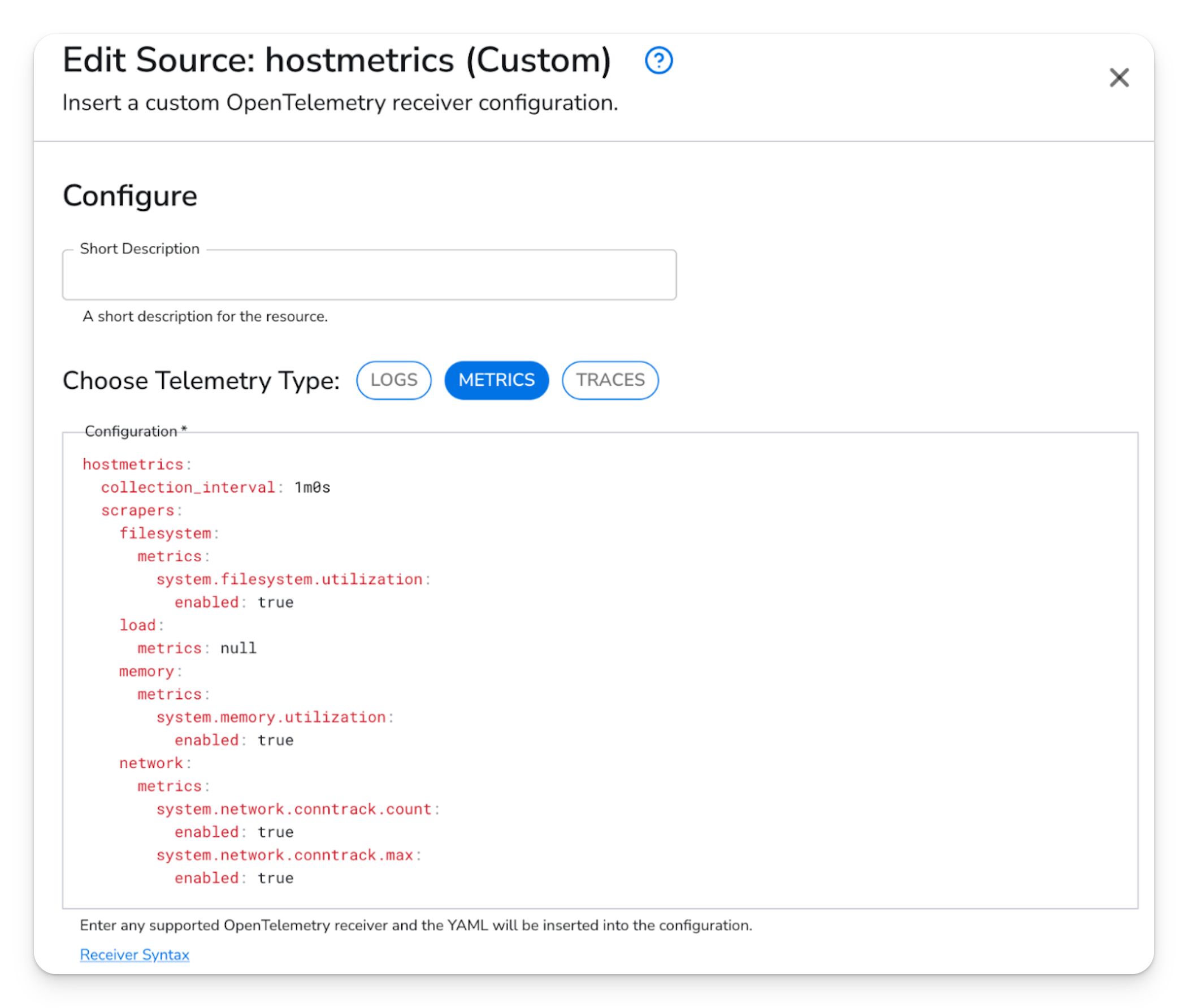
<figure><img src="/files/tWQrMR3Z7AKRNwKH8Ppe" alt="Bindplane UI: Edit Source dialog for custom hostmetrics receiver with Metrics selected and YAML configuration"><figcaption><p>Edit custom source in the UI: same hostmetrics YAML under <strong>Configuration</strong>, with telemetry type set to Metrics.</p></figcaption></figure>

**Identifiers** `metadata.id` and `metadata.name` identify this source. The configuration you build later references the resource by `metadata.name` (`hostmetrics` here). `id` is commonly a unique string or GUID; what matters for linking is a stable `name`.

**Parameters**

* `telemetry_types` controls which pipelines Bindplane adds this receiver to. Hostmetrics produces metrics only, so use `Metrics`.
* `configuration` is the YAML for that one component. Do not paste a full collector config here, only the receiver block.

#### Custom destination (OTLP exporter)

```yaml
apiVersion: bindplane.observiq.com/v1
kind: Destination
metadata:
  id: otlp-id
  name: otlp
spec:
  type: custom:1
  parameters:
    - name: telemetry_types
      value:
        - Logs
        - Metrics
        - Traces
    - name: configuration
      value: |-
        otlp:
          compression: gzip
          endpoint: 127.0.0.1:4317
          timeout: 30s
          tls:
            insecure: true
```

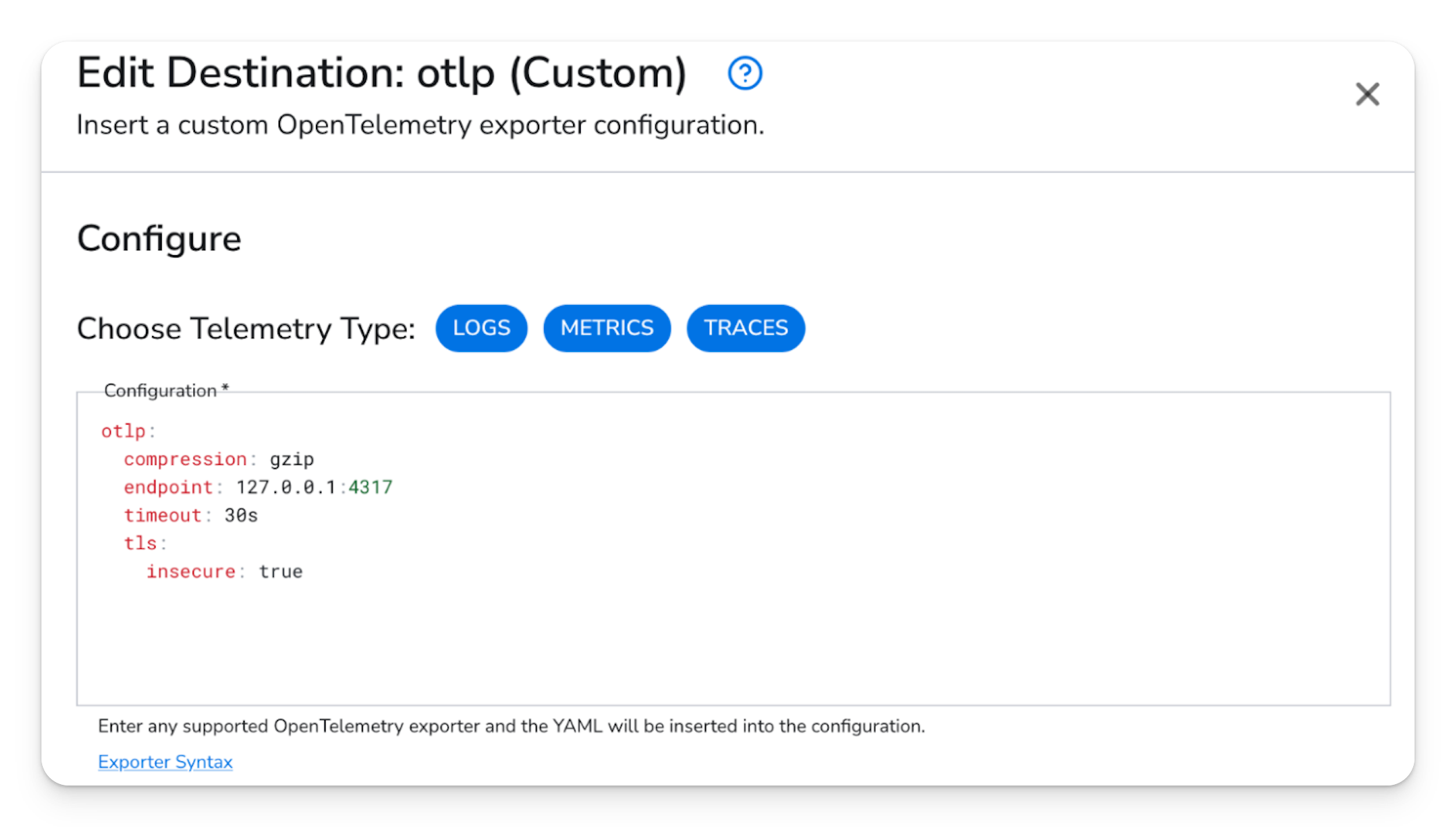
<figure><img src="/files/I7qpYWaIduK5puoJdZIY" alt="Bindplane UI: Edit Destination dialog for custom OTLP exporter with Logs, Metrics, Traces selected"><figcaption><p>Edit custom destination in the UI: OTLP exporter YAML and all three telemetry types selected.</p></figcaption></figure>

When a telemetry type is present from a source in the configuration, Bindplane attaches this destination to pipelines for those signal types. The `configuration` block is the OTLP exporter YAML only.

### Step 2 - Apply resources with the API

Bindplane resources are often edited as YAML, but `/v1/apply` expects a JSON body: an object with a `resources` array.

Example body that creates the destination and source above:

```json
{
  "resources": [
    {
      "apiVersion": "bindplane.observiq.com/v1",
      "kind": "Destination",
      "metadata": {
        "id": "otlp-id",
        "name": "otlp"
      },
      "spec": {
        "type": "custom:1",
        "parameters": [
          {
            "name": "telemetry_types",
            "value": ["Logs", "Metrics", "Traces"]
          },
          {
            "name": "configuration",
            "value": "otlp:\n  compression: gzip\n  endpoint: 127.0.0.1:4317\n  timeout: 30s\n  tls:\n    insecure: true"
          }
        ]
      }
    },
    {
      "apiVersion": "bindplane.observiq.com/v1",
      "kind": "Source",
      "metadata": {
        "id": "hostmetrics-id",
        "name": "hostmetrics"
      },
      "spec": {
        "type": "custom",
        "parameters": [
          {
            "name": "telemetry_types",
            "value": ["Metrics"]
          },
          {
            "name": "configuration",
            "value": "hostmetrics:\n  collection_interval: 1m0s\n  scrapers:\n    filesystem:\n      metrics:\n        system.filesystem.utilization:\n          enabled: true\n    load:\n      metrics: null\n    memory:\n      metrics:\n        system.memory.utilization:\n          enabled: true\n    network:\n      metrics:\n        system.network.conntrack.count:\n          enabled: true\n        system.network.conntrack.max:\n          enabled: true"
          }
        ]
      }
    }
  ]
}
```

Save that object to a file (for example `resources.json`) and send it:

```bash
curl -sS -X POST "${BINDPLANE_URL}/v1/apply" \
  -H "X-Bindplane-Api-Key: ${BINDPLANE_API_KEY}" \
  -H "Content-Type: application/json" \
  -d @resources.json
```

Set `BINDPLANE_URL` to your base URL (no trailing slash), for example `https://app.bindplane.com`.

### Step 3 - Create and apply a configuration

A configuration lists which sources and destinations to use. Under each entry, `id` is local to that configuration; `name` must match the `metadata.name` of the source or destination resource.

#### YAML

```yaml
apiVersion: bindplane.observiq.com/v1
kind: Configuration
metadata:
  id: test-config-id
  name: test-config
  labels:
    platform: macos
spec:
  sources:
    - id: source1
      name: hostmetrics
  destinations:
    - id: destination1
      name: otlp
```

Set `metadata.labels.platform` to the OS where collectors run: `macos`, `linux`, or `windows`.

#### JSON for `/v1/apply`

```json
{
  "resources": [
    {
      "apiVersion": "bindplane.observiq.com/v1",
      "kind": "Configuration",
      "metadata": {
        "id": "test-config-id",
        "name": "test-config",
        "labels": {
          "platform": "macos"
        }
      },
      "spec": {
        "sources": [{ "id": "source1", "name": "hostmetrics" }],
        "destinations": [{ "id": "destination1", "name": "otlp" }]
      }
    }
  ]
}
```

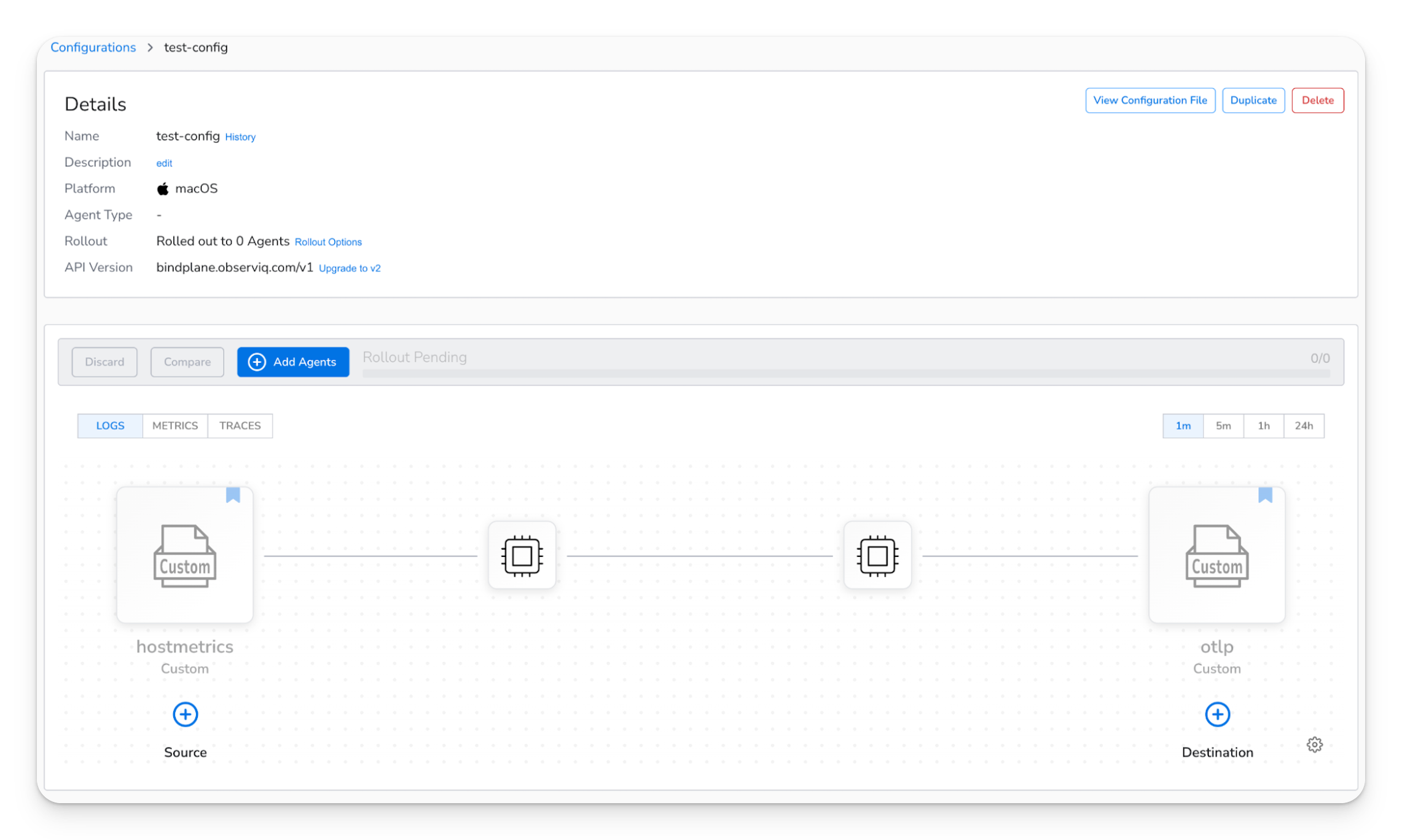
<figure><img src="/files/c57YqNKSAOlPMEsvlWZC" alt="Bindplane UI: test-config configuration showing pipeline from custom hostmetrics source to custom otlp destination"><figcaption><p>After resources exist, the configuration appears in the UI with custom hostmetrics and OTLP components on the pipeline canvas.</p></figcaption></figure>

Save the JSON to a file such as `configuration.json` and apply it:

```bash
curl -sS -X POST "${BINDPLANE_URL}/v1/apply" \
  -H "X-Bindplane-Api-Key: ${BINDPLANE_API_KEY}" \
  -H "Content-Type: application/json" \
  -d @configuration.json
```

After apply, roll out the configuration to agents from the Bindplane UI if you do not have automatic rollouts enabled.

### Processors

Custom processors follow the same `telemetry_types` and `configuration` pattern. Use the `spec.type` value your account expects for custom processors (often `custom` or `custom:1`); keep new resources consistent with your existing YAML exports.

#### Standalone processor resource (YAML)

```yaml
apiVersion: bindplane.observiq.com/v1
kind: Processor
metadata:
  id: addfields-id
  name: addfields
spec:
  type: custom
  parameters:
    - name: telemetry_types
      value:
        - Metrics
    - name: configuration
      value: |-
        transform:
          error_mode: ignore
          metric_statements:
            - context: datapoint
              statements:
                - set(attributes["field1"], "foo") where true
```

#### JSON for `/v1/apply`

```json
{
  "resources": [
    {
      "apiVersion": "bindplane.observiq.com/v1",
      "kind": "Processor",
      "metadata": {
        "id": "addfields-id",
        "name": "addfields"
      },
      "spec": {
        "type": "custom:1",
        "parameters": [
          {
            "name": "telemetry_types",
            "value": ["Metrics"]
          },
          {
            "name": "configuration",
            "value": "transform:\n  error_mode: ignore\n  metric_statements:\n    - context: datapoint\n      statements:\n        - set(attributes[\"field1\"], \"foo\") where true"
          }
        ]
      }
    }
  ]
}
```

#### Attach a processor to a configuration

Processors are not declared as a separate top-level list on the configuration. Attach them under a **source** or **destination**:

* Under a **source**, the processor runs **after** that source in the pipeline.
* Under a **destination**, the processor runs **before** that destination.

**Processor after source**

```yaml
spec:
  sources:
    - id: source1
      name: hostmetrics
      processors:
        - id: p-addfields
          name: addfields
  destinations:
    - id: destination1
      name: otlp
```

**Processor before destination**

```yaml
spec:
  sources:
    - id: source1
      name: hostmetrics
  destinations:
    - id: destination1
      name: otlp
      processors:
        - id: p-addfields
          name: addfields
```

With multiple processors in one list, Bindplane runs the first entry first.

### Extensions

Define extensions **inline** on the configuration `spec` with `type: custom` and the same parameter shape.

```yaml
apiVersion: bindplane.observiq.com/v1
kind: Configuration
metadata:
  id: test-config-id
  name: test-config
  labels:
    platform: macos
spec:
  sources:
    - id: source1
      name: hostmetrics
      processors:
        - id: p-addfields
          name: addfields
  destinations:
    - id: destination1
      name: otlp
  extensions:
    - id: extension1
      type: custom
      parameters:
        - name: telemetry_types
          value:
            - Logs
            - Metrics
            - Traces
        - name: configuration
          value: |-
            pprof:
              endpoint: 127.0.0.1:1777
```

Convert the configuration to the same `{"resources":[...]}` JSON shape and POST it to `/v1/apply` if you manage it through the API.

### Next Steps

* [Custom source](/integrations/sources/custom.md)
* [Custom destination](/integrations/destinations/custom.md)
* [Custom processor](/integrations/processors/custom.md)
* [Custom extension](/configuration/bindplane-otel-collector/extensions/custom.md)
* [REST API reference](/cli-and-api/api.md)


---

# Agent Instructions: Querying This Documentation

If you need additional information that is not directly available in this page, you can query the documentation dynamically by asking a question.

Perform an HTTP GET request on the current page URL with the `ask` query parameter:

```
GET https://docs.bindplane.com/how-to-guides/infrastructure-and-operations/create-configurations-with-custom-resources-via-the-api.md?ask=<question>
```

The question should be specific, self-contained, and written in natural language.
The response will contain a direct answer to the question and relevant excerpts and sources from the documentation.

Use this mechanism when the answer is not explicitly present in the current page, you need clarification or additional context, or you want to retrieve related documentation sections.