> For the complete documentation index, see [llms.txt](https://docs.bindplane.com/llms.txt). Markdown versions of documentation pages are available by appending `.md` to page URLs; this page is available as [Markdown](https://docs.bindplane.com/deployment/virtual-machine/bindplane/install-bindplane-server.md).
# Install Bindplane Server
Bindplane will run on Linux.
{% hint style="info" %}
If you use Docker, view [this guide](/deployment/docker/server/install-bindplane-in-docker-compose.md).
{% endhint %}
## Prerequisites
Self-hosted Bindplane requires the following prerequisites:
* A Bindplane license key
* A PostgreSQL database
* Verify that your system meets the recommended [Resource Requirements](/deployment/virtual-machine/bindplane/prerequisites.md)
See the [Prerequisites](/deployment/virtual-machine/bindplane/prerequisites.md) documentation for more information.
## Download and Install Bindplane Server
The first step is to download Bindplane from the [download page](https://bindplane.com/download).
You download and install Bindplane by following these steps:
1. Select your platform. Choose Linux.
2. If you don't already have a license, you can request one.
3. Run the install command in a terminal.
The install command will look like the example below.
{% code overflow="wrap" %}
```bash
curl -fsSlL https://downloads.bindplane.com/bindplane/latest/install-linux.sh -o install-linux.sh && bash install-linux.sh --init && rm install-linux.sh
```
{% endcode %}
## Configure Bindplane Server
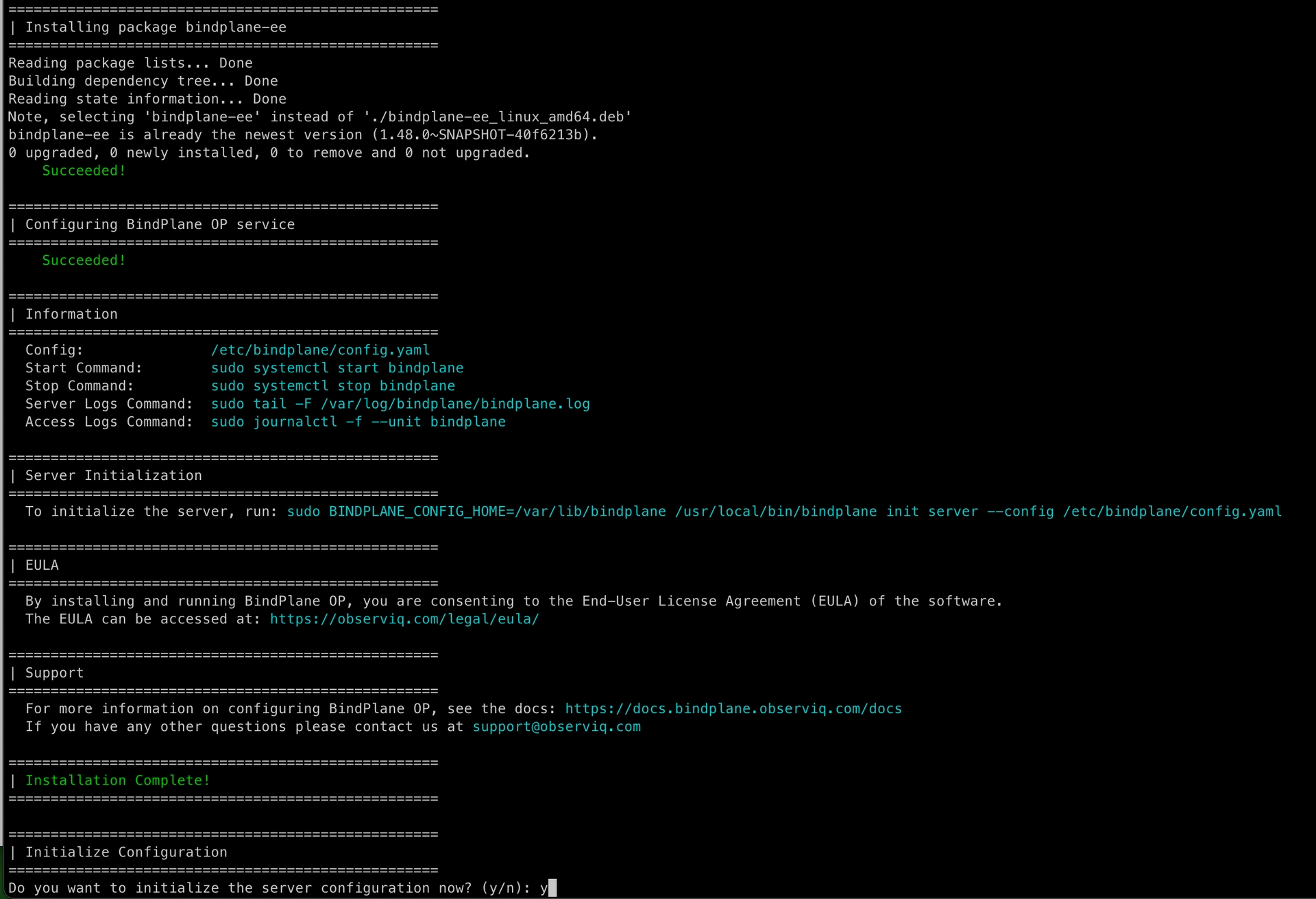
Type y to continue the installation process. This will initialize the server with some configuration parameters, which updates the fields in the `config.yaml` located by default at `/etc/bindplane/config.yaml`:
* **License Key**: A license is required to initialize the server configuration. If you do not have a license, you can request one on the [Download](https://bindplane.com/download) page.
* **Server Host**: Set to the instance's IP address, or `0.0.0.0` to bind to all IP addresses.
* **Server Port**: Set to `3001` (the default value) unless you have a reason to change it.
* **Remote URL**: Set to the URL that should be used to communicate with Bindplane externally. Generally, this is your server's hostname or IP address followed by the port. If Bindplane is behind a load balancer please follow the [High Availability](/production-checklist/bindplane/high-availability.md) instructions.
* **Authentication Method**: Choose the authentication type you would like to configure. (Free Edition users will not be prompted, instead, basic auth is configured automatically)
* **LDAP and Active Directory (Google Edition or Enterprise)**
* **Enable TLS**: If enabled, TLS will be used when communicating with the directory server.
* **Enable Mutual TLS**: If enabled, mutual TLS authentication will be used when communicating with the directory server.
* **TLS Certificate**: Path to the X509 PEM TLS certificate to use when mutual TLS is enabled.
* **Private Key**: Path to the X509 PEM TLS private key to use when mutual TLS is enabled.
* **Certificate Authority**: Optional path to the X509 PEM TLS certificate authority that should be used to validate the directory server's certificate.
* **Insecure Skip Verify**: Choose "n" here. It is not recommended to skip certificate verification outside of a development environment.
* **Server Address**: Set to the IP address or hostname of the directory server.
* **Server Port**: Set to the port of the directory server.
* **Base DN**: Set to the distinguished name that should be used to search for users.
* **Search Filter**: Set to the search filter that should be used to search for users.
* **Bind Username**: Set to the username that should be used when authenticating with the directory server.
* **Bind Password**: Set to the password that should be used when authenticating with the directory server.
* **Single User**
* **Username**: Set to your desired basic auth username
* **Password**: Set to your desired basic auth password
* **Store Type**: Choose PostgreSQL. The legacy Bbolt store is deprecated and will be removed in a future release.
* **PostgreSQL**: Provide connection parameters for the PostgreSQL database to connect to.
* **Host**: Set to the IP address or hostname of the PostgreSQL instance.
* **Port**: Set to the port that the PostgreSQL instance is reachable on.
* **Database Name**: Set to the name of the database to use for storage. Bindplane will create the database at startup if it does not already exist.
* **SSL Mode**: Set to the preferred SSL Mode for connecting to the PostgreSQL instance.
* **Username**: Set to the PostgreSQL user to authenticate as.
* **Password**: Set to the password for the chosen PostgreSQL user.
## **Restart Bindplane Server**
At the end of initialization, you'll be prompted to automatically restart Bindplane to have the changes take effect. If you choose not to restart automatically, use the following command to restart the server manually.
```bash
sudo systemctl restart bindplane
```
That's it; you've successfully installed Bindplane. Next, we'll show you how to access the [Bindplane UI](/readme/access-bindplane-ui.md) in your browser.
## View Bindplane Server Status
Once initialized, you can check the service.
```bash
sudo systemctl status bindplane
```
For upgrade, downgrade and uninstall instructions, please see [Upgrade, Downgrade or Uninstall Bindplane Server](/deployment/virtual-machine/bindplane/upgrade-or-uninstall-bindplane-server.md)
Additionally, you can download packages directly, see our [Downloads](/deployment/virtual-machine/bindplane/package-downloads.md).
---
# Agent Instructions
This documentation is published with GitBook. GitBook is the documentation platform designed so that both humans and AI agents can read, navigate, and reason over technical content effectively. Learn more at gitbook.com.
## Querying This Documentation
If you need additional information that is not directly available in this page, you can query the documentation by asking a question.
Perform an HTTP GET request on the following URL with the `ask` and `goal` query parameters:
```
GET https://docs.bindplane.com/deployment/virtual-machine/bindplane/install-bindplane-server.md?ask=&goal=
```
`ask` is the immediate question: it should be specific, self-contained, and written in natural language.
`goal` is what the user is ultimately trying to achieve, the reason they need the answer. Sharing it helps GitBook give you a better, more relevant answer. A goal is most helpful when it describes the outcome the user wants rather than restating the question. For example, with `ask=how do I create an API token`, a goal like `automate deployments from our CI pipeline` lets GitBook tailor the answer to that use case.
The response will contain a direct answer to the question and relevant excerpts and sources from the documentation.
Use this mechanism when the answer is not explicitly present in the current page, you need clarification or additional context, or you want to retrieve related documentation sections.