> For the complete documentation index, see [llms.txt](https://docs.bindplane.com/llms.txt). Markdown versions of documentation pages are available by appending `.md` to page URLs; this page is available as [Markdown](https://docs.bindplane.com/core-concepts.md).
# Core Concepts
How Collectors, Configurations, Rollouts, Edge Fleets, and Gateways fit together in Bindplane.
Bindplane manages OpenTelemetry collectors at scale. Five concepts sit at the center of everything you do in Bindplane: **Collectors** run the pipelines, **Configurations** define them, **Rollouts** deliver changes to them, and **Edge Fleets** and **Gateways** group collectors so you manage many of them as one.
## The Five Building Blocks
| Concept | What it is | Use it to |
| -------------------------------------------------- | ---------------------------------------------------------------------------------------------------------------------------------------------------------------------- | ---------------------------------------------------------------------------------------------------- |
| [Collectors](/core-concepts/collectors.md) | An OpenTelemetry collector connected to Bindplane over OpAMP. Each collector has a role: **Edge** or **Gateway**. | Collect, process, and forward telemetry. |
| [Configurations](/core-concepts/configurations.md) | A versioned pipeline of sources, processors, and destinations that Bindplane renders into collector YAML. Each configuration also has a role: **Edge** or **Gateway**. | Define what a collector collects and where it sends it. |
| [Rollouts](/core-concepts/rollouts.md) | The way a new configuration version is deployed to collectors, either in automatic batches (Standard) or in label-based stages you approve (Progressive). | Ship changes safely, catch errors on a few collectors, and roll forward to a known-good version. |
| [Edge Fleets](/core-concepts/fleets.md) | A named group of edge collectors that share one configuration. | Manage hundreds or thousands of edge collectors as a single unit. |
| [Gateways](/core-concepts/gateways.md) | A named group of gateway collectors that receive telemetry from edge collectors and other sources, process it centrally, and forward it to destinations. | Isolate destination credentials, control network egress, and offload heavy processing from the edge. |
## How They Fit Together
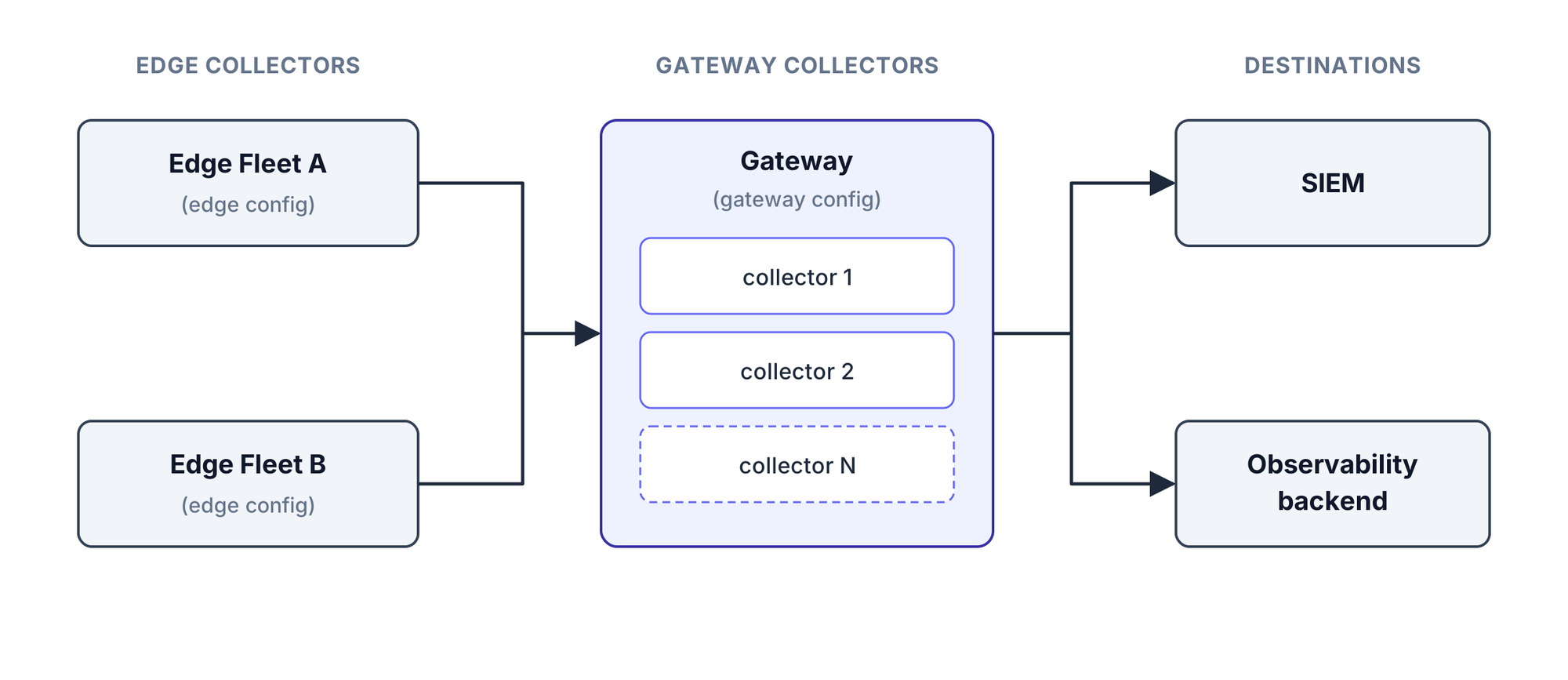
A typical production deployment looks like this:
1. **Edge collectors** run on the hosts, containers, or Kubernetes nodes you want to monitor. They collect logs, metrics, and traces close to the source.
2. Edge collectors are grouped into **Edge Fleets**, for example by environment, region, or workload. Each Edge Fleet has one **edge configuration** that every member collector runs.
3. The edge configuration sends telemetry to a **Gateway** using the [Bindplane Gateway destination](/integrations/destinations/bindplane-gateway.md).
4. The Gateway is a group of **gateway collectors**, usually behind a load balancer. They run a **gateway configuration** that receives edge traffic with the [Bindplane Gateway source](/integrations/sources/bindplane-gateway.md), applies processing, and sends the result to your final destinations.
Destination credentials and heavy processing live on the Gateway. Edge collectors stay lightweight and only need network access to the Gateway.
{% hint style="info" %}
Gateways are optional. Small deployments can send telemetry straight from edge collectors to destinations. See [Edge Collectors v. Gateways](/production-checklist/bindplane-otel-collector/edge-collectors-v.-gateways.md) for guidance on when a gateway tier pays off.
{% endhint %}
## How a Collector Gets Its Configuration
A collector runs exactly one configuration at a time. When a collector could receive a configuration from more than one place, Bindplane resolves it in this order:
1. **Gateway**: the collector belongs to a Gateway that has a configuration assigned.
2. **Edge Fleet**: the collector belongs to an Edge Fleet that has a configuration assigned.
3. **Direct assignment**: the configuration is assigned to the individual collector, either with **Change Configuration** on the collector's page or with the CLI. Both set the collector's `configuration=` label.
The first match wins. If a collector leaves its Gateway or Edge Fleet, it falls back to the next rung. If nothing matches, the collector receives an empty configuration that does nothing.
## Labels Tie It Together
Bindplane uses collector labels to track membership:
| Label | Meaning |
| ---------------------- | ----------------------------------------------- |
| `fleet=` | The collector belongs to this Edge Fleet. |
| `gateway=` | The collector belongs to this Gateway. |
| `configuration=` | The collector runs this configuration directly. |
You usually set these labels at install time by choosing an Edge Fleet, Gateway, or configuration in the install wizard. The `fleet` and `configuration` labels can also be changed later with `bindplane label collector`, and the `configuration` label with **Change Configuration** on the collector's page. The `gateway` label is managed by Bindplane and is hidden from the label editor.
## How Changes Reach Collectors
Assigning a configuration decides *which* configuration a collector runs. Rollouts decide *which version* of it. Every edit to a configuration creates a new draft version, and collectors keep running the live version until you start a rollout.
1. **Edit**: changes go into a draft version. Compare it against the live version before deploying.
2. **Roll out**: a [Standard Rollout](/core-concepts/rollouts.md#standard-rollouts) deploys in growing batches. A [Progressive Rollout](/core-concepts/rollouts.md#progressive-rollouts) deploys to stages you define with the same collector labels, and waits for you between each stage.
3. **Pause on errors**: if a collector reports an error, the rollout pauses so only a few collectors are affected.
4. **Roll forward**: to undo a change, [roll forward](/core-concepts/rollouts.md#rolling-back-to-a-previous-version) to any earlier version from the configuration's history.
Because a Gateway or Edge Fleet runs one configuration, a single rollout updates every collector in it.
## Next Steps
* [Collectors](/core-concepts/collectors.md): collector roles, the Collectors page, and how collectors connect to Bindplane
* [Configurations](/core-concepts/configurations.md): building and assigning configurations
* [Rollouts](/core-concepts/rollouts.md): deploying configuration changes with Standard and Progressive Rollouts
* [Edge Fleets](/core-concepts/fleets.md): grouping edge collectors under one configuration
* [Gateways](/core-concepts/gateways.md): creating and operating a gateway tier
---
# Agent Instructions
This documentation is published with GitBook. GitBook is the documentation platform designed so that both humans and AI agents can read, navigate, and reason over technical content effectively. Learn more at gitbook.com.
## Querying This Documentation
If you need additional information that is not directly available in this page, you can query the documentation by asking a question.
Perform an HTTP GET request on the following URL with the `ask` and `goal` query parameters:
```
GET https://docs.bindplane.com/core-concepts.md?ask=&goal=
```
`ask` is the immediate question: it should be specific, self-contained, and written in natural language.
`goal` is what the user is ultimately trying to achieve, the reason they need the answer. Sharing it helps GitBook give you a better, more relevant answer. A goal is most helpful when it describes the outcome the user wants rather than restating the question. For example, with `ask=how do I create an API token`, a goal like `automate deployments from our CI pipeline` lets GitBook tailor the answer to that use case.
The response will contain a direct answer to the question and relevant excerpts and sources from the documentation.
Use this mechanism when the answer is not explicitly present in the current page, you need clarification or additional context, or you want to retrieve related documentation sections.